Pwn135 1 2 3 4 5 6 7 8 int menu () { puts ("Choose a function to allocate heap memory:" ); puts ("1. malloc" ); puts ("2. calloc" ); puts ("3. realloc" ); return printf ("Enter your choice: " ); }
1 2 3 4 5 6 7 8 9 10 11 12 13 14 15 16 17 18 19 20 21 22 23 24 25 26 27 28 29 30 31 32 33 34 35 36 37 38 39 40 41 42 43 44 45 46 47 48 49 unsigned __int64 ctfshow () { int n4; size_t size; void *ptr; unsigned __int64 v4; v4 = __readfsqword(0x28u ); ptr = 0 ; __isoc99_scanf("%d" , &n4); if ( n4 == 2 ) { printf ("Enter the size to allocate using calloc: " ); __isoc99_scanf("%lu" , &size); ptr = calloc (1u , size); } else if ( n4 > 2 ) { if ( n4 != 3 ) { if ( n4 == 4 ) { printf ("Here is you want: " ); system("cat /ctfshow_flag" ); } goto LABEL_12; } printf ("Enter the size to allocate using realloc: " ); __isoc99_scanf("%lu" , &size); ptr = realloc (ptr, size); } else { if ( n4 != 1 ) { LABEL_12: puts ("Invalid choice." ); return __readfsqword(0x28u ) ^ v4; } printf ("Enter the size to allocate using malloc: " ); __isoc99_scanf("%lu" , &size); ptr = malloc (size); } if ( ptr ) printf ("Memory allocated at address: %p\n" , ptr); else puts ("Memory allocation failed." ); return __readfsqword(0x28u ) ^ v4; }
这里是展示里如何开辟内存区域:
malloc
1 2 scanf("%lu", &size); ptr = malloc(size);
作用:申请 size 字节堆内存,返回首地址给 ptr;内存内容未清零、这里只申请,不写内容
calloc
1 2 scanf("%lu", &size); ptr = calloc(1, size);
作用:申请 1 * size 字节内存,返回首地址给 ptr,内存自动清零
realloc
1 2 scanf("%lu", &size); ptr = realloc(ptr, size);
因为此时 ptr 初值是 NULL,所以等价于:
pwn136 1 2 3 4 5 6 7 8 int menu () { puts ("Choose a pointer to free:" ); puts ("1. ptr_malloc" ); puts ("2. ptr_calloc" ); puts ("3. ptr_realloc" ); return printf ("Enter your choice: " ); }
1 2 3 4 5 6 7 8 9 10 11 12 13 14 15 16 17 18 19 20 21 22 23 24 25 26 27 28 29 30 31 32 33 34 35 36 37 38 39 40 41 42 43 44 45 46 47 48 49 50 51 52 53 54 55 56 57 58 59 60 61 62 63 64 65 66 unsigned __int64 ctfshow () { int n2; void *ptr; void *ptr_1; void *ptr_2; unsigned __int64 v5; v5 = __readfsqword(0x28u ); ptr_1 = 0 ; ptr_2 = 0 ; ptr = malloc (4u ); if ( ptr ) { ptr_1 = calloc (1u , 4u ); if ( ptr_1 ) { ptr_2 = realloc (0 , 4u ); if ( ptr_2 ) { __isoc99_scanf("%d" , &n2); if ( n2 == 2 ) { free (ptr_1); puts ("ptr_calloc freed." ); return __readfsqword(0x28u ) ^ v5; } if ( n2 > 2 ) { if ( n2 == 3 ) { free (ptr_2); puts ("ptr_realloc freed." ); return __readfsqword(0x28u ) ^ v5; } if ( n2 == 4 ) { printf ("Here is you want: " ); system("cat /ctfshow_flag" ); } } else if ( n2 == 1 ) { free (ptr); puts ("ptr_malloc freed." ); return __readfsqword(0x28u ) ^ v5; } puts ("Invalid choice." ); return __readfsqword(0x28u ) ^ v5; } puts ("Memory allocation failed for ptr_realloc." ); free (ptr); free (ptr_1); } else { puts ("Memory allocation failed for ptr_calloc." ); free (ptr); } } else { puts ("Memory allocation failed for ptr_malloc." ); } return __readfsqword(0x28u ) ^ v5; }
相对于Pwn135来说,pwn136就是在于释放堆块。下面我们来详细看看函数。
函数一开始会做三次清零:
1 2 3 ptr_malloc = NULL; ptr_calloc = NULL; ptr_realloc = NULL;
这样做的意义是:保证变量一开始处于明确状态,避免使用未初始化指针,这是很常见的基础写法。
第一次分配: 第一块堆内存来自
含义:向堆申请 4 字节,返回值是这块内存的起始地址,如果失败,返回 NULL;后面紧接着就是失败检查:
1 2 3 4 if (!ptr_malloc) { puts ("Memory allocation failed for ptr_malloc." ); return 0 ; }
逻辑非常直接:如果第一块都申请失败,后面的流程没法继续,所以直接结束函数
第二次分配 :第二块堆内存来自
1 ptr_calloc = calloc (1 , 4 );
它和 malloc(4) 的区别是:
malloc(4) 只申请空间calloc(1, 4) 申请 1 * 4 = 4 字节,并且把内容清零
1 2 3 4 5 if (!ptr_calloc) { puts ("Memory allocation failed for ptr_calloc." ); free (ptr_malloc); return 0 ; }
这里要先 free(ptr_malloc)的原因是:
第一块已经申请成功了,第二块失败时,如果不释放第一块,就会留下未回收资源;这里想表达的是出错时要把已经拿到的资源主动清理掉。
第三次分配 :第三块堆内存来自
1 ptr_realloc = realloc (NULL , 4 );
这是这题最需要记住的点之一。这里不是“扩容已有堆块”,因为传进去的是 NULL。所以这句的实际语义是:
1 ptr_realloc = malloc (4 );
这里只是用 realloc 的另一种合法用法来演示接口行为。后面的失败分支是:
1 2 3 4 5 6 if (!ptr_realloc) { puts ("Memory allocation failed for ptr_realloc." ); free (ptr_malloc); free (ptr_calloc); return 0 ; }
这里的清理逻辑比前一个分支多一步,因为此时已经成功拿到过两块内存:
- `ptr_malloc`
- `ptr_calloc`
所以第三次失败时,要把前两块一起释放。
如果输入 **1**,程序释放 **ptr_malloc**
1 2 free (ptr_malloc);puts ("ptr_malloc freed." );
释放由 malloc 得到的那块内存
如果输入 **2**,程序释放 **ptr_calloc**
1 2 free (ptr_calloc);puts ("ptr_calloc freed." );
释放由 calloc 得到的那块内存
如果输入 **3**,程序释放 **ptr_realloc**
1 2 free (ptr_realloc);puts ("ptr_realloc freed." );
“释放由 realloc(NULL, 4) 得到的那块内存”。虽然它来自 realloc,但本质上还是一块普通的堆内存,所以最终仍然是用 free 来释放。
pwn137 在此之前可以研读一下这篇文章堆概述 - CTF Wiki ,本题和文章中的示例代码本质一样。
**sbrk** 就是把进程堆顶(program break)往上或往下挪,返回堆顶地址。
**brk(addr)**:把 program break 改到新的地址。
这里有一个示例代码:
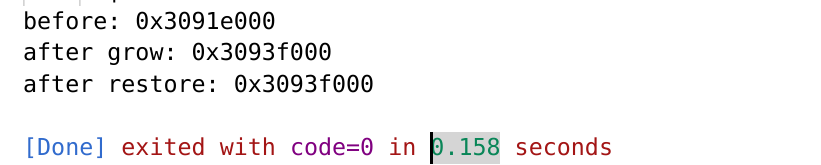
1 2 3 4 5 6 7 8 9 10 11 12 13 14 15 #include <stdio.h> #include <string.h> int main () { void *old = sbrk(0 ); printf ("before: %p\n" , old);brk(old + 0x1000 ); printf ("after grow: %p\n" , sbrk(0 ));brk(old); printf ("after restore: %p\n" , sbrk(0 ));return 0 ;}
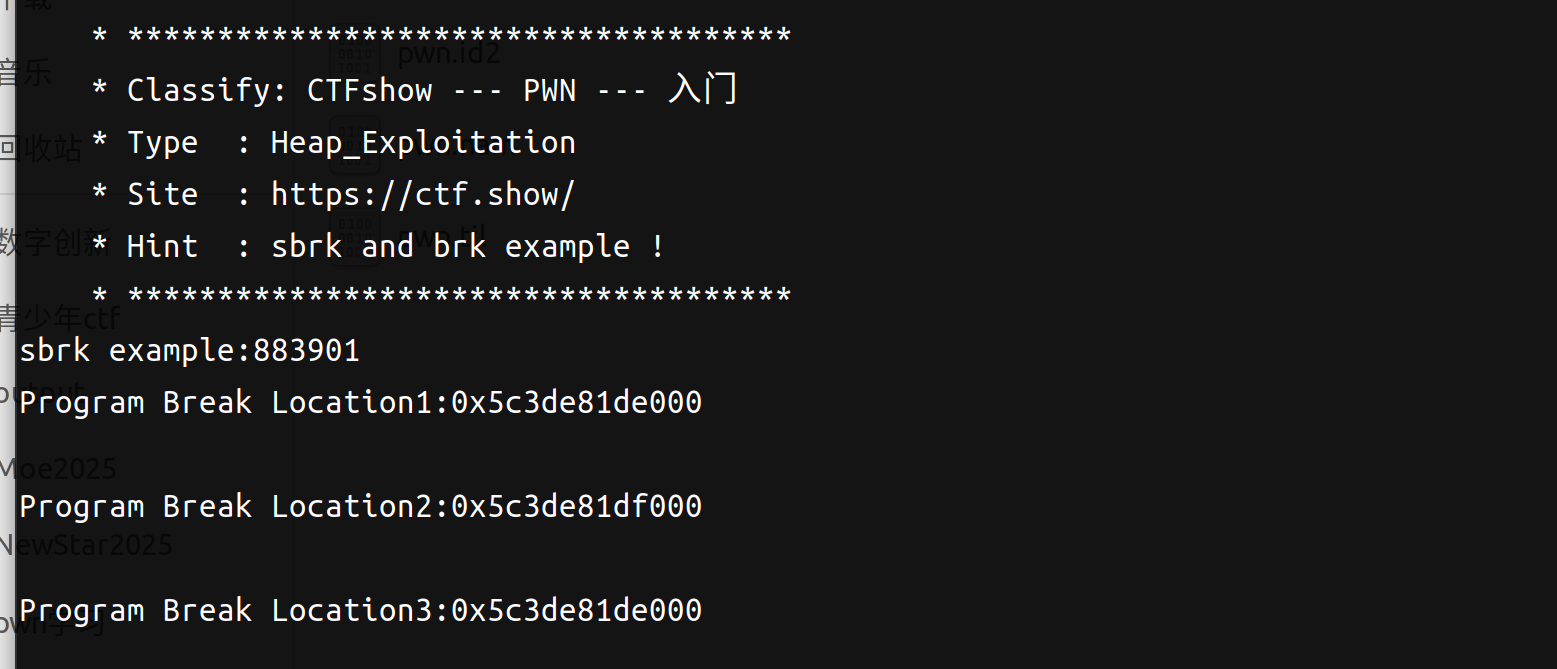
1 2 3 4 5 6 7 8 9 10 11 12 13 14 15 16 17 18 19 20 21 22 int sbrk_brk () { __pid_t pid; void *v1; char *addr; void *v4; pid = getpid(); printf ("sbrk example:%d\n" , pid); addr = (char *)sbrk(0 ); printf ("Program Break Location1:%p\n" , addr); getchar(); brk(addr + 4096 ); v1 = sbrk(0 ); printf ("Program Break Location2:%p\n" , v1); getchar(); brk(addr); v4 = sbrk(0 ); printf ("Program Break Location3:%p\n" , v4); getchar(); return system("cat /ctfshow_flag" ); }
代码逻辑是程序先用 sbrk(0) 读出当前 break,再用 brk 把 break 上移 0x1000,然后再次读取确认变化,最后再把 break 恢复回原位置并再次读取确认。
pwn138 同样可以参考ctfwiki。mmap的作用是将文件或设备映射到进程的地址空间,从而减少内核与用户空间的数据拷贝次数。函数原型如下:
1 void * mmap (void * addr, size_t length, int prot, int flags, int fd, off_t offset) ;
参数说明:
addr:由用户设置的映射地址。通常设置为NULL,表示让操作系统选择合适的地址。
length:映射的内存长度。
prot:内存区域的保护标志,如PROT_READ(可读)、PROT_WRITE(可写)、 PROT_EXEC(可执行)。
flags:映射标志,如MAP_SHARED(共享映射)、MAP_PRIVATE(私有映射)、 MAP_ANONYMOUS(匿名映射)。
fd:文件描述符,用于文件映射。如果是匿名映射,可以设置为-1。
offset:文件的偏移量,指定从文件的哪个位置开始映射。
1 2 3 4 5 6 7 8 9 10 11 12 13 14 15 16 17 18 19 20 21 22 23 int __fastcall main (int argc, const char argv, const char envp) { __pid_t pid; void *addr; init(argc, argv, envp); logo(); pid = getpid(); printf ("Welcome to private anonymous mapping example::PID:%d\n" , pid); puts ("Before mmap" ); getchar(); addr = mmap(0 , 0x21000u , 3 , 34 , -1 , 0 ); if ( addr == (void *)-1LL ) errExit("mmap" ); puts ("After mmap" ); getchar(); if ( munmap(addr, 0x21000u ) == -1 ) errExit("munmap" ); puts ("After munmap" ); getchar(); system("cat /ctfshow_flag" ); return 0 ; }
addr = mmap(0, 0x21000u, 3, 34, -1, 0);
第一个参数是 NULL,意思是让内核自己决定映射到哪里;第二个参数 0x21000 是映射长度,也就是申请一块这么大的地址区间;第三个参数 3 其实是 PROT_READ | PROT_WRITE,表示这段内存可读可写;第四个参数 0x22 其实是 MAP_PRIVATE | MAP_ANONYMOUS,表示这是匿名的、私有的映射,不依赖真实文件;第五个参数是 -1,因为既然是匿名映射,文件描述符就没有意义,按约定填 -1;第六个参数是 0,表示偏移为 0。
程序运行一下长这样
1 2 3 4 5 6 7 8 Welcome to private anonymous mapping example::PID:889243 Before mmap After mmap After munmap
我们看一下进程PID:889243的内存映射表
1 2 3 4 5 6 7 8 9 10 11 12 13 14 15 16 17 18 a1gorithms@A1gorithm:~$ cat /proc/889243 /maps ... 7 c42b3a1c000-7 c42b3a29000 rw-p 00000000 00 :00 0 7 c42b3a63000-7 c42b3a66000 rw-p 00000000 00 :00 0 7 c42b3a79000-7 c42b3a7b000 rw-p 00000000 00 :00 0 ... a1gorithms@A1gorithm:~$ cat /proc/889243 /maps ... 7 c42b3a1c000-7 c42b3a29000 rw-p 00000000 00 :00 0 7 c42b3a42000-7 c42b3a66000 rw-p 00000000 00 :00 0 7 c42b3a79000-7 c42b3a7b000 rw-p 00000000 00 :00 0 ... a1gorithms@A1gorithm:~$ cat /proc/889243 /maps ... 7 c42b3a1c000-7 c42b3a29000 rw-p 00000000 00 :00 0 7 c42b3a63000-7 c42b3a66000 rw-p 00000000 00 :00 0 7 c42b3a79000-7 c42b3a7b000 rw-p 00000000 00 :00 0 ...
0x7c42b3a63000 - 0x7c42b3a42000 = 0x21000也就是我们申请的映射长度。
1 2 3 4 5 7 c42b3a63000 是相应堆的起始地址rw-p 表明堆具有可读可写权限,并且属于隐私数据。 00000000 表明文件偏移,由于这部分内容并不是从文件中映射得到的,所以为 0 。这是匿名映射。00 :00 是主从 (Major/mirror) 的设备号,这部分内容也不是从文件中映射得到的,所以也都为 0 。0 表示着 Inode 号。由于这部分内容并不是从文件中映射得到的,所以为 0 。
能明显看到这里给的地址变大了。
好了,我们来看一下(s)brk和mmap扩内存区域方式:
对比项
brk / sbrkmmap
本质
调整 program break
新建一段 内存映射区
作用对象
主堆(heap) 的顶部独立的一段虚拟内存区域
地址形态
通常接着原 heap 往上长,偏连续
单独找一块地址映射,不要求接着 heap
是否直接操作 heap 顶
是
否
能否映射文件
不能
能
能否做匿名内存
不叫匿名映射,本质是扩堆
能,MAP_ANONYMOUS
常见用途
传统小块堆扩展
大块内存、文件映射、匿名映射
释放方式
缩 program break
munmap
灵活性
低
高
是否容易产生主堆碎片问题
容易受主堆管理影响
相对更独立
和 malloc
常作为小块分配的底层来源
常作为大块分配的底层来源
现代 glibc 是否使用
会
也会
在 /proc/pid/maps
常能看到 [heap]
常见一段 rw-p ... 00:00 0
关键词
扩主堆 开新映射
pwn139 这一篇讲动态缓冲区:
1 2 3 4 5 6 7 8 9 10 11 12 13 14 15 16 17 18 19 20 21 22 23 24 25 26 27 28 29 30 31 32 33 34 35 36 37 38 39 40 41 42 43 44 45 46 47 48 49 void flag_demo () { __int64 i; FILE *stream; __int64 size; char *ptr; stream = fopen("/ctfshow_flag" , "rb" ); if ( stream ) { fseek(stream, 0 , 2 ); size = ftell(stream); fseek(stream, 0 , 0 ); puts ("Allocate heap memory:" ); sleep(3u ); ptr = (char *)malloc (size); if ( ptr ) { sleep(1u ); puts ("Read ctfshow_flag" ); sleep(3u ); if ( fread(ptr, 1u , size, stream) == size ) { fclose(stream); puts ("Here is your flag:" ); for ( i = 0 ; i < size; ++i ) putchar (ptr[i]); sleep(1u ); puts ("free" ); free (ptr); } else { perror("Failed to read file" ); fclose(stream); free (ptr); } } else { perror("Memory allocation failed" ); fclose(stream); } } else { perror("Failed to open file" ); } }
当数据大小在运行前并不确定时,heap 非常适合用来承载这类数据。文件有多大,就先算出来,再申请多大的 heap,这才是本题最核心的思路。
**fseek + ftell + fseek**
程序会先 fseek(fp, 0, SEEK_END),再 ftell(fp),然后再 fseek(fp, 0, SEEK_SET)。这个组合的逻辑非常标准:先把文件位置移到末尾,这样 ftell() 读出的就是文件总长度;得到长度以后,再把文件位置重新移回开头,准备真正读取内容。
1 2 3 4 fseek(stream, 0 , 2 ); int fseek (FILE *stream, long offset, int whence) ;
“文件类型指针”指向被移动的文件;
“位移量”表示移动的字节数,一般为 long 型数据,以保证文件长度大于 64KB 时不会出错;
“起始点”表示从何处开始计算位移量,一般是文件首、文件当前位置和文件尾,其表示方法如下表所示。
起始点
表示符号
数字表示
文件首
SEEK_SET
0
文件当前位置
SEEK_CUR
1
文件尾
SEEK_END
2
1 2 3 4 5 size = ftell(stream); long ftell (FILE *stream) ;
1 2 3 4 fread(ptr, 1u , size, stream) size_t fread (void *ptr, size_t size, size_t count, FILE *stream) ;
ptr:指向要读取数据的缓冲区;
size:每个数据项的字节数;
count:要读取的数据项数目;
stream:指向文件流的指针。
1 2 3 fseek(fp, 0 , SEEK_END); size = ftell(fp); fseek(fp, 0 , SEEK_SET);
程序是这样的:先fseek吧fp移动到stream尾部,然后用ftell算出偏移,也就是size,然后再把fp移动到文件开头。
pwn140 同样可以读一下ctfwiki:https://ctf-wiki.org/pwn/linux/user-mode/heap/ptmalloc2/heap-overview/#_5
程序给了个提示:arena 是一块预先管理好的内存区域。程序申请小块内存时,不是每次都直接找操作系统要,而是先从某个 arena 里切。这样更快,也能减少锁竞争。
1 2 3 4 5 6 7 8 9 10 11 12 13 14 15 16 17 18 19 20 21 22 23 24 25 26 27 28 29 30 31 32 33 34 35 36 37 int __fastcall main (int argc, const char argv, const char envp) { __pid_t pid; pthread_t newthread; void *thread_return; void *ptr; unsigned __int64 v8; v8 = __readfsqword(0x28u ); init(argc, argv, envp); logo(); pid = getpid(); printf ("Welcome to per thread arena example::%d\n" , pid); puts ("Before malloc in main thread" ); getchar(); ptr = malloc (0x3E8u ); puts ("After malloc and before free in main thread" ); getchar(); free (ptr); puts ("After free in main thread" ); getchar(); if ( pthread_create(&newthread, 0 , threadFunc, 0 ) ) { puts ("Thread creation error" ); return -1 ; } else if ( pthread_join(newthread, &thread_return) ) { puts ("Thread join error" ); return -1 ; } else { system("cat /ctfshow_flag" ); return 0 ; } }
ret = pthread_create(&tid, NULL, threadFunc, NULL);
这句的含义是创建一个新线程,并让新线程从 threadFunc 开始执行。如果返回值不为 0,程序就打印 Thread creation error 并直接退出。
我们可以来看一下内存映射表 来进一步理解, 以下摘自ctfwiki:
第一次申请之前 , 没有任何任何堆段。
1 2 3 4 5 6 7 8 9 10 11 sploitfun@sploitfun-VirtualBox:~/ptmalloc.ppt/mthread$ ./mthread Welcome to per thread arena example::6501 Before malloc in main thread ... sploitfun@sploitfun-VirtualBox:~/ptmalloc.ppt/mthread$ cat /proc/6501/maps 08048000-08049000 r-xp 00000000 08:01 539625 /home/sploitfun/ptmalloc.ppt/mthread/mthread 08049000-0804a000 r--p 00000000 08:01 539625 /home/sploitfun/ptmalloc.ppt/mthread/mthread 0804a000-0804b000 rw-p 00001000 08:01 539625 /home/sploitfun/ptmalloc.ppt/mthread/mthread b7e05000-b7e07000 rw-p 00000000 00:00 0 ... sploitfun@sploitfun-VirtualBox:~/ptmalloc.ppt/mthread$
第一次申请后 , 从下面的输出可以看出,堆段被建立了,并且它就紧邻着数据段,这说明malloc的背后是用brk函数来实现的。同时,需要注意的是,我们虽然只是申请了1000个字节,但是我们却得到了0x0806c000-0x0804b000=0x21000个字节的堆。这说明虽然程序可能只是向操作系统申请很小的内存,但是为了方便,操作系统会把很大的内存分配给程序。这样的话,就避免了多次内核态与用户态的切换,提高了程序的效率。 我们称这一块连续的内存区域为 arena。此外,我们称由主线程申请的内存为 main_arena。后续的申请的内存会一直从这个 arena 中获取,直到空间不足。当 arena 空间不足时,它可以通过增加brk的方式来增加堆的空间。类似地,arena 也可以通过减小 brk 来缩小自己的空间。
1 2 3 4 5 6 7 8 9 10 11 12 13 sploitfun@sploitfun-VirtualBox:~/ptmalloc.ppt/mthread$ ./mthread Welcome to per thread arena example::6501 Before malloc in main thread After malloc and before free in main thread ... sploitfun@sploitfun-VirtualBox:~/lsploits/hof/ptmalloc.ppt/mthread$ cat /proc/6501/maps 08048000-08049000 r-xp 00000000 08:01 539625 /home/sploitfun/ptmalloc.ppt/mthread/mthread 08049000-0804a000 r--p 00000000 08:01 539625 /home/sploitfun/ptmalloc.ppt/mthread/mthread 0804a000-0804b000 rw-p 00001000 08:01 539625 /home/sploitfun/ptmalloc.ppt/mthread/mthread 0804b000-0806c000 rw-p 00000000 00:00 0 [heap] b7e05000-b7e07000 rw-p 00000000 00:00 0 ... sploitfun@sploitfun-VirtualBox:~/ptmalloc.ppt/mthread$
在主线程释放内存后 ,我们从下面的输出可以看出,其对应的 arena 并没有进行回收,而是交由glibc来进行管理。当后面程序再次申请内存时,在 glibc 中管理的内存充足的情况下,glibc 就会根据堆分配的算法来给程序分配相应的内存。
1 2 3 4 5 6 7 8 9 10 11 12 13 14 sploitfun@sploitfun-VirtualBox:~/ptmalloc.ppt/mthread$ ./mthread Welcome to per thread arena example::6501 Before malloc in main thread After malloc and before free in main thread After free in main thread ... sploitfun@sploitfun-VirtualBox:~/lsploits/hof/ptmalloc.ppt/mthread$ cat /proc/6501/maps 08048000-08049000 r-xp 00000000 08:01 539625 /home/sploitfun/ptmalloc.ppt/mthread/mthread 08049000-0804a000 r--p 00000000 08:01 539625 /home/sploitfun/ptmalloc.ppt/mthread/mthread 0804a000-0804b000 rw-p 00001000 08:01 539625 /home/sploitfun/ptmalloc.ppt/mthread/mthread 0804b000-0806c000 rw-p 00000000 00:00 0 [heap] b7e05000-b7e07000 rw-p 00000000 00:00 0 ... sploitfun@sploitfun-VirtualBox:~/ptmalloc.ppt/mthread$
在第一个线程malloc之前 ,我们可以看到并没有出现与线程1相关的堆,但是出现了与线程1相关的栈。
1 2 3 4 5 6 7 8 9 10 11 12 13 14 15 16 sploitfun@sploitfun-VirtualBox:~/ptmalloc.ppt/mthread$ ./mthread Welcome to per thread arena example::6501 Before malloc in main thread After malloc and before free in main thread After free in main thread Before malloc in thread 1 ... sploitfun@sploitfun-VirtualBox:~/ptmalloc.ppt/mthread$ cat /proc/6501/maps 08048000-08049000 r-xp 00000000 08:01 539625 /home/sploitfun/ptmalloc.ppt/mthread/mthread 08049000-0804a000 r--p 00000000 08:01 539625 /home/sploitfun/ptmalloc.ppt/mthread/mthread 0804a000-0804b000 rw-p 00001000 08:01 539625 /home/sploitfun/ptmalloc.ppt/mthread/mthread 0804b000-0806c000 rw-p 00000000 00:00 0 [heap] b7604000-b7605000 ---p 00000000 00:00 0 b7605000-b7e07000 rw-p 00000000 00:00 0 [stack:6594] ... sploitfun@sploitfun-VirtualBox:~/ptmalloc.ppt/mthread$
第一个线程malloc后 , 我们可以从下面输出看出线程1的堆段被建立了。而且它所在的位置为内存映射段区域,同样大小也是132KB(b7500000-b7521000)。因此这表明该线程申请的堆时,背后对应的函数为mmap函数。同时,我们可以看出实际真的分配给程序的内存为1M(b7500000-b7600000)。而且,只有132KB的部分具有可读可写权限,这一块连续的区域成为thread arena。
注意:
当用户请求的内存大于128KB时,并且没有任何arena有足够的空间时,那么系统就会执行mmap函数来分配相应的内存空间。这与这个请求来自于主线程还是从线程无关。
1 2 3 4 5 6 7 8 9 10 11 12 13 14 15 16 17 18 19 sploitfun@sploitfun-VirtualBox:~/ptmalloc.ppt/mthread$ ./mthread Welcome to per thread arena example::6501 Before malloc in main thread After malloc and before free in main thread After free in main thread Before malloc in thread 1 After malloc and before free in thread 1 ... sploitfun@sploitfun-VirtualBox:~/ptmalloc.ppt/mthread$ cat /proc/6501/maps 08048000-08049000 r-xp 00000000 08:01 539625 /home/sploitfun/ptmalloc.ppt/mthread/mthread 08049000-0804a000 r--p 00000000 08:01 539625 /home/sploitfun/ptmalloc.ppt/mthread/mthread 0804a000-0804b000 rw-p 00001000 08:01 539625 /home/sploitfun/ptmalloc.ppt/mthread/mthread 0804b000-0806c000 rw-p 00000000 00:00 0 [heap] b7500000-b7521000 rw-p 00000000 00:00 0 #thread arena b7521000-b7600000 ---p 00000000 00:00 0 b7604000-b7605000 ---p 00000000 00:00 0 b7605000-b7e07000 rw-p 00000000 00:00 0 [stack:6594] ... sploitfun@sploitfun-VirtualBox:~/ptmalloc.ppt/mthread$
在第一个线程释放内存后 , 我们可以从下面的输出看到,这样释放内存同样不会把内存重新给系统。
1 2 3 4 5 6 7 8 9 10 11 12 13 14 15 16 17 18 19 20 sploitfun@sploitfun-VirtualBox:~/ptmalloc.ppt/mthread$ ./mthread Welcome to per thread arena example::6501 Before malloc in main thread After malloc and before free in main thread After free in main thread Before malloc in thread 1 After malloc and before free in thread 1 After free in thread 1 ... sploitfun@sploitfun-VirtualBox:~/ptmalloc.ppt/mthread$ cat /proc/6501/maps 08048000-08049000 r-xp 00000000 08:01 539625 /home/sploitfun/ptmalloc.ppt/mthread/mthread 08049000-0804a000 r--p 00000000 08:01 539625 /home/sploitfun/ptmalloc.ppt/mthread/mthread 0804a000-0804b000 rw-p 00001000 08:01 539625 /home/sploitfun/ptmalloc.ppt/mthread/mthread 0804b000-0806c000 rw-p 00000000 00:00 0 [heap] b7500000-b7521000 rw-p 00000000 00:00 0 #还在这儿 b7521000-b7600000 ---p 00000000 00:00 0 b7604000-b7605000 ---p 00000000 00:00 0 b7605000-b7e07000 rw-p 00000000 00:00 0 [stack:6594] ... sploitfun@sploitfun-VirtualBox:~/ptmalloc.ppt/mthread$
以上示例说明了heap 使用并不只发生在主线程里,多线程程序里的各个线程也会正常进行分配和释放,而分配器为了支持多线程高效工作,内部往往会有额外设计,per thread arena 就是在引导你去认识这件事。